Search results for tag #NetBSD
![[?]](https://fediverset.dk/wp-content/uploads/2025/11/cropped-fediverse.png)
LittleFedi – lille fedivers-server med masser af power!
En af mine favoritnørderier i forhold til Fediverset er at undersøge, hvor lidt der skal til, før man kan drive sin egen fedivers-fællesskabsserver. Regnestykket er ret simpelt: Jo færre barrierer, jo flere får måske smag for at etablere sig i vores fantastiske fællesskab. Man kan teknisk set godt kan installere en full-blown Mastodon på en Raspberry Pi, og drive et lille fællesskab for få mennesker. Men allerede fra første boot trækker Ruby, Postgres, og Redis-kombinationen […] [SENSITIVE CONTENT]
En af mine favoritnørderier i forhold til Fediverset er at undersøge, hvor lidt der skal til, før man kan drive sin egen fedivers-fællesskabsserver. Regnestykket er ret simpelt: Jo færre barrierer, jo flere får måske smag for at etablere sig i vores fantastiske fællesskab.
Man kan teknisk set godt kan installere en full-blown Mastodon på en Raspberry Pi, og drive et lille fællesskab for få mennesker. Men allerede fra første boot trækker Ruby, Postgres, og Redis-kombinationen lynhurtigt en del ressourcer, der hurtigt får den lille, stakkels Raspberry til at gispe efter mere overskud.
Men så er der littleFedi, et nyt projekt af Stefano Maranelli, der også står bag BSDCafé og FediMeteo.
littleFedi er skrevet i Go, og beregnet til at køre på meget let hardware. Stefano har littleFedi kørende på sin blog, på en Raspberry Pi Zero 2 med et ramforbrug på kun 100 MB på NetBSD. Database-backenden er heller ikke nogen beefy installation, nej – det er yderst kapable SQLite, der også bruges som lager på din Android eller iOS-telefon.
Kigger jeg på oversigten over features i littleFedi, så er jeg dybt imponeret. Der er naturligvis support for ActivityPub, så instansen kan snakke med resten af fediverset, men derudover understøttelse af Mastodons ActivityPub API-udvidelser, så du kan lave bl.a. citerede opslag. Der er WebSocket / SSE-support, så indlæg kan streames i realtid, og S3-support, så dine filer kan ligge i en ekstern S3-kompatibel spand. Det bare for lige at nævne nogle af de fede ting, der lige fangede mit øje, da jeg kiggede over listen af features.
Jeg skal nok vende tilbage med en mere tilbundsgående test på et senere tidspunkt 🙂
Links
Littlefedi website (m/download)
Littlefedi’s officielle konto i fediverset
Littlefedi instans-frontend
![[?]](https://files.mastodonapp.uk/accounts/avatars/109/508/813/126/393/770/original/98a69cbbce7ad298.png)
If there were a BSDs for Linux users guide, the fact that third-party applications don't get installed in /bin or /usr/bin, or even /opt, would be one of the major points.
Alongside the geom, gpart, and gpt commands; the consistent -h option to ln and mv for acting upon symbolic link targets; pax coming in the box; mtree coming in the box; various system flles being vis encoded, vis itself being the command made famous by the cat -v is harmful people; wsconsole and the number of KVTs being variable; login.conf as the better shell-agnostic way to do things; and many text configuration files being source needing compilation to binary Berkeley DB files.
 boosted
![[?]](https://social-coop-media.ams3.cdn.digitaloceanspaces.com/accounts/avatars/000/029/792/original/5828bf713c0eee79.jpeg)
All right, #NetBSD folks, I need some help.
I just upgraded a Raspberry Pi 3 from 10.1 to 11.0. I'm using the evbarm-aarch64 port, which until today worked just fine. But every time it boots after the upgrade I just get:
init: `/bin/sh' or `/etc/rc' terminated abnormally, going to single user mode
I found the sh.core file in / and ran gdb against it. gdb says that /bin/sh terminated with SIGSYS, Bad system call and that this is coming from /lib/libc.so.12.
Does anyone have any idea what's causing this and how to fix it? Unfortunately this is happening on the device that I run Asterisk on so my phone system is completely out until this gets fixed.
![[?]](https://indiepocalypse.files.fedi.monster/accounts/avatars/117/102/576/716/677/162/original/cea2ad95dd7a18df.png) boosted
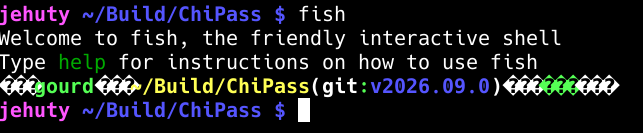
boostedWhenever I run a program on #NetBSD with non-ASCII characters like fish shell or the QR code generated by the gurk Signal client, I get garbage question mark characters in their place. Any ideas on how to fix this?
This happens in the VT when X isn't running, xterm, and xfce-terminal.
Alt...
A screenshot of a terminal where once fish is launched, large amounts of "?"s in diamonds are shown.
boosted![[?]](https://cdn.woof.tech/accounts/avatars/110/845/362/143/356/321/original/c901c046c550f1b3.png)
Alright, serious question for #NetBSD experts: is there any way to mount and access a BTRFS partition in NetBSD?
I have been looking and looking and LOOKING for information about this, but keep finding crappy dead ends. I need some means of being able to mount two BTRFS partitions so that I can migrate the data to something that both Linux and NetBSD will use. Here is what I have found:
1) https://github.com/adam900710/btrfs-fuse A read-only FUSE driver for BTRFS. Appears to be Linux only?
2) https://github.com/rustutils/btrfsutils Buried in here is another read-only FUSE driver for BTRFS. Again, seems to be aimed at Linux only.
3) https://github.com/maharmstone/btrfs WinBtrfs, Windows-oriented... but is willing to relicense to make it BSD-friendly. https://github.com/maharmstone/btrfs/issues/531
4) https://github.com/lkl/linux/ Linux Kernel Library, aka LKL, which allows for using the Linux kernel as a FUSE driver. There is a version for FreeBSD: https://www.freshports.org/filesystems/lkl/ but even I, a complete newbie to the world of the BSD Boys, knows that FreeBSD and NetBSD are completely different operating systems, so I have no idea how portable this is to NetBSD. However if this DOES work with NetBSD, then this would be an excellent solution...
boosted![[?]](https://nfts.freeradical.zone/accounts/avatars/113/534/365/251/365/702/original/ac9c08cf21dc5ed3.jpeg)
To test the journal (of #NetBSD FFS) resilience in case of "power cut off", how could the Windows process|thread be killed -- without wait & without harming any other processes -- that is running the virtual machine under MS Windows Hyper-V (generation 2) (on a laptop with working battery)?
boosted![[?]](https://cdn.masto.host/rubysocial/accounts/avatars/000/093/360/original/920f5a8782200f9b.jpg)
I forgot to mention that when I was doing my bare metal test of #NetBSD, wpa_gui did work and got my WiFi configured.
![[?]](https://media.bsd.cafe/bsdmmedia01/accounts/avatars/115/015/302/977/472/157/original/42ad1d8b0f4dbf22.png)
 [
[So, I decided not to use ZFS for my in-home NAS. I checked it in another server with 2GB of RAM and... it works, but any heavy I/O operation resulted in killing spree of NetBSD kernel, OOM-killing the processes to free the memory. And NetBSD ZFS doesn't have knobs to fine-tune memory limits (IIRC they are still in development).
Instead, the usual approach - the old^Wmature technology - is in use. With the help of netbsd-users maillist (https://mail-index.netbsd.org/netbsd-users/2026/09/21/msg034895.html) I configured the next thing for HDD with RAIDframe, CGD and LVM:
1) Two identical 1TB disks: /dev/wd0 and /dev/wd1.
2) Both in use in RAID1 /dev/raid0 (as described in this document: https://netbsd.org/docs/guide/en/chap-rf.html, but without any tricks for root FS).
3) /dev/raid0 divided in two parts: /dev/raid0a for root FS and /dev/raid0b.
4) Both disks (/dev/wd0 and /dev/wd1) has installed bootloader via /usr/sbin/installboot -o timeout=10 -v /dev/rwd0 /usr/mdec/bootxx_ffsv2 and /usr/sbin/installboot -o timeout=5 -v /dev/rwd1 /usr/mdec/bootxx_ffsv2
5) The /dev/raid0b was encrypted with CGD, so the /dev/raid0b -> /dev/cgd0.
6) The whole encrypted disk (/dev/cgd0a) was added as physical volume to LVM. The volume group /dev/vg0 was created with this PV and the logical volume /dev/vg0/lv0 was created inside this VG to store the real data.
The LVM allows to add new disk space, just by adding new physical volume to the volume group and then extending the logical volume and resizing the FFSv2. I tested it with a test USB drive and it works and even doesn't led to data loss 
And the separate CGD separately encrypts existing physical volume and each new physical volume just in case 
One quirk: the underlying physical disks (/dev/wd0 and /dev/wd1) plus /dev/raid0 should use MBR partition scheme or NetBSD disklabel - because the root partition should start from 0 sector - if it started not from zero sector, then the bootloader will be unable to find root FS. I tried to use GPT, but the installer was unable to create root partition not from zero sector, only from 2048 sector 
![[?]](https://files.mastodon.social/accounts/avatars/108/217/143/359/557/467/original/7feaa1d88a2ac72c.jpg)
![[?]](https://cdn.masto.host/dicecamp/accounts/avatars/110/545/329/151/420/101/original/c35fb021b71e8a46.png)
 [
[OK, last mention of #PaleMoon - the build I am using on #NetBSD is not an official build from the project. Here is the output of "pkgin pkg-descr palemoon":
Description:
A customizable, privacy-respecting web browser derived from the independent Pale Moon(tm) codebase....
This package is an UNOFFICIAL build and not to be confused with
official Pale Moon software....
No support is provided from Moonchild Productions - all
responsibility for this package falls on the pkgsrc community.
![[?]](https://cdn.fosstodon.org/accounts/avatars/109/860/465/494/023/450/original/eb2faa9c8053bd7a.jpg)
Day 24
A clock is usually included in a desktop panel, but I'm not using a panel on Openbox. I wanted a clock that would pop up on demand using a key combo, and liked the chunky font look of 'tty-clock' but could not get it to work properly: as the time display refreshed it would accumulate artifacts ('10:99').
I found a replacement in 'clock-rs', which retains the visual style of 'tty-clock' with a few extra features. Works OK!
![[?]](https://snac.bsd.cafe/kaixin/s/cc35d4b8e796c869289176c383aa3da3.png)
Should I add journaling to the filesystem in #NetBSD?
I've been giving #Palemoon browser a spin for the last couple weeks on my #NetBSD laptop. From the project's website:
"If you’re looking for a fully non-commercial alternative to Chrome that respects your privacy, Pale Moon is built for you.
Pale Moon is... Open Source...[,] built on its own maintained platform and rendering engine (Goanna™), available for various operating systems..., focusing on customization, security, privacy and extensibility."
![[?]](https://s3.eu-central-003.backblazeb2.com/social-lol-media/accounts/avatars/111/887/223/729/319/238/original/b4e4bf986ca15639.jpeg)
New link saved:
Running Emacs in microVM - The Emacs Cat
🔗 https://olddeuteronomy.github.io/post/running-emacs-in-microvm/
Running Emacs inside a NetBSD microVM.
#emacs #netbsd
![[?]](https://ffuent.es/pub/soy/s/15c9e6d35da9846bf97c633d5de93551.jpg)
No quedó un registro audiovisual de la charla pero espero poder dejarlo por escrito en mi web personal en unos días.
Alt...
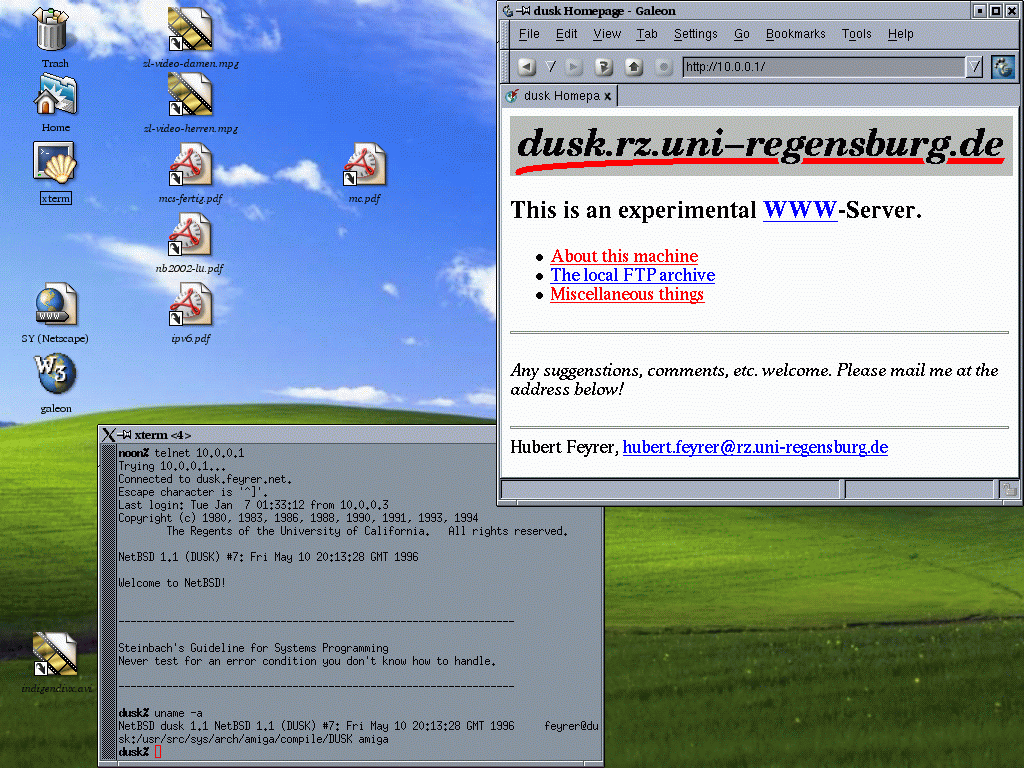
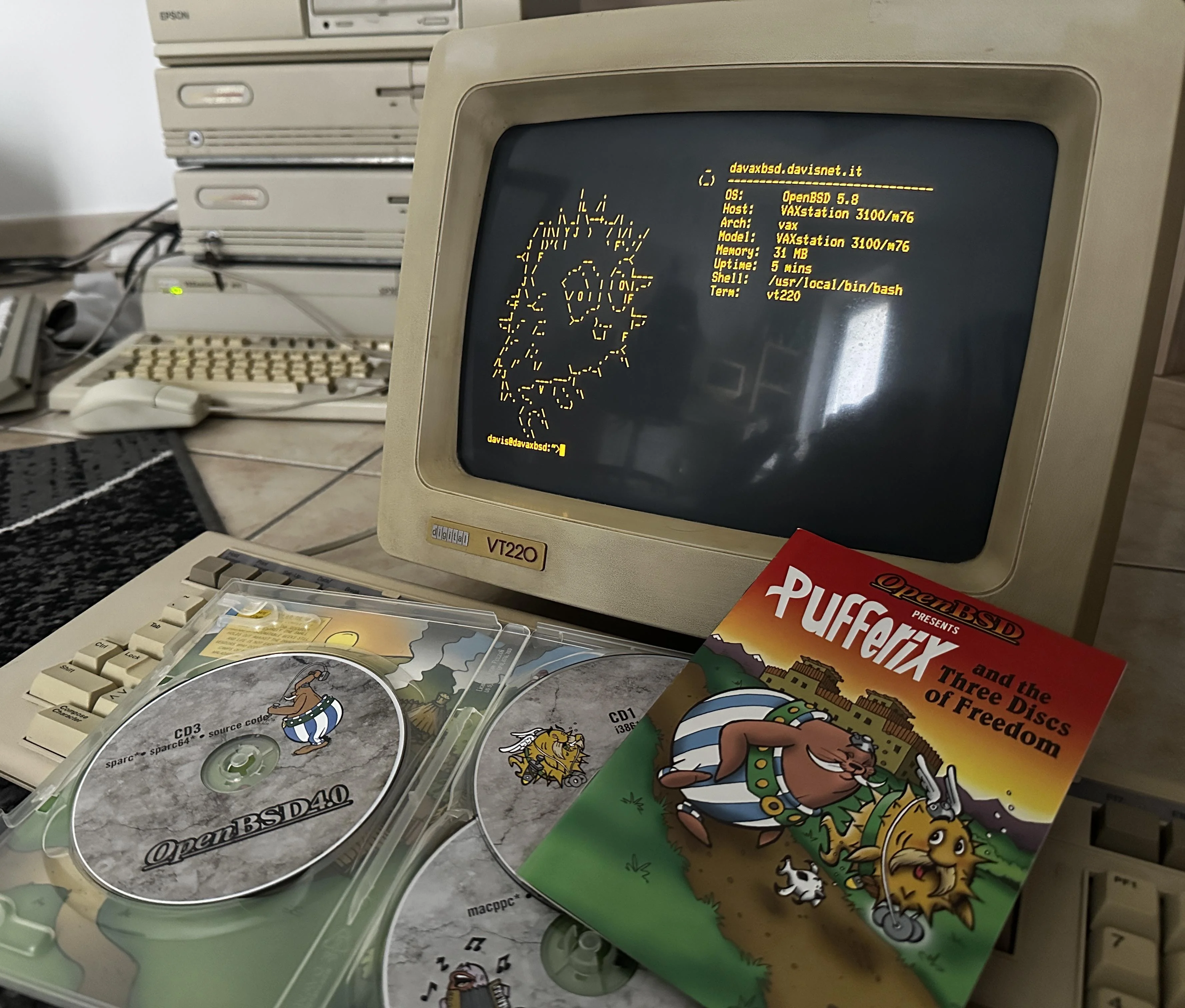
OpenBSD 5.8 en una VAX con terminal vt220
![[?]](https://mastodon.sdf.org/system/accounts/avatars/000/108/923/original/06de5d5cdd6b6754.png)
![[?]](https://pleroma.anduin.net/media/e42775318fd38a77b2c02300192e27e61861443424849feef9767918512fac8b.png?name=blob.png)
But my plan is #NetBSD, obviously. After fixing it up a bit. Why?
![[?]](https://ftp.ieji.de/accounts/avatars/116/578/734/142/392/173/original/bdc54fb8637b820c.jpg)
I'm not loving the fact that the only way to limit my emails being used for surveillance capitalism, slop training, and other nefarious purposes is to submit to vendor lock-in.
I've been trying out both Proton and Tuta for a while. Proton on Debian is mildly annoying, due to needing to install and run their bridge to access my email in Thunderbird. Tuta is even more annoying, due to having to install and run a separate email client.
But now that I'm moving to NetBSD and Gentoo, even those annoyances are not available. I just have their websites. I don't want websites, I want my email on my hard drive. I miss the 90s...
![[?]](https://media.mstdn.social/accounts/avatars/109/521/442/245/107/734/original/9303ae5bd9aebaa5.jpeg)
If you create a symlink to a symlink to a symlink ... at some point your system will return ELOOP.
A reasonable system has that value defined in sys/param.h as MAXSYMLINKS or as sysconf(_SC_SYMLOOP_MAX).
On Linux, the value of MAXSYMLINKS in sys/param.h is 20, but the kernel actually uses 40:
https://elixir.bootlin.com/linux/v7.2.8/source/include/linux/namei.h#L14
The sysconf(3) man page on Linux documents _SC_SYMLOOP_MAX, but then fails to actually retrieve that value.
Good job, Linux. You illustrate why I use #NetBSD to teach this class.
![[?]](https://polymaths.social/fileserver/01HCMX6M1CZNEVJ4F5H58TT5XJ/attachment/original/01JHC5KM5K0V0J0436SPD3F86H.jpeg)


 🍵
🍵  [
[*cough*
#NoSlop / #NoAI / #AInt / #NeverSlop folks, it's time to put our money where our mouths are. (As you're able)
![[?]](https://snac.smithies.me.uk/justine/s/avatar-270304302821a87b50026a5768a00c56.png) boosted
boosted![[?]](https://media.bsd.network/accounts/avatars/000/006/949/original/9592eac6e5018e39.png)
Happy #WorldHeartDay! 🫀
Small healthy choices today can make a big difference tomorrow. choose #NetBSD 🚩🧡
#NetBSD #WorldHeartDay2026 #OpenSource #UNIX #noai #nollm #runbsd

![[?]](https://files.raphus.social/accounts/avatars/116/366/479/330/331/657/original/03ca16006c35ecbe.jpg)
New #passgen release! It works on #NetBSD now, and the portability changes will probably improve support on other systems too. If you're on a platform with `bash`, I'd appreciate you trying this out and reporting how it fares on your computer. I suspect it'll work on any BSD at this point, at least.
If you're on Linux, you do not need to upgrade. Prior versions are perfectly fine permanent software for your use case. You can if you want though, and even review the contents - it's still, by design, a sub-hundred-line bash script, with no room to hide anything up its sleeve. If anything, the word separator logic is now a bit cleaner and easier to follow.
https://git.sr.ht/~maddiem4/passgen/commit/bdb073ec2312545ffb3d9779d868a96529b208d8
Day 23
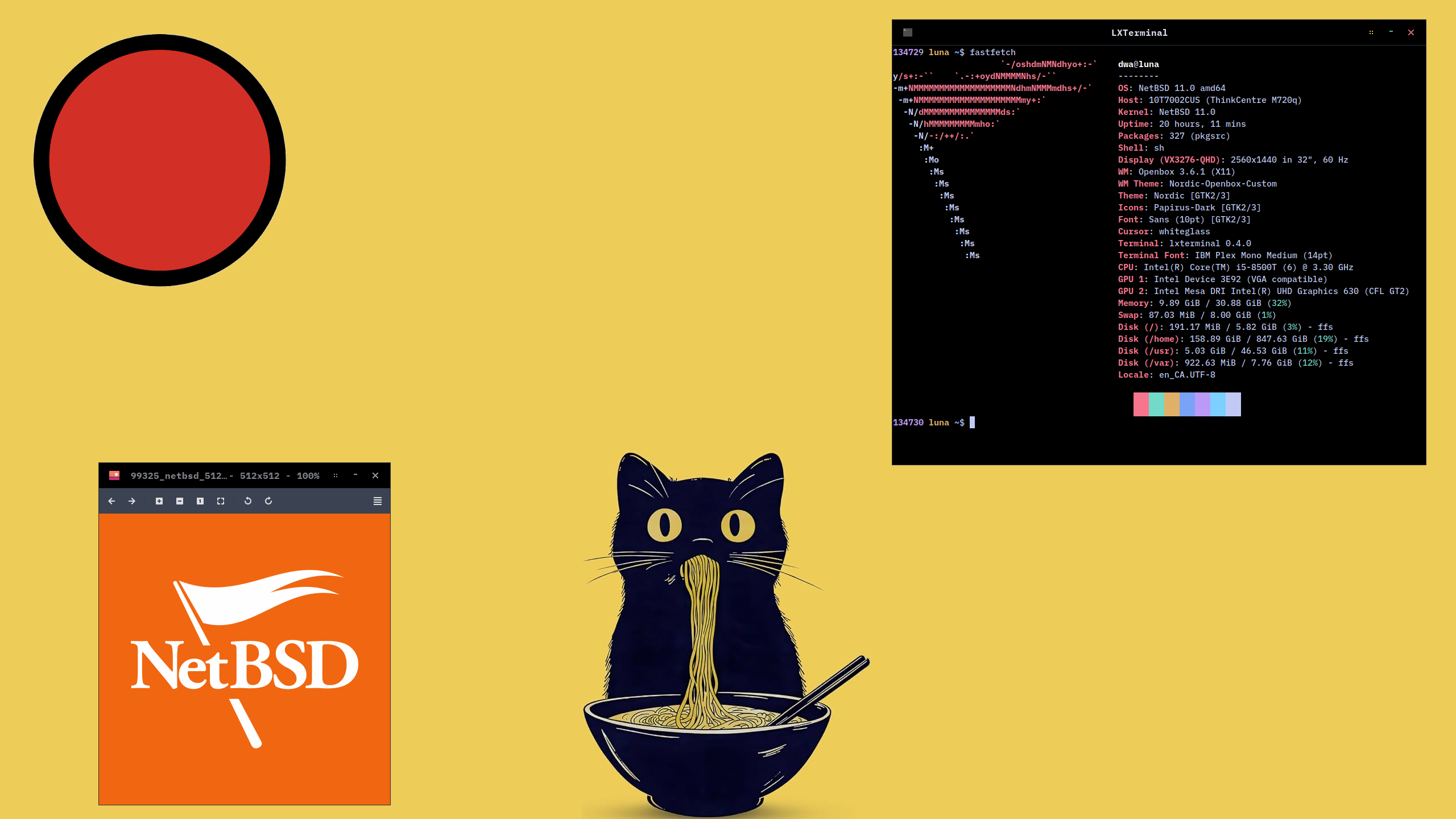
After exploring NetBSD on spare hardware, I've moved Linux (LMDE with Cinnamon desktop) off my main desktop (ThinkCentre M720q) and replaced it with NetBSD and Openbox.
I think its a keeper!
#X11 #Openbox #40DaysOfNetBSD #NetBSD #RunBSD
Alt...
Screenshot of the Openbox window manager. Background image is a ramen-eating cat under a red sun. In the foreground is a terminal window with system information outputted by the 'fastfetch' command, and a second window with the NetBSD logo displayed by the 'viewnior' image viewer.

 boosted
![[?]](https://gts.tumfatig.net/fileserver/01FJ093H6Y5VGN20G998J7KN1M/attachment/original/01JZTJV1P9RVJ502PCXKN68R1F.jpeg)
In today’s episode of "You can’t pronounce the hostname but you can hopefully read the content", an overview of the two #ThinkCentre that I recently got, centered towards power consumption when running #FreeBSD, #NetBSD and #OpenBSD.
TL;DR:  not bad at all!
https://www.tumfatig.net/2026/what-about-thinkcentre-m710q-m720q-and-bsd/
boosted![[?]](https://media.bsd.cafe/bsdmmedia01/accounts/avatars/113/407/688/140/177/903/original/de6c43fbc2be3c55.jpg)
Okay, while I've stubbed my toes on a few corners, this attempt at installing and using #NetBSD has gone a lot better than the last time I tried this.
GUI is up and running X with the default window-manager (#ctwm though I'll replace that with #Fluxbox).
A few common packages installed so it's time to go kick the tires on the install.
boosted![[?]](https://todon.eu/system/accounts/avatars/108/195/195/683/530/949/original/8174cd7215c979ba.png)
Great news to finish the day. I just sucessfully compiled & installed #ChiPass in #NetBSD 11. ChiPass is defined as "A cross-platform password manager for people with extremely high demands on secure personal data management" . They also refuse #LLM ❤️ . Good night, everyone!
https://codeberg.org/ChiPass/ChiPass
#privacy #noAI
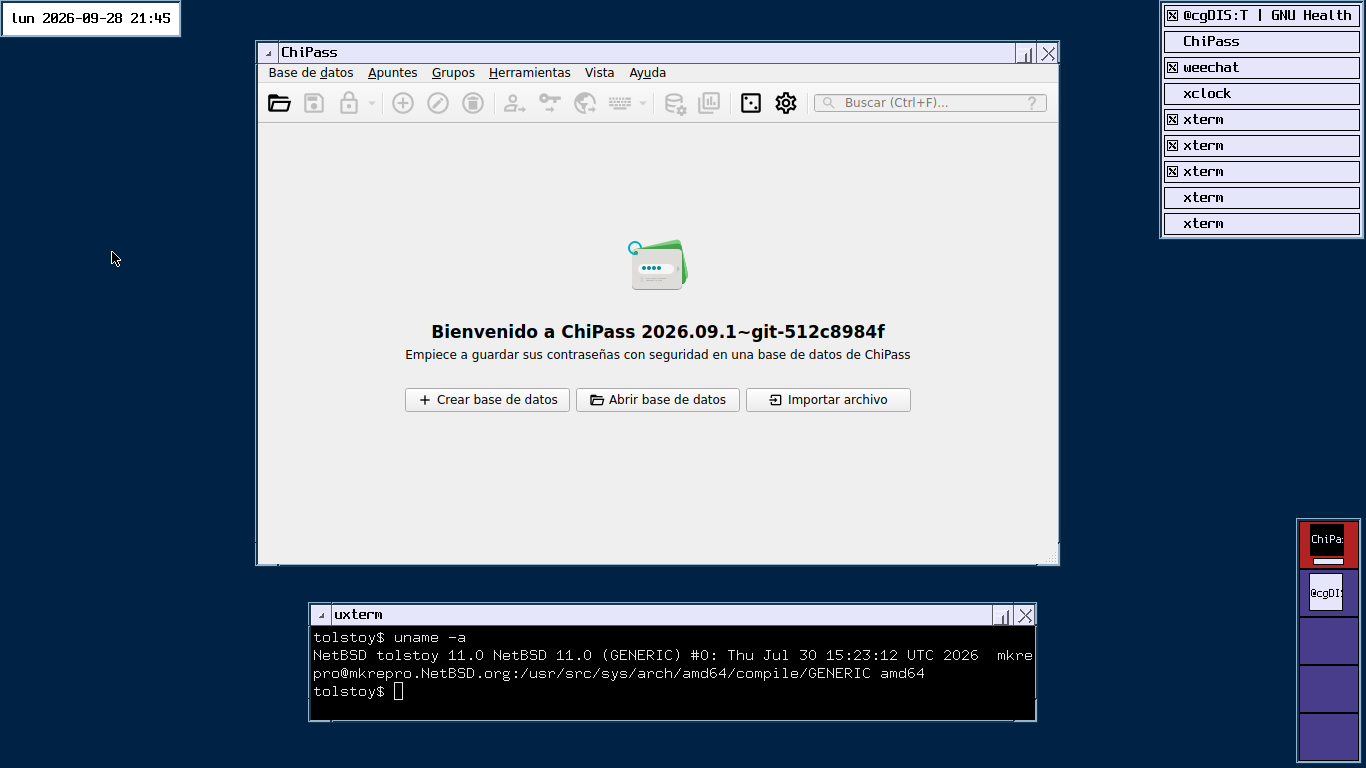
Alt...
The initial screen of ChiPass password manager running on NetBSD in a CTWM window manager. The text is in Spanish matching my locale settings "Bienvenido a ChiPass 2026.09.01" . Options to open a database, create a new one or import a file.
There is a another terminal emulator below, showing the uname command result:
"NetBSD tolstoy 11.0 NetBSD 11.0 (GENERIC) #0: Thu Jul 30 15:23:12 UTC 2026 mkrepro@mkrepro.NetBSD.org:/usr/src/sys/arch/amd64/compile/GENERIC amd64"
![[?]](https://mastodon.sdf.org/system/accounts/avatars/114/955/123/294/148/566/original/35a0500e08209819.jpeg)

![[?]](https://media.bsd.cafe/bsdmmedia01/accounts/avatars/113/311/272/554/458/614/original/4ee66d78a6bbc131.png)
🚨 It's is happening!! 🚨
Some people might have seen the EuroBSDCon closing, either in person or the video, where it was announced there would be BSD-NL Late / Autumn edition.
It's all true!! And... we are looking for speakers. If you have something to share with a small group of like-minded people, please add your submission. First time speakers are very welcome!
https://events.bsdnl.nl/late2026/
All the other details:
📅 2026-11-07 @ 09:30-end
📍 Utrecht, NL
🌐 https://bsdnl.nl/
🎫 https://tickets.bsdnl.nl/bsdnl/late26/
The moment at EuroBSDCon ... https://exquisite.tube/w/xkUjYkVYdcKWwq8Jnr1aMz?start=52m41s
#RUNBSD #BSDNL #OpenBSD #FreeBSD #NetBSD #HardenedBSD

Alt...
"My brain is full" meme. It has a picture of Jackie Chan holding is hands up near his head, with a "my brain is full" expression on his face.
It has the text: What is happening?
boosted![[?]](https://pxscdn.com/cache/avatars/789980589548961657/avatar_4v14.jpg)
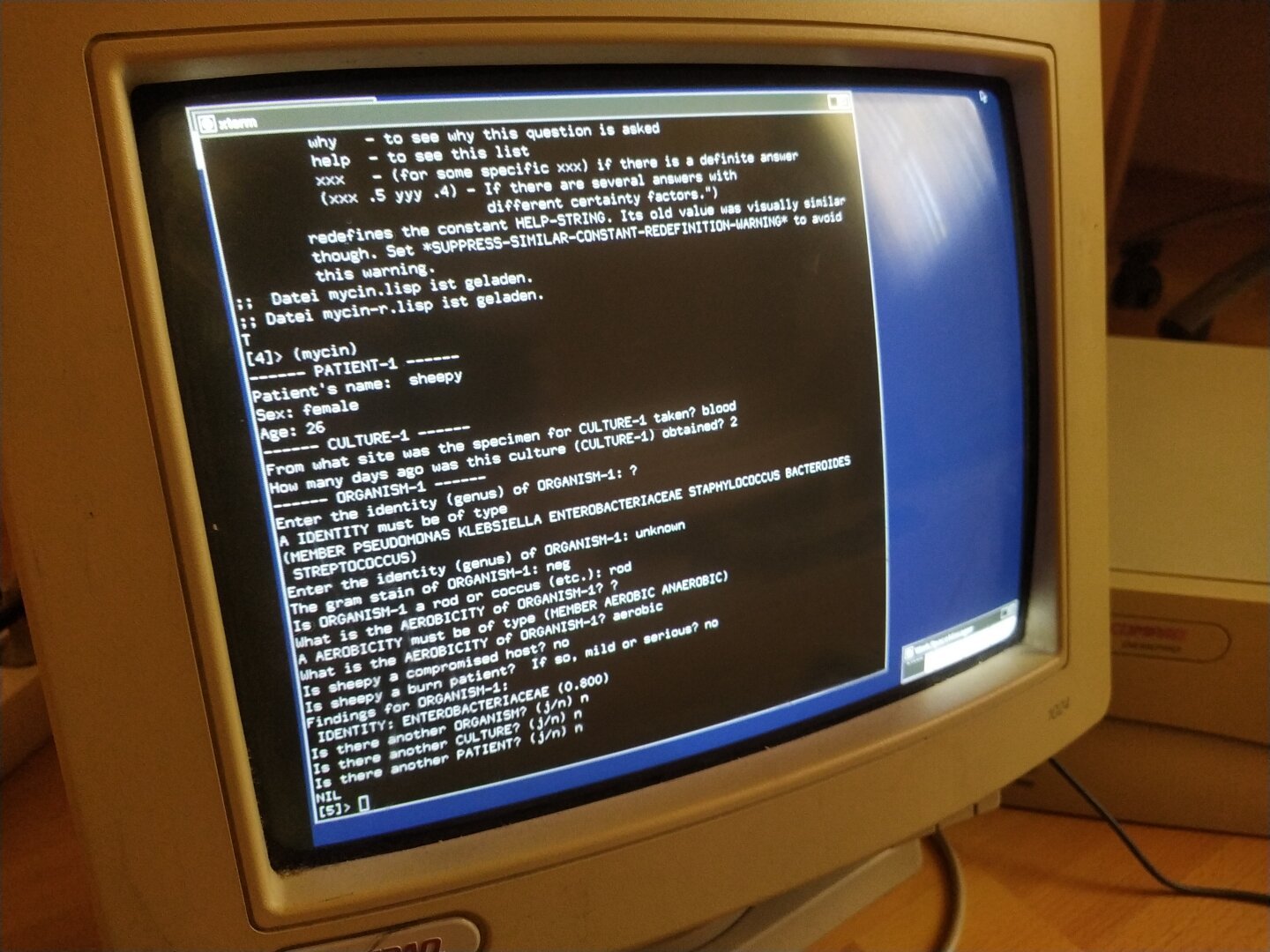
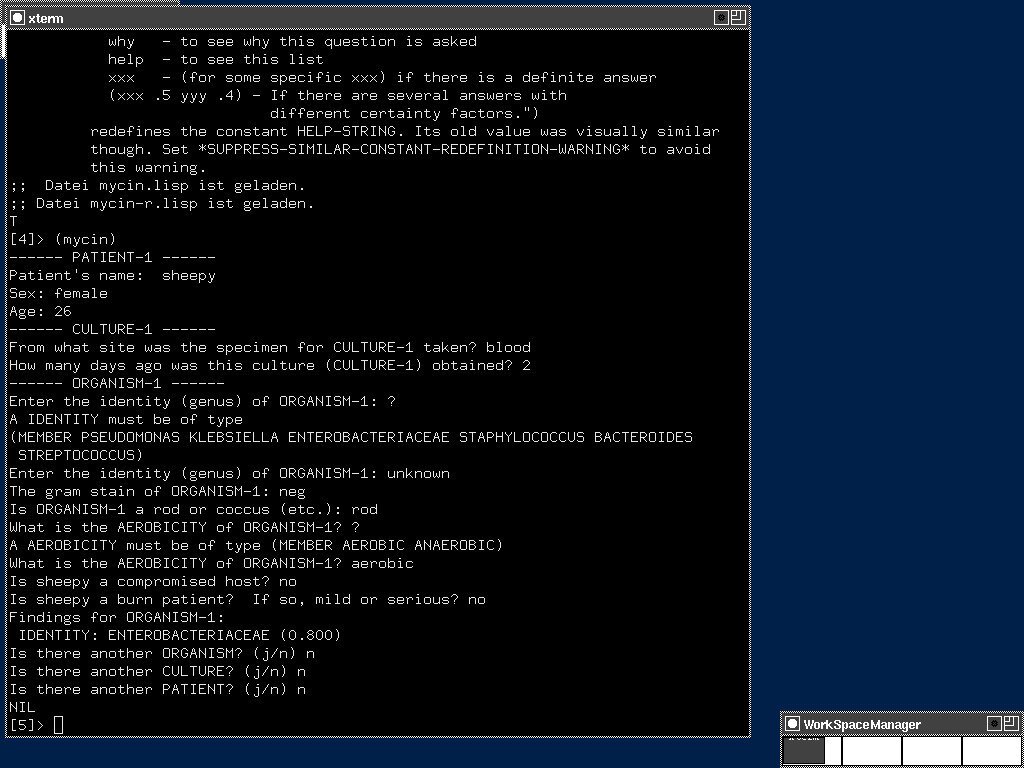
MYCIN was developed at Stanford University in the early 1970s to diagnose bacterial infections and recommend antibiotics. In 1979, it achieved a 90.9% agreement rate with Stanford experts.
The system was built around roughly 450 production rules, each representing clinical decision criteria from infectious disease experts.
So I got the code, installed CLISP on the Pentium 1 and started the consultation.
There was one small compatibility issue: Peter Norvig's implementation uses two functions not defined in modern CLISP, requires and rest2. A short shim file fixed that and the inference engine came to life.
The version available today is only a fragment of the original MYCIN. The implementation from Peter Norvig's book "Paradigms of AI Programming" contains the inference engine and just 6 rules for identifying organisms. The remaining rules for therapy, dosage and patient-specific recommendations are gone.
The original MYCIN was written in Interlisp for a DEC PDP-10 running WAITS. It was never released as open source. What survives today is essentially the shell of the system, not the knowledge it contained.
MYCIN is a monument to AI history. The way its source code was handled is both a memorial and a warning.
ELIZA (1966) survived because Weizenbaum published the code. CLIPS (1985) survived because NASA released it as open source. MYCIN (1972) did not.
Publicly funded research. Publicly funded code. Never released to the public.
This is why publicly funded research should be open source. Always!
#MYCIN #AIHistory #ExpertSystems #ArtificialIntelligence #AI #Stanford #Lisp #CLISP #NetBSD #Pentium1 #Pentium #Pentium166 #RetroComputing #vintagecomputing #OpenSource #FOSS #OpenScience #PubliclyFundedResearch #ComputerHistory #Science #Research #AcademicChatter
![[?]](https://mastodon.sdf.org/system/accounts/avatars/114/205/366/579/623/449/original/2eeba344bc5e17ba.png)
OS: #NetBSD and Mac OS X 10.4
Editor: vi
Audio editing: Reason on Mac OS X 10.4 and Techno Motor on Sega Saturn https://washbear.neocities.org/techno-motor/
Browser: #PaleMoon
Image editing: Photoshop CS2 and GIMP 2.10. Never upgrading.
Password Manager: kpcli https://kpcli.sourceforge.io/
Did not think #NetBSD "/usr/pkg" would have file collection which could compress enough to matter, but ...
zfs list -o name,used,avail,mounted,compress,compressratio,mountpoint pool/usr/pkg pool/ pool/var/log
NAME USED AVAIL MOUNTED COMPRESS RATIO MOUNTPOINT
pool/usr/pkg 965M 16.7G yes gzip-4 4.60x /usr/pkg
pool/var/log 168K 16.7G yes gzip-4 4.32x /var/log
![[?]](https://files.mastodon.social/accounts/avatars/000/396/350/original/707d3beea6076986.png)
Latest 𝗩𝗮𝗹𝘂𝗮𝗯𝗹𝗲 𝗡𝗲𝘄𝘀 - 𝟮𝟬𝟮𝟲/𝟬𝟵/𝟮𝟴 (Valuable News - 2026/09/28) available.
https://vermaden.wordpress.com/2026/09/28/valuable-news-2026-09-28/
Past releases: https://vermaden.wordpress.com/news/
#verblog #vernews #news #bsd #freebsd #openbsd #netbsd #linux #unix #zfs #opnsense #ghostbsd #solaris #vermadenday
![[?]](https://media.bsd.cafe/bsdmmedia01/accounts/avatars/110/753/691/400/011/788/original/7decba5a2514dda4.png)
Latest 𝗩𝗮𝗹𝘂𝗮𝗯𝗹𝗲 𝗡𝗲𝘄𝘀 - 𝟮𝟬𝟮𝟲/𝟬𝟵/𝟮𝟴 (Valuable News - 2026/09/28) available.
https://vermaden.wordpress.com/2026/09/28/valuable-news-2026-09-28/
Past releases: https://vermaden.wordpress.com/news/
#verblog #vernews #news #bsd #freebsd #openbsd #netbsd #linux #unix #zfs #opnsense #ghostbsd #solaris #vermadenday
@NASA btw fun fact #NetBSD logo on moon inside USB
https://mail-index.netbsd.org/netbsd-advocacy/2021/02/07/msg000849.html
Man, I need a table of commands of #Git or #Mercurial equivalent in #CVS!
Has been ages since I last used the latter ... might have been c late 1990, when I switched to Subversion.
Any news on when #NetBSD be switching to Mercurial|Git?


