Search results for tag #netbsd
![[?]](https://media.norden.social/accounts/avatars/117/194/703/927/011/599/original/6bc00348cd1c60cb.png)
 gebastel [
![[?]](https://media.bsd.cafe/bsdmmedia01/accounts/avatars/117/229/469/256/862/649/original/1f7e21b86b7a3a7f.jpeg)
![[?]](https://files.mastodon.social/accounts/avatars/108/319/157/409/975/618/original/e6886ed3948ef9d4.jpeg)
![[?]](https://drive.nya.social/files12/webpublic-a2647278-0bb5-442b-9b98-743a825b8510.png)
for desktop/laptop use it may be worthwhile to investigate #HaikuOS. instead of #NetBSD as it has a lot more focus on desktop use and polish, and will be less frustrating for a nontechnical user to set up and use as well. i was daily driving it on a laptop for email/web/etc type tasks last year for a few months and it wasn't bad. they have a fairly strict policy against inclusion of LLM-generated code, as well.
Haiku still will be missing things that gamers or power users want, though, like the ability to run Steam games, or disk encryption (or even user separation and login)
![[?]](https://assets.oldbytes.space/assets.oldbytes.space/accounts/avatars/117/269/529/528/928/810/original/2943bbcfc7b5171f.png)
 sinza [
Huh! #TodayILearned that #Haiku uses #NVMM as it's hypervisor. NVMM is the hypervisor from #NetBSD and is also used by #DragonflyBSD.
https://www.haiku-os.org/blog/dalme/2024-08-19_gsoc_2024_hardware_virtualization_final_report/
![[?]](https://cdn.masto.host/acp/accounts/avatars/000/060/722/original/8e1035e12dcaed00.png)
![[?]](https://media.mathstodon.xyz/accounts/avatars/116/159/891/833/300/151/original/1a4c2abaffba1b58.png)
*sidles up to the special-interest event horizon*
I’m not touching you
I’m not touching you
Alt...
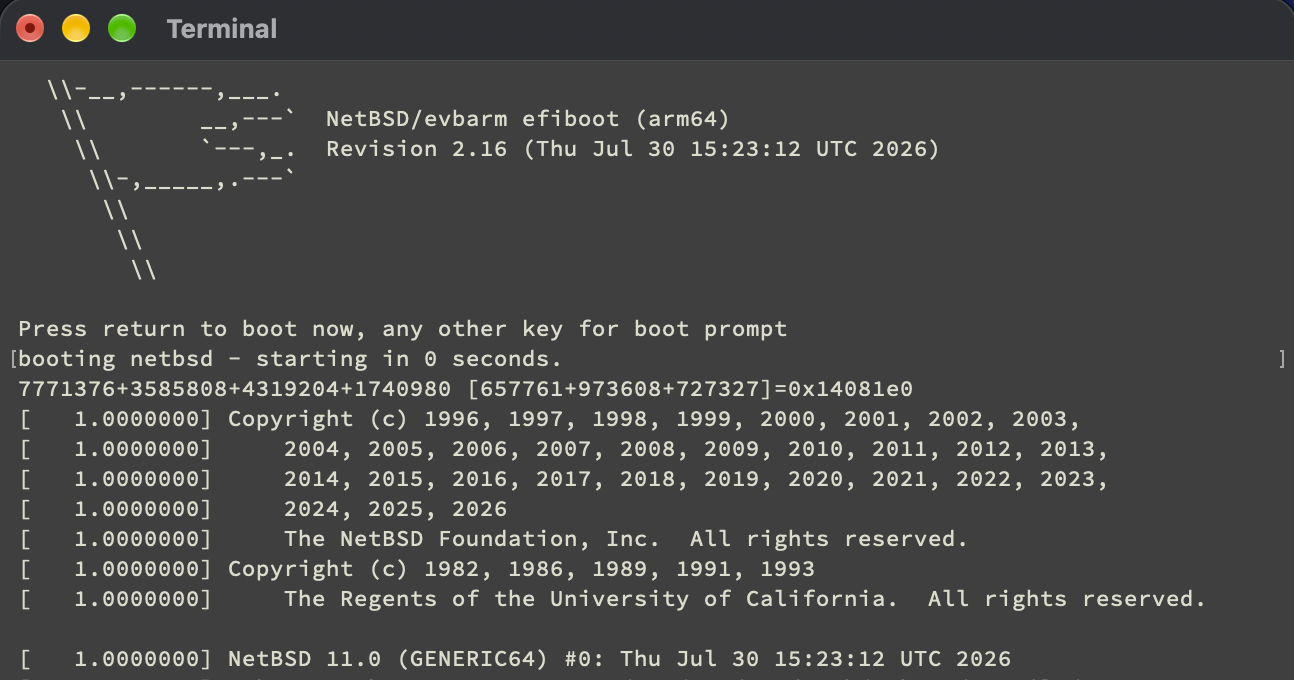
Screenshot of NetBSD/evbarm running under QEMU in Terminal.app
 boosted
![[?]](https://justfollow.me.uk/system/accounts/avatars/109/320/306/219/107/803/original/abdeb1bbb89e40f5.jpg)
@BoydStephenSmithJr My company provides #NetBSD VPS as our first choice (and other #BSD and #Linux if needed). Plenty of IPv4 addresses available
![[?]](https://assets.oldbytes.space/assets.oldbytes.space/accounts/avatars/110/511/259/967/231/570/original/188eb1d423b8de63.jpg)
![[?]](https://media.hachyderm.io/accounts/avatars/109/498/573/053/367/436/original/72c5c6d63e4b8cd0.png)
Anyone have an #NetBSD VPS provider? I've done a few searches myself, but each time I get to the configuration stage, there's no NetBSD option.
I don't need it for much, but I would like to get my personal email and web hosting off of LInux. It has to be a VPS (or something equivalent) with IPv4 access, because neither static IPs nor IPv6 access are available from my Internet provider, and unless I want to throw in with Starlink, they are the only provider in the area.
I am not confident I could install NetBSD remotely, as I've only installed NetBSD once, and even then I messed up the networking during that process. I am fairly sure I can migrate my existing dovecot+exim+spamassassin and apache setups once I have ssh+su root access to a system with working network configuration.
![[?]](https://media.bsd.cafe/bsdmmedia01/accounts/avatars/115/259/277/430/803/651/original/4b70dbf4edf35875.jpg)
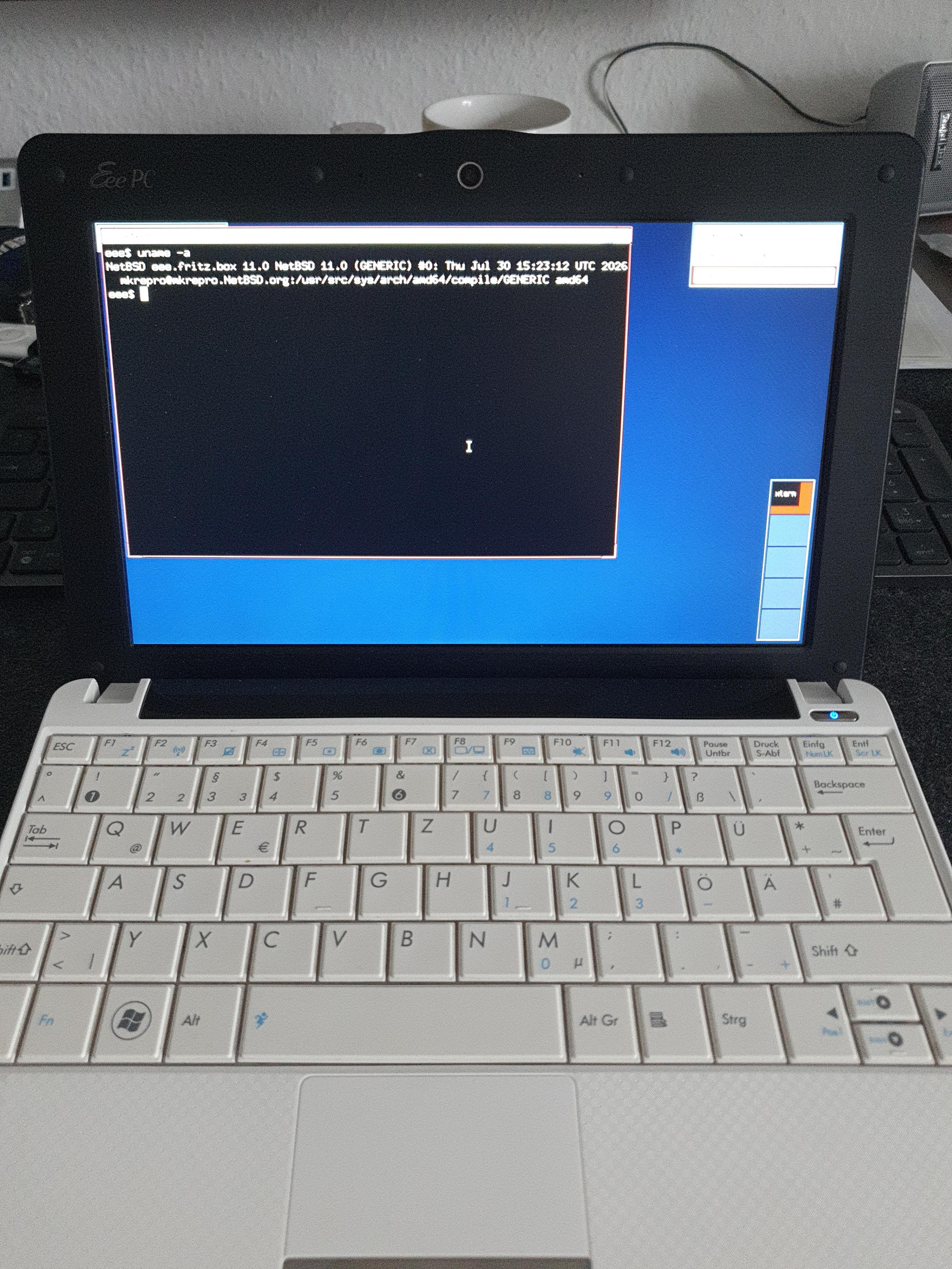
Oh look what found its way onto my Eee PC :)
Took my first baby steps into #netbsd today :)
Alt...
An Asus Eee PC running a fresh NetBSD installation
boosted![[?]](https://files.sueden.social/accounts/avatars/110/215/853/631/484/521/original/054991cf7a6d1691.png)
Dear BSD community,
I've got to reduce my number of books so here are some BSD related books I'd like to give away for free.
If you're in the EU and would like to have one, please reply. Can send them to you if you pay the shipping costs
#OpenBSD #BSD #FreeBSD #NetBSD

Alt...
The book of PF
Absolute OpenBSD
![[?]](https://mastodon.uy/system/accounts/avatars/000/000/003/original/f5baa4af59d10487.jpg)
Yo solo quiero saber si Slackware Linux va a tomar una postura definida en contra de la IA o si va a terminar siendo NetBSD la última reserva moral de los sistemas operativos tipo Unix... veremos #linux #slackware #netbsd #bsd #IA
![[?]](https://cdn2.miau.pub/accounts/avatars/111/077/294/997/712/881/original/e466d91ac7b69254.png)
![[?]](https://typo.social/system/accounts/avatars/109/313/698/978/921/520/original/c46f1882e5d23705.png)
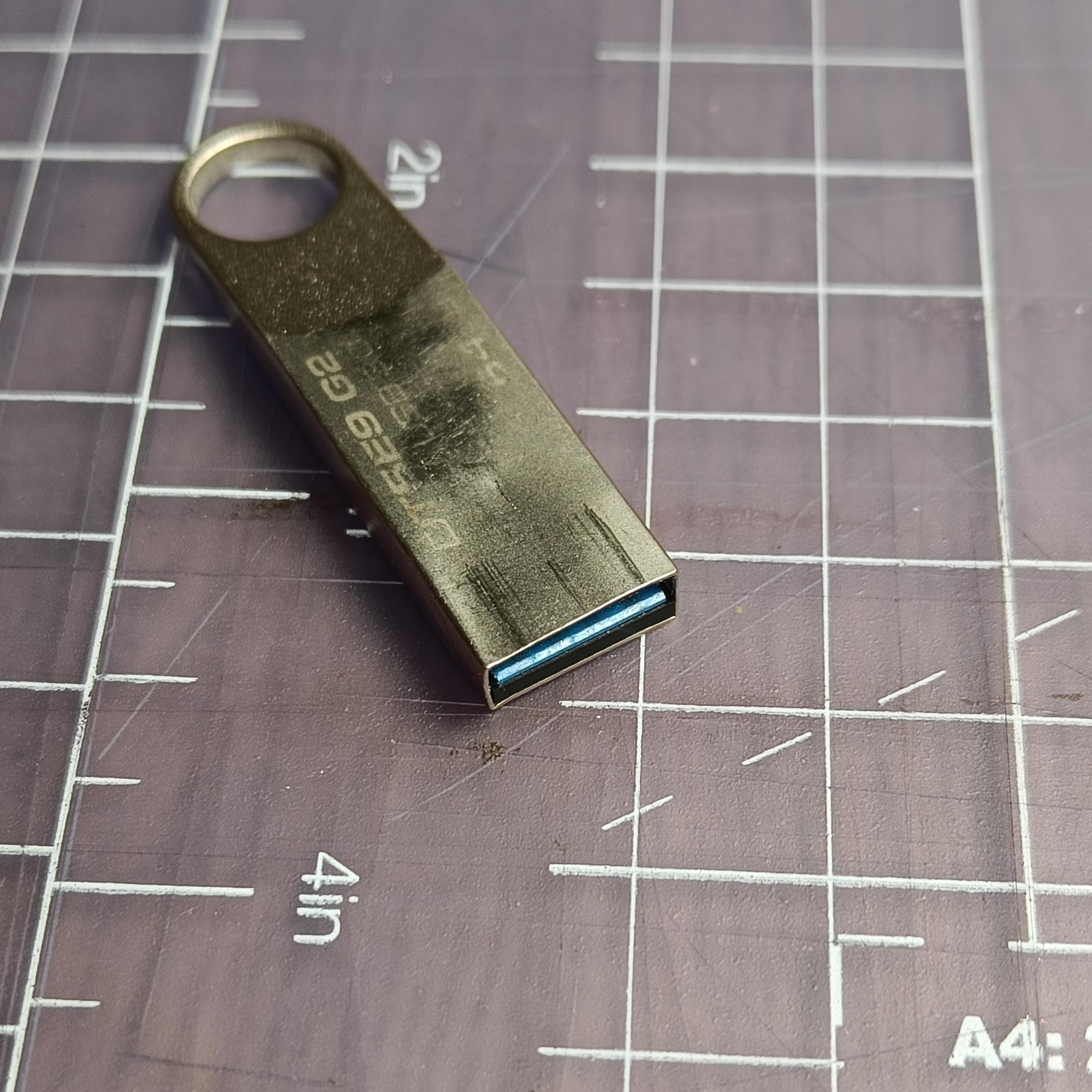
My NetBSD journey has me using pliers, and a small file, to bend this USB stick back into shape. It's 64GB. I think it was okay back in the day (the day was 2016).
Alt...
A slim metal USB stick on a cutting mat. You can see that the metal at the "port" end is a bit bent and scratched. It says 64GB, but it's barely readable
![[?]](https://static.mamot.fr/accounts/avatars/000/403/497/original/cea764ca080038b9.jpg)
Today I wound up installing NetBSD 11 on one of my lab boxes (converted chromeboxes, with extra memory in them). It's been a long time experimenting with an OS, but in the end after a few tries it worked. Networking, display, audio (with external DAC) working with some manual configuration and reading the documentation.
Getting all to my tastes should take a bit longer, but it's familiar enough for me, using a divers set of *ux os'es in the last 30 years. #netbsd #noslop
boosted![[?]](https://cannot.understand.computer/kunev/s/avatar-65999931a6a066390559fd4274303df5.png)

#netbsd #analognowhere #unix_surrealism

![[?]](https://recurse.social/system/accounts/avatars/000/027/974/original/0aad3b48c170be13.jpeg)
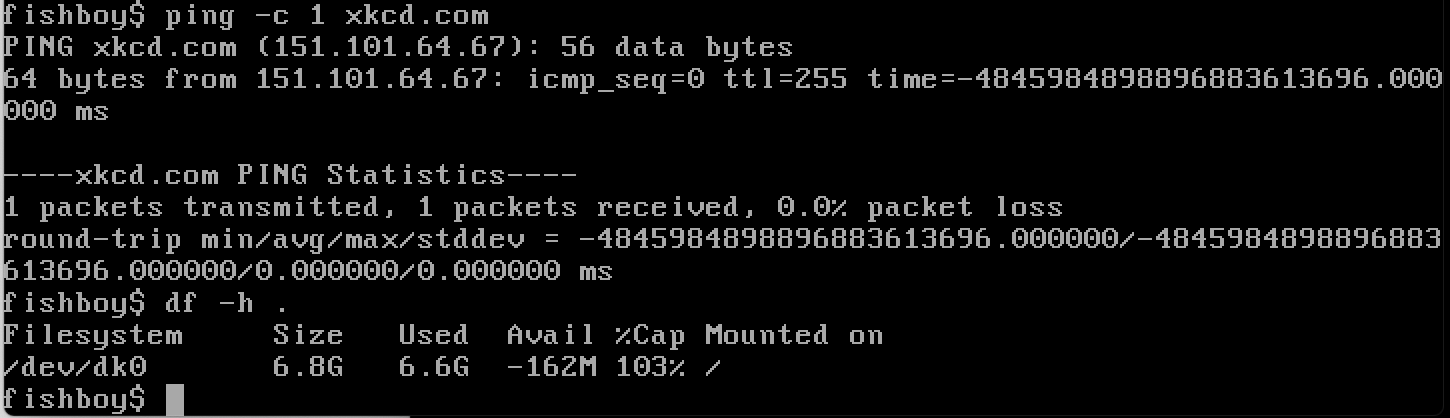
seeing some curious sign errors in my qemu install of #netbsd
Alt...
ping with a large negative value for response time... df reporting negative space free on a disk
boosted@klausman Xen support in #NetBSD both as a host and guest is very mature; it got support not much after Linux and predates KVM by a number of years. It supports UVC with the uvideo driver. USB audio also generally OK. You can do kernel USB development entirely in userland using rump kernels, so the actual kernel code is used but cannot panic the machine and you can debug with gdb.
![[?]](https://media.tech.lgbt/accounts/avatars/116/612/407/162/815/535/original/893cf69790332e06.png)
 🦀🇵🇸🇺🇦 [
Because of the direction that Linux is going with AI slop, I installed NetBSD on an older laptop to test things out and gain some familiarity with the operating system. I have no plans on immediately switching to NetBSD, but if the situation with Linux gets really bad in the future, making the switch will be a bit easier.
![[?]](https://r6xjcr4byvoci6cdmbon2u3vtqlxlfwsfd2dpae7zpqfql5quqmq.mesh.yrabbit.cyou/media/01a1259e-4672-7728-9c04-8c958da3ade7/image.jpg) YRabbit » 🌐
YRabbit » 🌐
@xiaotuolu@r6xjcr4byvoci6cdmbon2u3vtqlxlfwsfd2dpae7zpqfql5quqmq.mesh.yrabbit.cyou
I’m back online after experimenting with the NPF packet filter on #NetBSD. It works great (aside from that JIT-related message) on my router, and it looks like it’s going to stay there - the SD card is now set to full read-only mode, and everything is running smoothly.😜
The one thing I couldn’t get NPF to do was act as a transparent proxy for applications running on the same machine; it simply refuses to perform a route-to (lo0 127.0.0.1)🤣
It’s a good thing PF is still included in the base system.
![[?]](https://pxscdn.com/cache/avatars/789980589548961657/avatar_4v14.jpg)
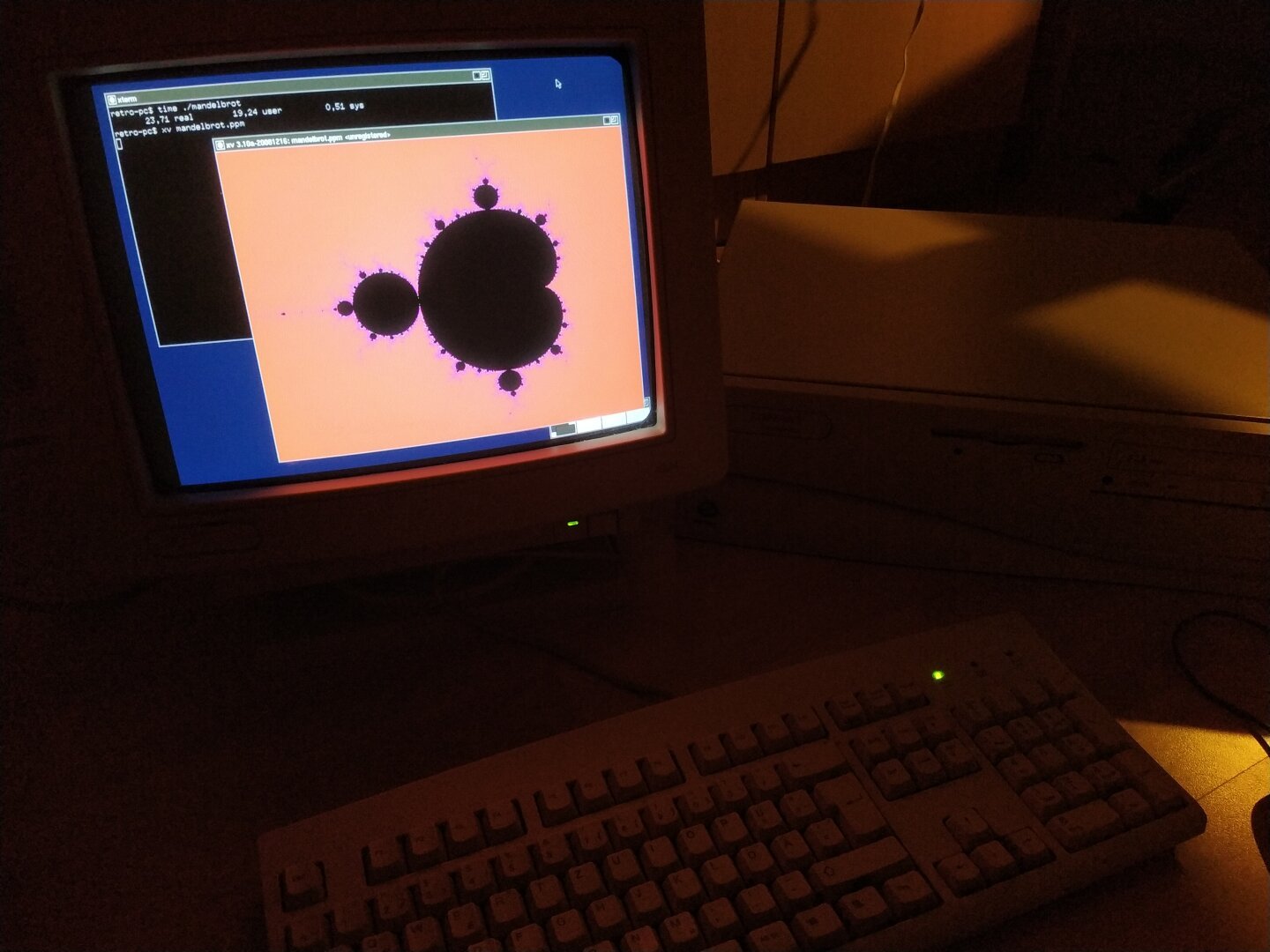
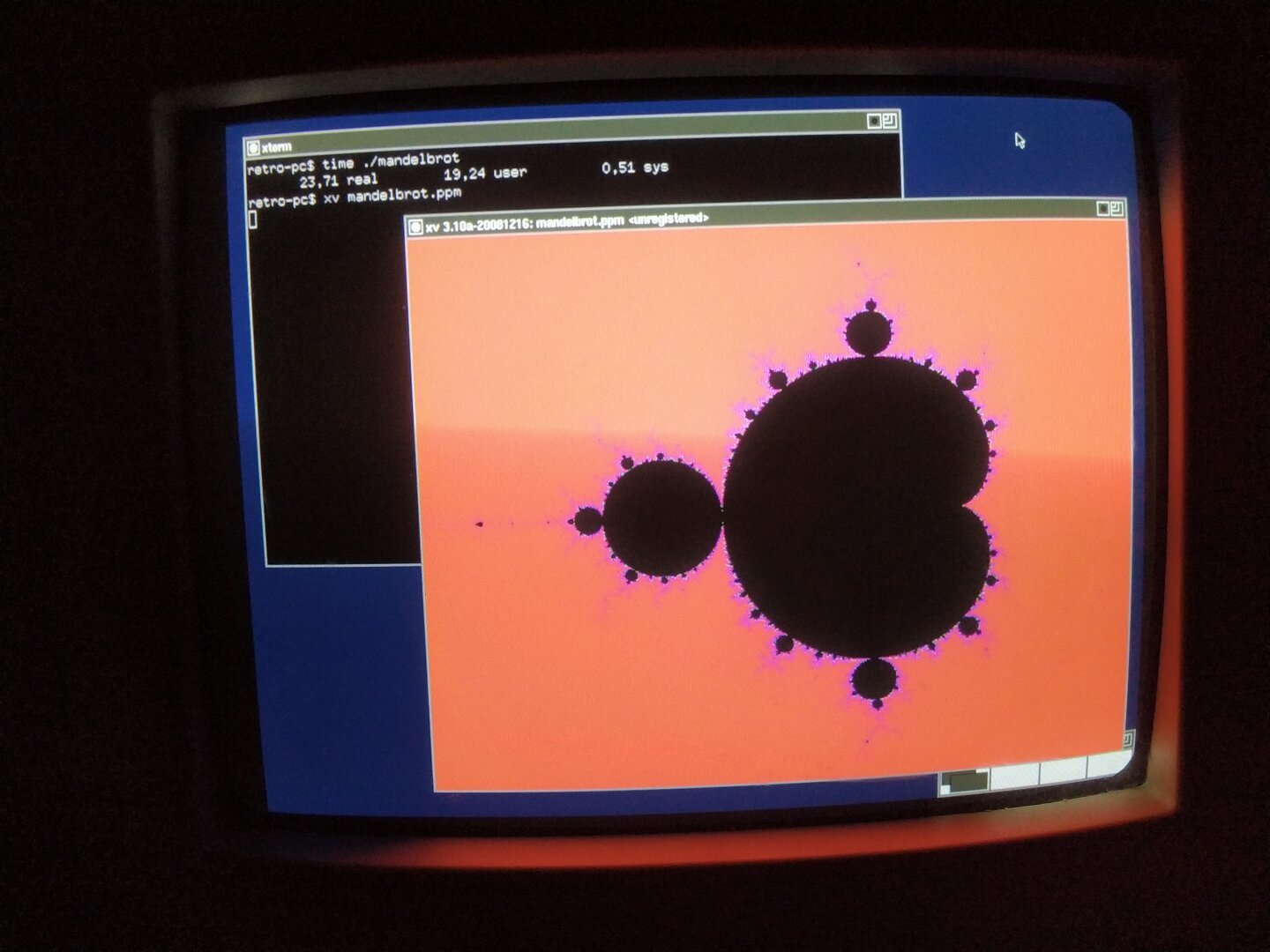
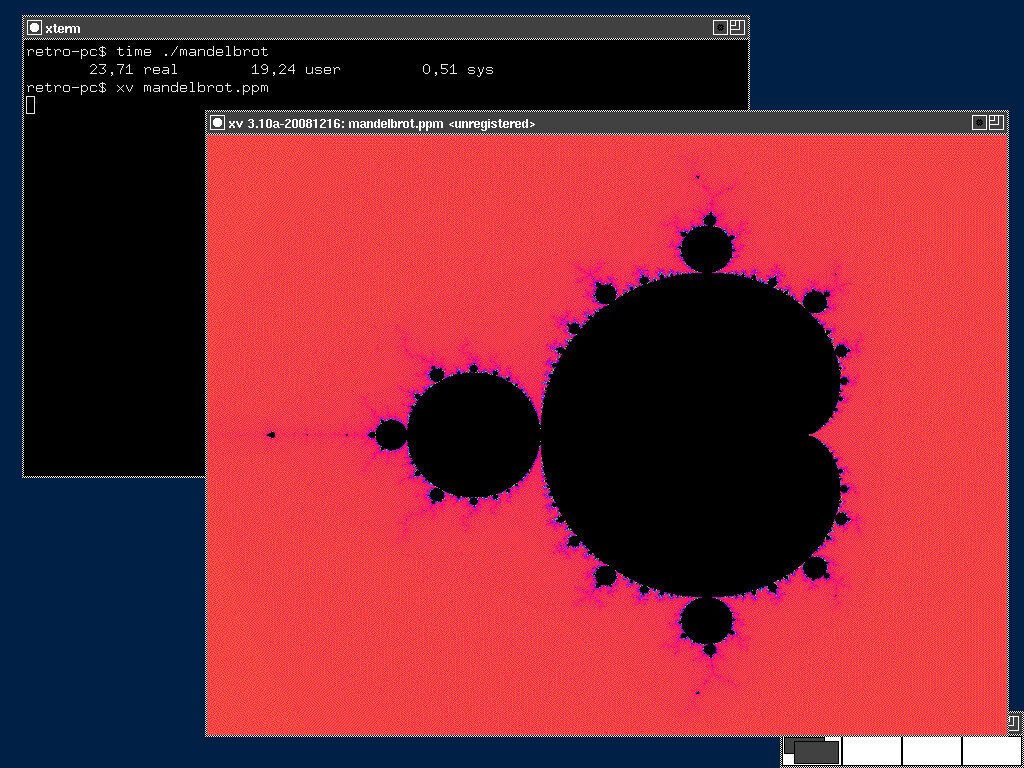
The Mandelbrot set is a great fit for this: it is generated entirely from a simple mathematical iteration, but produces a surprisingly complex and colorful result.
I wrote a small C program using only the standard library and double-precision floating-point arithmetic. For every pixel, the program iterates the Mandelbrot equation and counts how many iterations are needed for the sequence to escape. This iteration count is then mapped to a color.
The result is written as a PPM image and displayed directly on the Pentium using XV, an old X11 image viewer. I could have used feh, which was already available, but I wanted to build something myself. Since no binary package was available for XV, I built it from pkgsrc in a NetBSD build VM and then transferred the resulting package to the Pentium.
Rendering at 800×600 with 500 iterations per pixel took 23.71 seconds.
#RetroComputing #RetroPC #Pentium #Pentium1 #Pentium166 #NetBSD #NetBSD11 #BSD #i386 #X11 #XOrg #CProgramming #C #Fractals #Mandelbrot #MandelbrotSet #NumericalComputing #ScientificComputing #OpenSource #FOSS #FreeSoftware #VintageComputing #OldComputers #RetroTechnology #ComputerHistory #CPU #SoftwareRendering

![[?]](https://media.mstdn.social/accounts/avatars/110/258/549/476/859/116/original/1b3ad77a5596c355.png)
![[?]](https://d35e9bfo1msux2.cloudfront.net/accounts/avatars/109/535/770/898/980/239/original/fe47a9c6a062442b.png)
It needs at least an extra case in iwm_attach() in /usr/src/sys/dev/pci/if_iwm.c and a new binary firmware file in /libdata/firmware .
The firmware binaries seem to be pulled from https://git.kernel.org/pub/scm/linux/kernel/git/iwlwifi/linux-firmware.git/tree/intel/iwlwifi , which does not have a 9560 file that I can see.
![[?]](https://media.bsd.network/accounts/avatars/000/006/949/original/9592eac6e5018e39.png)

![[?]](https://media.tech.lgbt/accounts/avatars/116/087/888/376/253/090/original/66d54b0bca86f260.jpeg)
X11 sucks on HiDPI displays as expected, but this is suprisingly comfy 
(I did get wayland/sway to run and it was much better, but everything was segfaulting for some reason).
Sadly #netbsd doesn't have drivers for EC in this machine either, but at least trackpad can do PS/2 emulation (using it is pretty tedious due to lack of scrolling etc though). Only headphone jack works, but that's fine. At least you can vibe to music.
3D acceleration works (as expected), shall try to run Celeste (under Linux-compat), ktita gets stuck on a loading screen though so will need some investigation.
Alt...
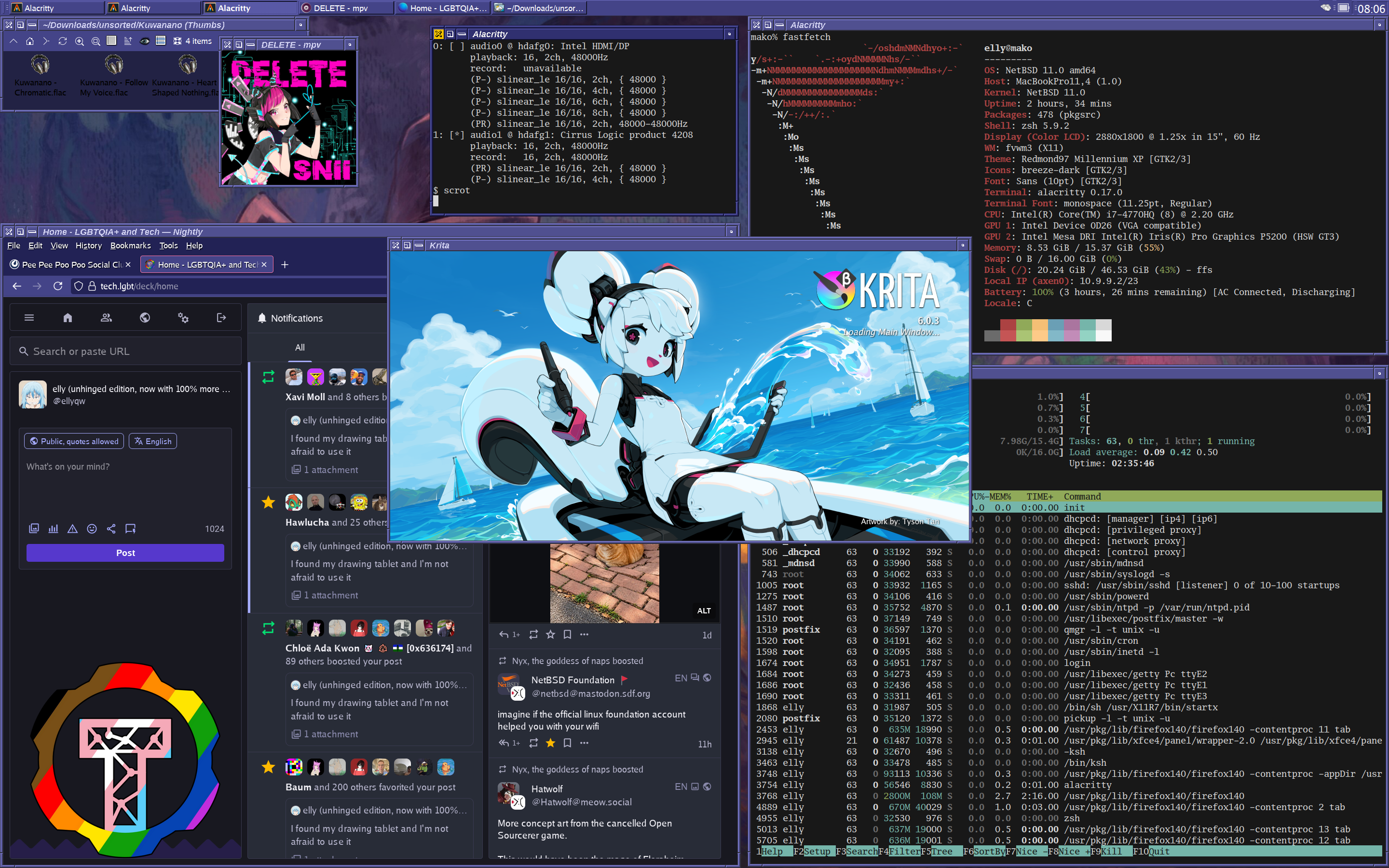
MacBook Pro 2015 15" (A1398 MacBookPro11,4) running NetBSD with FVWM3 (loopy-desktop).
In the upper left corner there's ROX Filer and mpv playing music, alacritty showing audiocfg.
Below that there's firefox with mastodon open.
In upper right corner there's fastfetch, and bottom-right corner htop.
Center of the screen shows krita starting up, but it never loads the main interface in the end.
![[?]](https://sfo3.digitaloceanspaces.com/solarpunk/accounts/avatars/108/861/517/727/656/545/original/34d9478a5ffc861b.png)
#NetBSD comes with a full recursive resolver out of the box so you can just turn it on and you don't have to trust your ISP or Cisco or Cloudflare or Google.
Why is this not more common?
NetBSD 11.0 runs about equally as well on my Sega Dreamcast or a 30 year old Pentium II PC as it does on any modern computer that i have. this goes both ways.
to know whether your modern gaming pc will be able to do something, you should first ask yourself: "could i do this on a Sega Dreamcast or a 30 year old Pentium II PC?". if the answer is yes, you will probably succeed! if the answer is no, it still might be possible, but here be daemons.
for example:
- can i ssh into it and edit files and compile little programs?
yes! absolutely! definitely.
- can i run a webserver?
indeed you can.
- can i install Steam?
hahahahaha no.
- can i run X11?
yep! may need to do some tweaking depending on your hardware though.
- can i run KDE plasma?
outlook not so good.
![[?]](https://cdn.fosstodon.org/accounts/avatars/108/194/405/521/059/098/original/5819cae4e7eaad69.png)
My issue may well be related to #Tailscale on #NetBSD, not #Restic. I found post with a very similar issue showing up when using #rsync over Tailscale on NetBSD: https://mail-index.netbsd.org/pkgsrc-users/2026/04/28/msg042883.html

The only thing that stops me from running #NetBSD on the VM where I do most of my professional work is that I get "write: address family not supported by protocol family" when trying to use #restic over #tailscale.
I first thought it was due to enabling #ipv6, but I get the same issue after disabling it on the VM.
I used NetBSD for a number of years in the 1990s, before switching over to #OpenBSD for most things. The rest of my on-line life happens on #macOS and #AlpineLinux.
![[?]](https://cdn.masto.host/floss/accounts/avatars/110/684/815/186/127/406/original/63507e43d67e9049.png)
To wrap up my adventure (so far) with #NetBSD and #Barebox on the RK3588 #MNT Pocket Reform open hardware laptop I created this post in the MNT Community forum:
https://community.mnt.re/t/status-of-netbsd-on-the-rk3588-pocket-reform/4699
The actual work was not done by me but by Barebox folks like @a3f and the NetBSD maintainers. If you want to help making non-slop alternatives better and (like me) lack the time or technical expertise don't forget that you can donate to the NetBSD Foundation:
https://www.netbsd.org/donations/
boostedTerrible news: All of my laptop's important hardware seems to work under #NetBSD 11.0 /except/ for the wireless NIC, which appears to call itself an "Intel Wireless AC 9560". The iwm driver appears to support the immediately prior generation but not the one I happen to have. I suppose I have a spare USB port so I could go out and buy a USB dongle that I know there's a working driver for…
![[?]](https://media.mstdn.social/accounts/avatars/109/696/860/885/494/817/original/835eb175bbf72dc8.png)
“There has been a lot of work in this area already, but it has not yet been finalized. Which is a diplomatic way of saying that this project has been attempted repeatedly and failed every time.”
Lolz.
All these help wanted projects seem to be “Last edited 3 million years ago”, are they all still things that need doing? Or is updating the wiki pages the thing that needs doing? Or both?
I’m resisting joining the mailing lists, but I should probably ask there.
![[?]](https://furry.engineer/system/accounts/avatars/111/761/256/045/390/019/original/7f26489400fd479e.png)
 [
[i tried #NetBSD in a vm, it's pretty cool. i'll play around eith it more tomorrow. certainly won't be using it as a daily driver any time soon, due to programs and all that, but i could install it on a laptop i have if its hardware is supported. i liked CTWM, it's different and neat
![[?]](https://triptico.com/social/angel/s/4489c37d896224fc004b7759f2960515.jpg) boosted
boostedYRabbit » 🌐
@xiaotuolu@r6xjcr4byvoci6cdmbon2u3vtqlxlfwsfd2dpae7zpqfql5quqmq.mesh.yrabbit.cyou
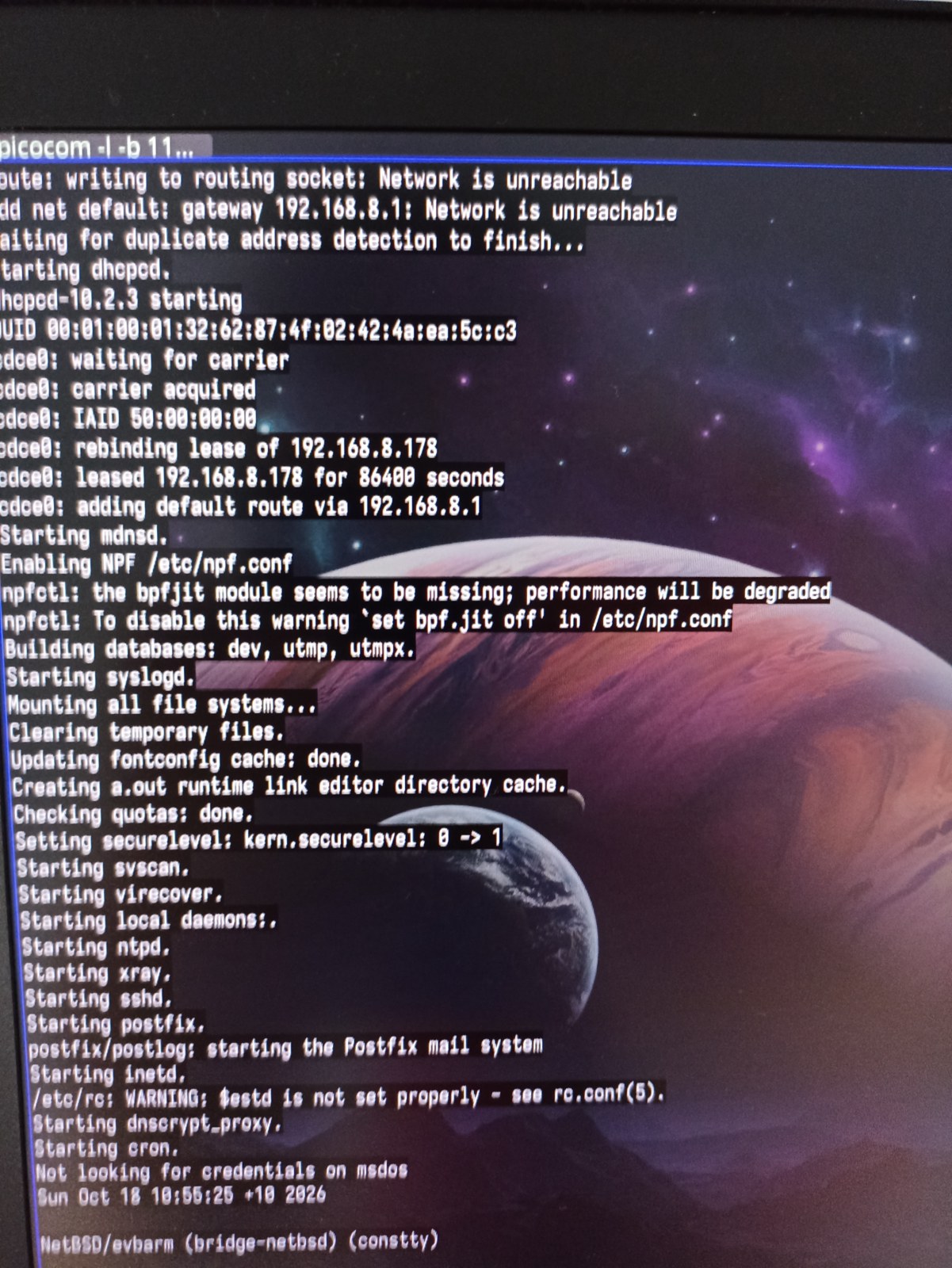
#netbsd says "the bpfjit module seems to be missing; performance will be degraded"
hmm... I don’t want things to be "degraded" :) As I understand it, routers are built on #ARM, so shouldn’t this module be included in the distribution? Where can I get it?
Alt...
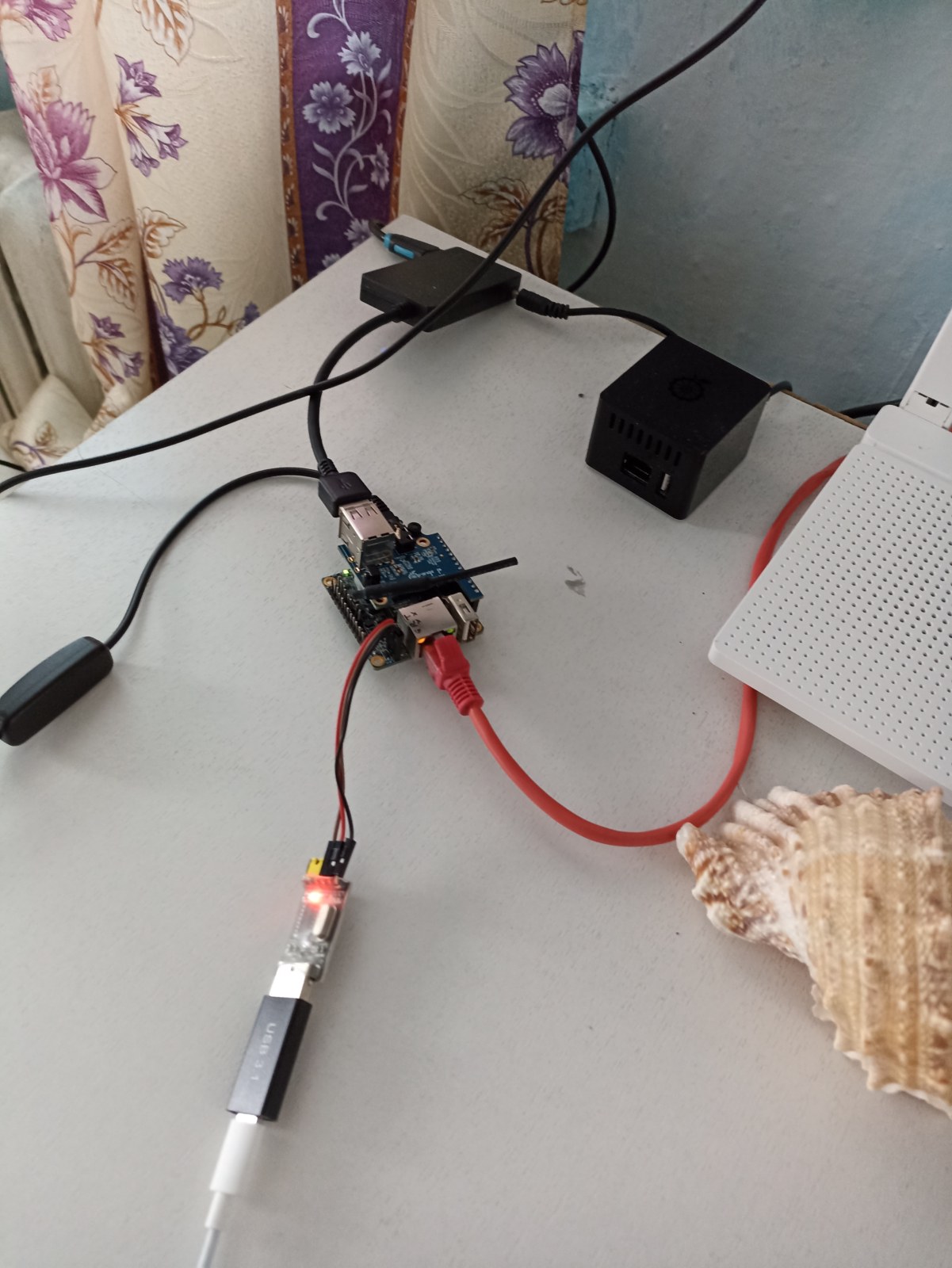
Two #OrangePi boards: in case running #FreeBSD, and one disassembled board running #NetBSD; you can also see the wires leading to the hubs, and so on.
Alt...
#netbsd boot log - 'the bpfjit module seems to be missing; performance will be degraded
![[?]](https://mastodon.clitheroe.ca/system/accounts/avatars/114/441/807/466/803/214/original/94ade8d5ba444135.jpg)
NetBSD sea trials day 2 - currently doing work to free up my secondary machine for a bare metal NetBSD install now that a root-on-RAID config is understood (and documented in my wiki). This mostly consists of migrating a couple VMs back over to my primary machine, writing out a NetBSD USB stick image, and I ordered a cheap KVM as a quality of life item (the second machine ran headless)
Also tried running sysupgrade in the NetBSD sea trial VM
VMs moved, fresh local and offsite backup cycle run, secondary machine idled, and the KVM I ordered arrived while I was out for a run.
After a slice of apple pie, I think it's go time.
Reclamation day is at hand!
![[?]](https://media.infosec.exchange/infosec.exchange/accounts/avatars/111/483/146/790/492/677/original/0fc9d472abd6911c.png)
YRabbit » 🌐
@xiaotuolu@r6xjcr4byvoci6cdmbon2u3vtqlxlfwsfd2dpae7zpqfql5quqmq.mesh.yrabbit.cyou
Today I’m working on the packet filter in #NetBSD — this is the very first task after having demonstrated that everything works in general.😉
![[?]](https://assets.chaos.social/accounts/avatars/108/198/383/090/213/558/original/92bec86704400a34.jpg)
@nina_kali_nina @the_wub @davidgerard and I'd be glad to "sweeten the pot" if an #artist can make a happier #NetBSD daemon image to show up on DLNA media players instead of the bland vanilla one for BSDs. The file is buried in minidlna somewhere.

Alt...
Daemon and Spiral
BSD and Linux logos
![[?]](https://media.bsd.cafe/bsdmmedia01/accounts/avatars/117/006/199/875/207/359/original/dfd5a542d6917324.jpeg)
RE: https://mastodon.sdf.org/@netbsd/117455748417638482
During episode 132 of Linux After Dark from @latenightlinux, the hosts talked about how they could recapture the passion they once had for computers and technology. This episode got me thinking quite a lot. I've been a Linux user for more than 30 years and, admittedly, my excitement for tech was dying. Actually, it had been dying for a few years. Shitty comments from Torvalds, many projects embracing AI, and maybe even the fact that I had been using Linux for so many years, contributed to my, well, less that excited feelings about all of it. I know that I needed a change.
I may have found something that has rekindled my love and excitement. And that something is BSD. After a few months of struggling to get a BSD installed on my hardware (laptop and desktop), with the help of many here in the Fediverse over the past month or so, I finally got NetBSD installed on my laptop and desktop. It was exciting! I'm actually feeling the way I did when I first started using Linux all those years ago. I have to work a bit to get some hardware working, I have to do a lot of reading and research, and I've even joined some IRC channels and forums. Forums. Remember those?
I'm leaving Linux behind and moving on after more than 30 years. This isn't a decision that I take lightly. Quite the contrary. It's one of the hardest decisions that I've ever had to make. I spent those 30+ years preaching about how great Linux was and even moved a lot of people away from Windows to Linux and Open Source software over the years. And for a lack of a better description, I feel betrayed by the Linux kernel project and all of the open source projects who have decided to embrace AI, even with all of terrible ethical issues.
Well, anyway, I didn't write this to bash on Linux. I wrote this because I'm starting to feel excited about tech again. I may even start writing about my move from Linux BSD and how it's all going. The good things. The struggles. And everything in between.
Okay, I've put enough people to sleep with this post. I have a long road ahead of me before I feel as comfortable with BSD as I do with Linux, but I think that is where all the excitement is.
#bsd #netbsd #freebsd #openbsd #linux #noAI
Some #NetBSD questions that keep coming up.
We don't use modules for HW drivers in the default install. All baked into the kernel. If you're curious about desktop hardware, for x86 there are lists https://wiki.netbsd.org/laptops/ https://wiki.netbsd.org/gpus/ (and the pci/usb manual pages)
x86 virtual machines. https://www.netbsd.org/docs/guide/en/chap-virt.html#chap-virt-guest
For disk encryption there's different options, such as creating a small root with the installer, then adding encrypted partitions later (see man cgdconfig). Also: cgdroot.
![[?]](https://mastodon.sdf.org/system/accounts/avatars/108/233/134/134/174/252/original/75cf6c02b16edbb2.png)
The dance to get my pi4s to boot was getting the disk image from here & dd-ing it onto a microsd card in the usual way:
https://cdn.netbsd.org/pub/NetBSD/NetBSD-11.0/evbarm-aarch64/binary/gzimg/
But then also getting the UEFI files from here & copying those files across to the root of the sd card (not into /EFI which is what I'd been doing half asleep on Friday, don't know what I'd tried the time before that but into root is the go).
![[?]](https://social.cyberia9.org/files/dae06e95-9ef5-4290-b807-40847ed19558.png)
![[?]](https://media.muenchen.social/muc/accounts/avatars/114/047/524/902/733/373/original/be74d649303ff325.jpg)
Werd longsom Zeit fia an "Uninstall Linux Workshop" wei da Linus hot jetz an dotalen Vogl mit dera "KI" Freindin oiso mias ma hoit zu NetBSD nüba rutschn. 🤷 #noAI #daLinusSpinnt #NetBSD