Search results for tag #NetBSD
![[?]](https://media.bsd.cafe/bsdmmedia01/accounts/avatars/116/916/392/971/982/972/original/7d940acb1047b6c5.png)
@netbsd Hey. Would ebook readers such as #Kobo and #Pocketbook which permit custom OS be good hardware donations?
 boosted
![[?]](https://cdn.woof.tech/accounts/avatars/110/845/362/143/356/321/original/c901c046c550f1b3.png)
WELP, I attempted to install #NetBSD today, but I ran into some serious problems. Namely, after following the instructions on the official website to write the installer image to my USB thumbdrive (which keep changing what the block size should be!), the resulting drive fails to find the kernel and won't go further than the boot prompt. I'm trying some other dd flags and am about to try again, but if this doesn't work SOMEBODY is going to need to step up. Tagging @netbsd because you're the most obvious person here to ask for help with installing NetBSD
![[?]](https://sb17.space/system/accounts/avatars/109/315/439/018/386/418/original/6d29e7fa05fc0a26.png)
I am looking for a #retrocomputer kit that I can start to daily drive for funsies with a #NetBSD jumpbox to do most things. I have been looking at the #RC2014 Zed Pro II and the #SC792. Does anyone have any recommendations?
Or maybe something I missed?
| RC2014: | 0 |
| SC792: | 0 |
| Something else (comment below): | 0 |
Closes in 3:19:32:14
![[?]](https://files.mastodon.social/accounts/avatars/113/635/103/853/964/473/original/0a4435eaf8d5c473.png)
Improving and Stabilizing the racoon2 IKE Daemon in NetBSD https://lobste.rs/s/wbpt5y #netbsd
https://blog.netbsd.org/tnf/entry/gsoc2026_racoon2
boosted![[?]](https://media.bsd.network/accounts/avatars/000/006/949/original/9592eac6e5018e39.png)
Google Summer of Code 2026 Reports: Improving and Stabilizing the racoon2 IKE Daemon in #NetBSD
#runbsd
https://blog.netbsd.org/tnf/entry/gsoc2026_racoon2
![[?]](https://lemmy.ml/pictrs/image/9AY4jZuh4Q.png)
Google Summer of Code 2026 Reports: Improving and Stabilizing the racoon2 IKE Daemon in NetBSD
racoon2 is a system to exchange and install security parameters for IPsec. It consists of an IKEv1/IKEv2 key exchange daemon, a security policy management daemon, and a Kerberos-based key exchange daemon. The project lives at zoulasc/racoon2 and is being modernized so that it can serve as a reliable L2TP/IPsec or IKEv2 VPN server on NetBSD and Linux for built-in Windows, iOS and Android VPN clients.
boosted![[?]](https://assets.chaos.social/accounts/avatars/108/198/383/090/213/558/original/92bec86704400a34.jpg)
Someone mentioned @jwz on a #NetBSD mailing list, about xscreensaver:
"I am thinking that perhaps the author is the
only person that may understand it better, but in his WEB page he tells that" (to upgrade).
A bug that happens only once a week.
https://mail-index.netbsd.org/pkgsrc-users/2026/10/04/msg043564.html
> It appears than xscreensaver calls xscreensaver-auth to unlock the screen and it crashes there...
Someone may file a bug report, methinks.
![[?]](https://media.bsd.cafe/bsdmmedia01/accounts/avatars/117/229/469/256/862/649/original/1f7e21b86b7a3a7f.jpeg)
![[?]](https://files.mastodon.social/accounts/avatars/114/607/187/120/236/637/original/f20c75b766aa628d.jpg)
![[?]](https://pxscdn.com/cache/avatars/789980589548961657/avatar_4v14.jpg)
So I implemented a Lotka-Volterra predator-prey simulation in plain C and ran it natively on my Pentium 166 MHz with 80 MB RAM, running NetBSD 11.0 i386.
The model describes the interaction between a prey population and a predator population using a pair of differential equations. I used a simple Euler integration scheme and double-precision floating-point arithmetic.
The program simulated 1000 time units using a time step of 0.01, resulting in 100000 integration steps.
The Pentium completed the calculation in 9.35 seconds of real time, with 7.79 seconds of user CPU time and 0.41 seconds of system time.
The results were written to a data file, which I then visualized using gnuplot running directly on the Pentium.
The first plot zooms in to the first 20 time units, making the characteristic population oscillations easier to see. The second plot shows the complete 1000 time units.
This 30-year-old Pentium is still perfectly capable of doing some numerical science.
#RetroComputing #RetroPC #Pentium1 #Pentium166 #NetBSD #NetBSD11 #BSD #i386 #ScientificComputing #NumericalMethods #LotkaVolterra #CProgramming #Gnuplot #FOSS #OpenSource #ComputerHistory #VintageComputing #OldComputers
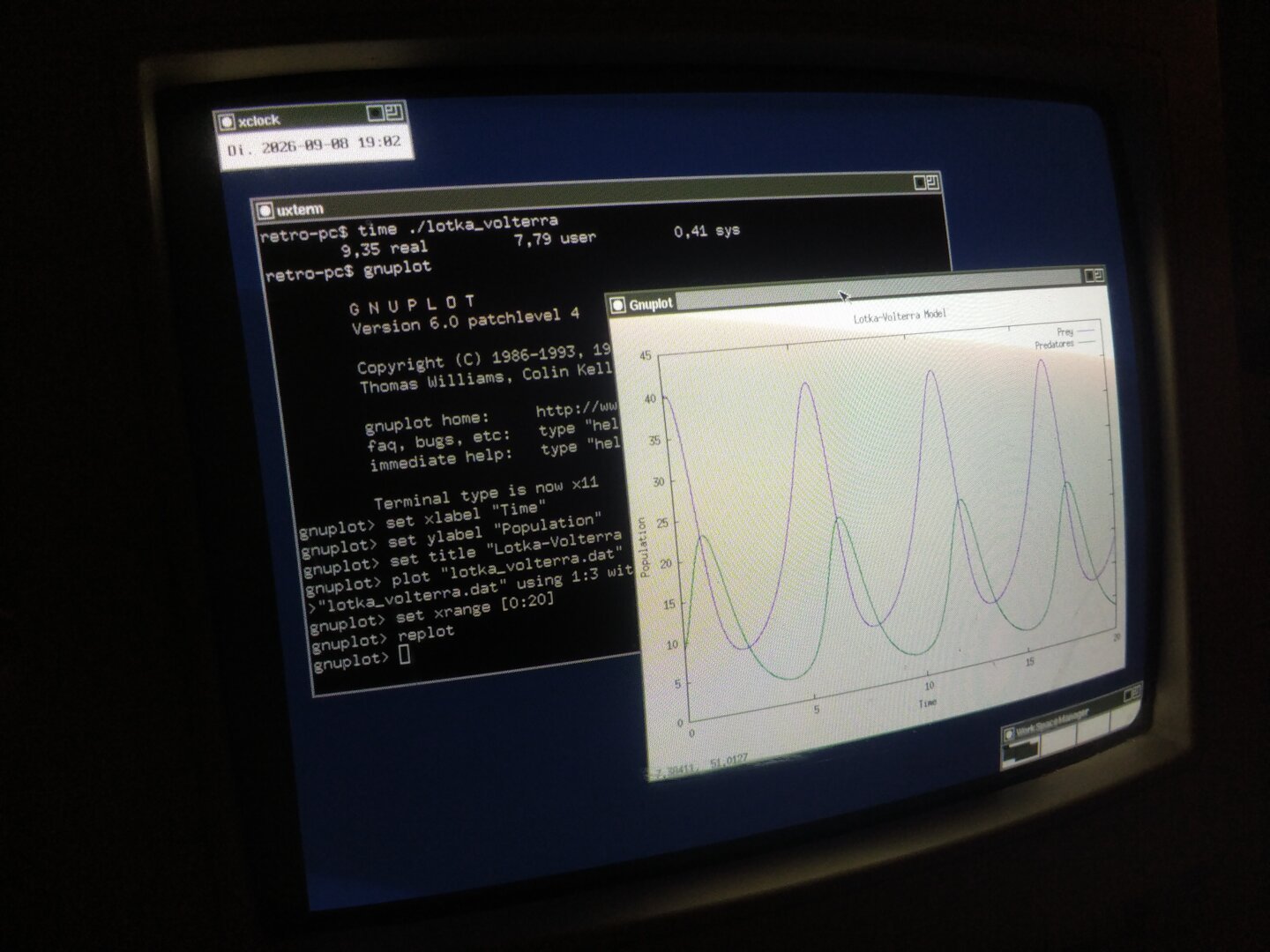
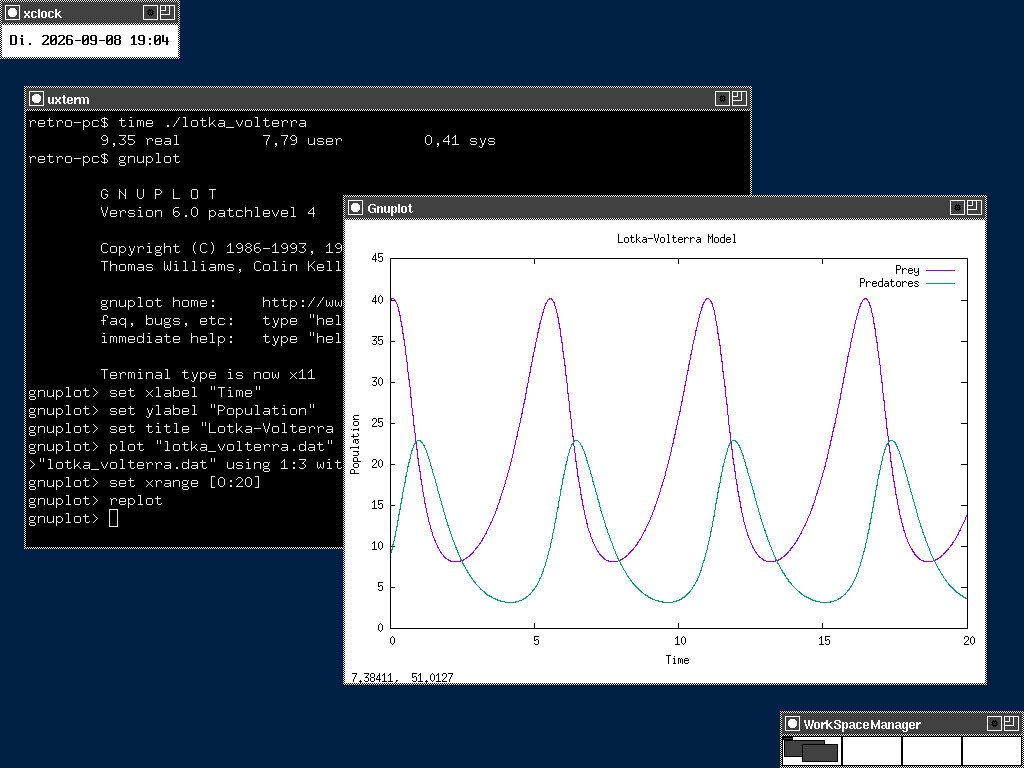
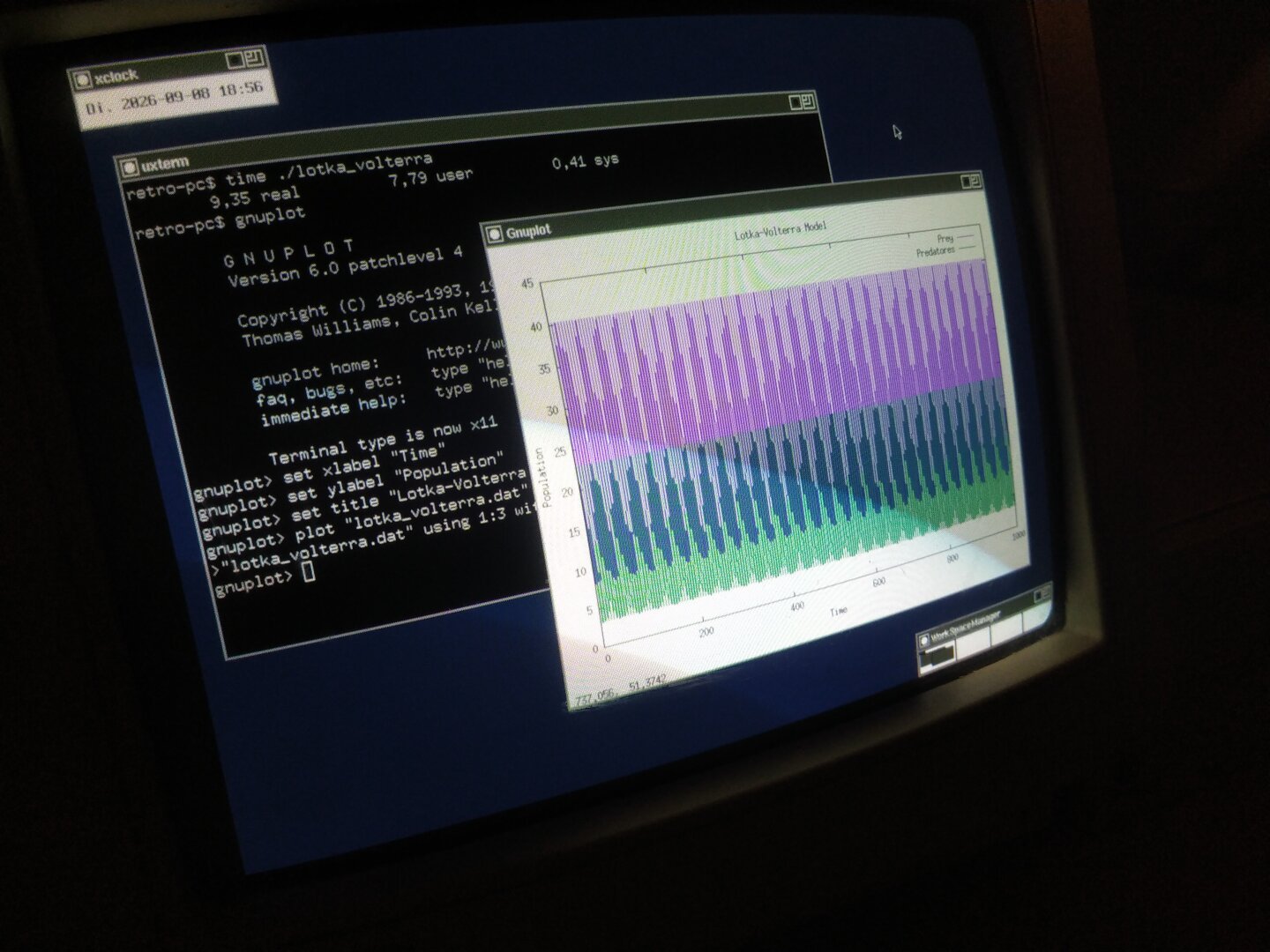
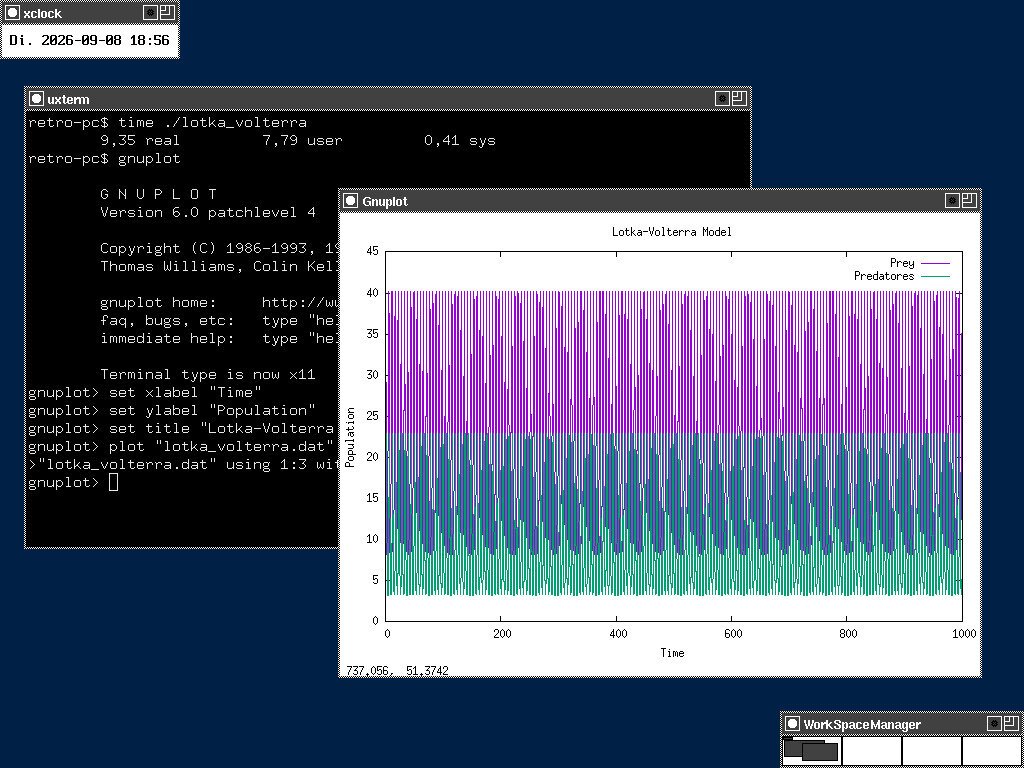
So I implemented a Lotka-Volterra predator-prey simulation in plain C and ran it natively on my Pentium 166 MHz with 80 MB RAM, running NetBSD 11.0 i386.
The model describes the interaction between a prey population and a predator population using a pair of differential equations. I used a simple Euler integration scheme and double-precision floating-point arithmetic.
The program simulated 1000 time units using a time step of 0.01, resulting in 100000 integration steps. The results were written to a data file, which I then visualized using gnuplot running directly on the Pentium.
The first plot zooms in to the first 20 time units, making the characteristic population oscillations easier to see. The second plot shows the complete 1000 time units.
This 30-year-old Pentium is still perfectly capable of doing some numerical science.
#RetroComputing #RetroPC #Pentium1 #Pentium166 #NetBSD #NetBSD11 #BSD #i386 #ScientificComputing #NumericalMethods #LotkaVolterra #CProgramming #Gnuplot #FOSS #OpenSource #ComputerHistory #VintageComputing #OldComputers


![[?]](https://polymaths.social/fileserver/01HCMX6M1CZNEVJ4F5H58TT5XJ/attachment/original/01JHC5KM5K0V0J0436SPD3F86H.jpeg)


 🍵
🍵  [
[#uBlock Origin rules to get rid of "log in with google" and #wikipedia nag screens:
! Aug 28, 2026 https://screenrant.com
||accounts.google.com/gsi/iframe/select$subdocument

! Sep 27, 2026 https://en.wikipedia.org
en.wikipedia.org##.frb-inline-main
en.wikipedia.org##.frb-inline-bottombar

! Oct 3, 2026 https://en.wikipedia.org
en.wikipedia.org##.frb-layout
en.wikipedia.org###frb-main > .skin-invert.frb-close.frb-icon-btn
en.wikipedia.org##.frb-annual-enabled.frb-rml-enabled.frb-mini-banner.frb
Zero apologies to Wikipedia. They've got like half a billion in the bank, repress workers trying to organize, and beg for money like a Sally Struthers donation campaign. Good grief.
Give to the #InternetArchive and #NetBSD foundation instead.
boosted![[?]](https://indiepocalypse.files.fedi.monster/accounts/avatars/117/102/576/716/677/162/original/cea2ad95dd7a18df.png)
If anyone's having problems getting Rust applications to load dynamic libraries from the right locations, this page on the #NetBSD wiki has some flags to set in ".cargo/config.toml" that helped me get a program to successfully load libraries from '/usr/pkg", the base system, and "/usr/local" simultaneously.
Said program didn't work entirely once it launched, but that's a different issue.
boostedDoes anyone with #NetBSD experience know why manipulating outputs.master with mixerctl (tested both directly or via aiomixer) wouldn't affect volume? outputs.master3 does do something, but it's a weird shifting of the audio to only some of the speakers. None of the others do anything.
![[?]](https://cdn.fosstodon.org/accounts/avatars/111/284/870/534/127/034/original/999341839729d524.jpg)
![[?]](https://media.mstdn.social/accounts/avatars/110/258/549/476/859/116/original/1b3ad77a5596c355.png)
Ok, #netbsd installed totally fine on the x280. WiFi runs out of the box as well.
I'm afraid i'll need to open firefox occasionally, since some sites won't work without javascript. But i'll use this experiment also to focus more on alternatives like #links2 and dillo.
Will also have a look on replacements with less dependencies. Like giving #got a run instead of git.
CTWM is fun so far, might switch to something else later on though.
![[?]](data:image/png;base64, iVBORw0KGgoAAAANSUhEUgAAAEAAAABAAQAAAACCEkxzAAAAUUlEQVQoz43R0QkAMQwCUDdw/y3dwEvsvzlL4X1IoQkAisKmwfAFT3RgJHbQezpSRoXEqeqCL9BJBf7h3QbOCCxV5EVWMEMwG7K1/WODtlvxAYTtEsDU9F34AAAAAElFTkSuQmCC) boosted
boosted![[?]](https://files.mastodon.social/accounts/avatars/000/027/233/original/4a1f1367cafeaaa0.jpg)
If you need financial assistance to attend EuroBSDCon 2027, the Paul Schenkeveld Travel Grant https://eurobsdconfoundation.org/travel-grant.html may be for you. Apply before 2027-02-01 #eurobsdcon @EuroBSDCon #bsd #openbsd #netbsd #freebsd
![[?]](https://media.infosec.exchange/infosec.exchange/accounts/avatars/109/288/650/829/872/194/original/c25bc31d8a80c563.jpeg)
![[?]](https://mastodon.sdf.org/system/accounts/avatars/000/108/923/original/06de5d5cdd6b6754.png)
I’m desperate to get #NetBSD running on some cheap board, but I haven't managed it yet.
I’m not buying a Raspberry Pi - I wouldn't touch one with a ten-foot pole - but I’ll try looking for some other simple alternatives 🤪
boostedI just have no luck with small SBCs :)
This Banana Pi M2 Zero boots up perfectly in Armbian, detects Wi-Fi, and connects to the access point. Pings go through, and so on...
#NetBSD boots right up to the "words" "sunxisramc0 at sim" and then stops. It’s always "at sim"...
I wonder why it dies in the middle of the word—is the SRAM being activated? Is a watchdog that wasn't disabled triggering?🤔

Alt...
Banana Pi M2 Zero + antenna + USB-uart

Alt...
Armbian on Banana Pi M2 Zero. WiFi works.
![netbsd boot log
last words: "[ 1.0000040] sunxisramc0 at sim"](https://mastodon.sdf.org/system/media_attachments/files/117/376/749/863/787/686/original/f673381d89401eec.png "netbsd boot log
last words: \"[ 1.0000040] sunxisramc0 at sim\"")
Alt...
netbsd boot log
last words: "[ 1.0000040] sunxisramc0 at sim"

Alt...
start of the NetBSD boot
![[?]](https://files.mastodonapp.uk/accounts/avatars/109/508/813/126/393/770/original/98a69cbbce7ad298.png)
Damn!
It looks like the phones(5) manual page is out of date everywhere.
http://jdebp.info/FGA/BSDs-for-Linux-users/use-the-man-man.html
#FreeBSD #NetBSD #OpenBSD #DragonFlyBSD #MidnightBSD #GhostBSD #LinuxMigration
It might. I've not tried full-screen commands on a wscons system in rescue mode. It might need wsconscfg to tell it what emulation it is supposed to be using.
I forgot the one major point that seems to surprise Linux people the most, at least when I have told them about it. (-:
http://jdebp.info/FGA/BSDs-for-Linux-users/ftp.html
#FreeBSD #NetBSD #OpenBSD #DragonFlyBSD #MidnightBSD #GhostBSD #LinuxMigration
Sycophantic Chatbots Cause Delusional Spiraling, Even in Ideal Bayesians
![[?]](https://social-cdn.vivaldi.net/system/accounts/avatars/116/387/395/794/911/208/original/5f50910a24f856cf.jpeg)
I have a Lenovo ThinkCentre M72e Tiny with a bunch of upgrades that I was going to gift to a friend, but turns out it's the only box in the house that loves #NetBSD so looking like it's a keeper.
![[?]](https://assets.oldbytes.space/assets.oldbytes.space/accounts/avatars/117/269/529/528/928/810/original/4bbe6219d0c145fb.png)


 [
[Hi! I'm looking for a job or gig! I live in the US (Central Indiana), and would much much rather work remotely.
I have system administration experience with #WindowsServer, #Linux, and #OpenBSD professionally. I strongly prefer the #BSD family of OSes and am willing to work with #NetBSD and #FreeBSD professionally and have played with them off the job. I have done this for about three years.
I also know graphic design. My preferred programs are #GIMP and #Inkscape, but I can use #Photoshop or #Illustrator if need be. I have done this for a decade.
I have skills in development, especially web development, and have professionally developed with #Javascript, #Python, and #Go. I also am trying to familiarize myself with #VisualBasic6 for legacy maintenance. I also have experience working with Microsoft #SQLServer databases, as well as played with other major SQL servers. I've also played with many other languages. I'm also willing to familiarize myself with a tech stack on the fly. As implied, I am willing to touch legacy code.
I have also designed websites, and am quite familiar with #HTML and #CSS. I also got #JQuery to play nicely as well.
I am a jack of all trades, with my strongest skills I feel be in system administration and graphic design.
LLMs and generative AI are something I prefer to avoid where possible. I have experience with working under tight deadlines with a micromanaging boss before recent hype around LLMs, though I'd rather avoid such things if possible.
![[?]](https://justfollow.me.uk/system/accounts/avatars/109/320/306/219/107/803/original/abdeb1bbb89e40f5.jpg)
@mrgtwentythree @stefano@bsd.cafe @dch @stefano@rpi0w.stefanomarinelli.it Feeling rather guilty we didn't get it into #pkgsrc for 2026Q3 given it's been on #NetBSD throughout its development especially as #FreeBSD had a Day 1 release
boosted![[?]](https://media.nerdculture.de/accounts/avatars/109/274/692/598/892/436/original/768e4668071143b1.png)
Just started a monthly donation of 5€ to The #NetBSD Foundation. I don't know if I once will leave Linux and Debian behind, but I really like the clean and oldschool UNIX style of NetBSD.
![[?]](https://files.ohai.social/accounts/avatars/114/456/967/863/618/736/original/f647d10235954580.png)
You're welcome :)
I'd kinda forgotten about Cosmic because of the impression (don't know if it's justified) that it's Gnome-like. But if it's really AI-free, might be worth checking out.
PS ah but it seems it's dependent on SystemD, which means it's Linux-only.
https://github.com/pop-os/cosmic-epoch
So Cosmic can't be run on an AI-free OS like NetBSD :(
boosted![[?]](https://masto.bike/system/accounts/avatars/109/298/328/498/155/315/original/70dbdf0cef9f4ef2.png)
I have an issue with mdnsd at boot.
It's annoying, most machines use dhcp and I rely on their hostnames to be able to ssh/ansible.
I don't have the skills nor the time to learn how to debug/fix.
Witness my crontab:
@reboot /bin/sleep 120; /usr/sbin/service mdnsd restart
I don't know better, I fix stuff with a hammer if the only tool I have is a hammer. Maybe it's a coincident and doesn't work at all, but now I can ssh to that machine after a reboot.
![[?]](https://mastodon.sdf.org/system/accounts/avatars/114/205/366/579/623/449/original/2eeba344bc5e17ba.png)
Given there's been a lot of improvements to the Log File System in #NetBSD -current, here's how you can install a system to boot to an LFS root:
* Download -current, e.g. https://nycdn.netbsd.org/pub/NetBSD-daily/HEAD/latest/images/NetBSD-11.99.8-amd64-dvd.iso
* Boot the installer and follow the steps as usual
* When it shows you the final partition layout, use the arrow keys up to the partition displaying "FFSv2ea". Press return.
* Modify its "type" to "4.4LFS", scroll down and select "OK".
* Finish the installation and reboot. Pretty easy, right?

Alt...
The step of the NetBSD installer that shows the final partition table, the FFSv2ea partition is highlighted.

Alt...
The menu to select the file system type, "4.4LFS" is selected.
@thomasadam I think what you read might have been the toot asserting incorrectly that #NetBSD #ZFS was based on OpenZFS and as they allow AI code now, somehow NetBSD was also tainted (presumably through a magical time portal)
![[?]](https://elu.egois.org/media/01a0fb80-08d9-7c9e-911e-bc3d5cdaf570/image.png)
Ini adalah instance coba - coba pakai littlefedi dari littlefedi.org
sepertinya menarik karena ringan banget dan punya fitur lebih banyak daripada gotosocial. Ane akan coba untuk beberapa lama dan kalo cocok akan migrasi.
Instance ini dihost di #NetBSD di #TierHive NAT VPS dengan spek 1vcpu (prioritas medium), 768MB RAM, dan 3GB SSD. Spek SSDnya sempit tapi ane rencana pakai S3, tapi sementara belum ketemu pengaturannya.
I think i'm in need of some positive tinkering. Might use october to try out #netbsd on the main thinkpad to see if it fits my overall needs there.
boostedDebian is obviously a rock-solid choice for CERN. With their massive software ecosystem and community, it makes total sense why they went that route. But part of me can't help but wonder what a NetBSD-powered Large Hadron Collider would look like! ⚛️
NetBSD’s hardware portability just seems like a perfect match for lab. Plus, using pkgsrc to manage complex scientific software seamlessly across all those different niche architectures would be incredible to see at that scale.
Nothing but respect for the Debian rollout, but a sysadmin can dream! 🚩🚀
#NetBSD #CERN #Debian #Linux #UNIX #OpenSource #noai #nollm #antiai
![[?]](https://snac.smithies.me.uk/justine/s/avatar-270304302821a87b50026a5768a00c56.png)
![[?]](https://media.bsd.network/accounts/avatars/109/207/430/504/108/566/original/b37198ec33972825.png)
Slow and steady wins the race though. I'll get there eventually.
boosted![[?]](https://snac.bsd.cafe/bpl/s/avatar-b605f1db31dc57fe49b6eb2033dc306c.jpg)
![[?]](https://littleone.littlefedi.social/media/01a0a91d-21e5-7701-87d0-bb53a60b6233/image.png) littleFedi - Official Account » 🌐
littleFedi - Official Account » 🌐
@littlefedi_official@littleone.littlefedi.social
Thank you, @dch@bsd.network
One of the peculiarities of littleFedi is that it was developed and tested first on the BSDs, then on illumos, and only later on Linux.
The first public instance, my own @stefano@rpi0w.stefanomarinelli.it account, runs on a Raspberry Pi Zero W with NetBSD.
I don’t think many social platforms have started out on NetBSD in recent years.
#NetBSD #FreeBSD #littleFedi #Fediverse
I want to publicly thank @dch
The FreeBSD port of littleFedi was already ready at release time, and it’s really well done.One of the peculiarities of littleFedi is that it was developed and tested first on the BSDs, then on illumos, and only later on Linux.
The first public instance, my own @stefano@rpi0w.stefanomarinelli.it account, runs on a Raspberry Pi Zero W with NetBSD.
I don’t think many social platforms have started out on NetBSD in recent years.
#ThankYou #RunBSD #NetBSD #FreeBSD #OpenBSD #illumos #OwnYourData #Fediverse #littleFedi
![[?]](https://media.bsd.cafe/bsdmmedia01/accounts/avatars/110/740/169/477/916/693/original/dfa8f1b9beefa405.png)
I want to publicly thank @dch
The FreeBSD port of littleFedi was already ready at release time, and it’s really well done.
One of the peculiarities of littleFedi is that it was developed and tested first on the BSDs, then on illumos, and only later on Linux.
The first public instance, my own @stefano@rpi0w.stefanomarinelli.it account, runs on a Raspberry Pi Zero W with NetBSD.
I don’t think many social platforms have started out on NetBSD in recent years.
#ThankYou #RunBSD #NetBSD #FreeBSD #OpenBSD #illumos #OwnYourData #Fediverse #littleFedi
boosted![[?]](https://media.bsd.cafe/bsdmmedia01/accounts/avatars/113/311/272/554/458/614/original/4ee66d78a6bbc131.png)
Hello speakers!
What's happening... I gonna need you to go ahead and submit that abstract.
So if you could do that, that would be great. Okay...
CfP: https://events.bsdnl.nl/late2026/
#RUNBSD #BSDNL #OpenBSD #FreeBSD #NetBSD #HardenedBSD

Alt...
Image of the "That Would Be Great" meme featuring the character Bill Lumbergh from the 1999 comedy film Office Space. It has the text: "That'd be great"
boostedIt is amazing how without fail search engines respond to searching for #NetBSD resources with pages related to FreeBSD. Also it's hilarious how bad slop pages for NetBSD are. Just referring to Linux and FreeBSD commands, configuration, and packages that do not exist on NetBSD.
![[?]](https://mastodon.sdf.org/system/accounts/avatars/113/901/805/312/566/231/original/5fd582ede8052819.jpg)
Hey folks!
I have written some travel notes from EuroBSDCon 2026, Brussels, Belgium:
https://blog.NetBSD.org/tnf/entry/eurobsdcon_2026_in_brussels_belgium
The conference was amazing and I had a lot of fun and learned a bunch!
Thanks to everyone who made it possible!
#EuroBSDCon2026 #EuroBSDCon #NetBSD #pkgsrc #FreeBSD #OpenBSD

Alt...
Photograph showing a diagonal light over my EuroBSDCon 2026 badge. Near the badge there are a lot of BSD-related stickers. BSD-NL, NetBSD, pkgsrc, BSDCan, BSD, BSD Cafe, Run BSD and Run BSD Stop Fascism.