Search results for tag #netbsd
![[?]](https://files.mastodon.social/accounts/avatars/113/322/507/919/173/074/original/3b1d8cf61b7c7a82.jpg)
![[?]](https://files.mastodon.social/accounts/avatars/117/277/585/360/793/271/original/2148c08851a60288.png)
Good debugging thread from @kusalananda. Restic over Tailscale on NetBSD kept failing with "address family not supported". Dropping the tun MTU from Tailscale's 1280 to 1200 seems to avoid it, and it may have turned up a 22-year-old bug in NetBSD's if_tun.c. NetBSD folks picked it up, and a Tailscale engineer offered help.
https://fosstodon.org/@kusalananda/117459955856928626
#NetBSD #Tailscale
![[?]](https://cdn.masto.host/rubysocial/accounts/avatars/000/093/360/original/920f5a8782200f9b.jpg)
I now have a #NetBSD 11 VPS on TierHive that only costs $5 a year. Thanks @bt for the tip.
I'm looking forward to learning.
![[?]](https://media.tech.lgbt/accounts/avatars/109/287/597/283/006/444/original/23fa549b53fa0945.png)
Got NetBSD installed, using an external keyboard, since the built-in one somehow only worked at the very beginning, before starting the installation wizard. It still doesn't work, and the WiFi card isn't recognised either 
Looks like I'll have plenty more stuff to figure out tomorrow 
![[?]](https://files.mastodon.social/accounts/avatars/000/453/056/original/ffa8a6dd5bfd4183.png)
Following up to yesterday's shitpost: I did actually slap #NetBSD onto a random old laptop. Been thinking for a while "I should play around with a BSD or something, to understand Unix portability better". And then recently everyone got excited about NetBSD for Reasons™, so why not try that one? 🧵
![[?]](https://ap.nil.im/media/034e2b1732a0e5a1f3c10ef2579bdd0e4fc751ecf9affc9a3557b5e1a47e972c.png)
![[?]](https://files.mastodonapp.uk/accounts/avatars/109/508/813/126/393/770/original/98a69cbbce7ad298.png)
Presumably on modern #FreeBSD the local fix is also a relatively simple exercise in using certctl(8), as it is on #NetBSD.
 boosted
![[?]](https://media.bsd.cafe/bsdmmedia01/accounts/avatars/115/138/278/314/458/705/original/14801851e6f000f4.png)
Installed #NetBSD/amd64 11.0 on a 2012 Mac Mini. Now I'm waiting for packages to build.
![[?]](https://cdn.masto.host/mastodongamedevplace/accounts/avatars/109/268/799/272/128/498/original/741578ac3fad4b23.jpeg)
![[?]](https://social-cdn.vivaldi.net/system/accounts/avatars/116/522/207/585/194/189/original/dfe141c0ee1ee52f.jpg)
![[?]](data:image/png;base64, iVBORw0KGgoAAAANSUhEUgAAAEAAAABAAQAAAACCEkxzAAAAUUlEQVQoz43R0QkAMQwCUDdw/y3dwEvsvzlL4X1IoQkAisKmwfAFT3RgJHbQezpSRoXEqeqCL9BJBf7h3QbOCCxV5EVWMEMwG7K1/WODtlvxAYTtEsDU9F34AAAAAElFTkSuQmCC)
![[?]](https://fedi.bobadin.icu/fileserver/01JW8FA8KA9818YWHHBPPZ7TCK/attachment/original/01J0DHDSP9WC6YXEWC97N7TXKR.webp)


I quickly tried compiling zmenu on NetBSD.
After modifying the makefile with the correct Xlib path, it seems to be working correctly.
X11INC = /usr/X11R7/include
X11LIB = /usr/X11R7/lib
I also changed PREFIX to install it in the .bin folder in my home directory.
So far, it seems to be working correctly.
#netbsd #zmenu #clang #c-programming #guufxmmp #guufita #bsdITA #unixITA
https://codeberg.org/norwd/zmenu

Alt...
zmenu running on NetBSD

Alt...
zmenu makefile on Emacs (Spacemacs)
![[?]](https://cdn.masto.host/mastodongamedevplace/accounts/avatars/109/124/033/154/053/996/original/90ff75fd7310bc86.png)

 🎃👻
🎃👻Older laptop (XPG Xenia 15, IIRC) wasn't able to boot Haiku OS (kernel debugger land, which is better than a panic) or Redox OS (some sort of Rust panic/backtrace loop that very slowly writes PCI IDs on the screen).
So I guess *BSD is basically my only slop-free (or lower-slop) option unless I buy a desktop or something. 🤷
![[?]](https://drive.nya.social/files12/webpublic-a2647278-0bb5-442b-9b98-743a825b8510.png)
i guess it is time to order some new #NetBSD mugs from https://www.cafepress.com/profile/1821586, the proceeds from which i am told will in turn go to NetBSD
i guess it is time to order some new #NetBSD mugs from https://www.cafepress.com/profile/1821586, the proceeds from which will in turn go to NetBSD
![[?]](https://snac.bsd.cafe/r1w1s1/s/avatar-f4bb891519b2dd4faaf0697b384c3c6f.png)
and an experimental optional colour feature for brackets and operators.
To try it:
```
make clean && make DBG='-DNDEBUG -DCOLOUR'
Press ```Ctrl+]``` to toggle the colours.Feedback is welcome: useful, harmless, or distracting? I’ll collect the responses and add them to issue #44:
https://codeberg.org/SirWumpus/eh/issues/44Please reply here with your experience if you try it.
NetBSD - untrust certificates
mastodon.sdf.org/@netbsd/117473734072004396
Hello, please immediately run the following commands on your NetBSD installations:
certctl untrust /usr/share/certs/mozilla/all/emSign_Root_CA_-_C1.pem
certctl untrust /usr/share/certs/mozilla/all/emSign_ECC_Root_CA_-_C3.pem
Hm. I wanted to install NetBSD on a laptop from a USB drive, but it refused to boot. I've tried a different drive, I've tried an older version, I've tried both the USB image and the DVD iso, and nothing worked. Installing Fedora worked without a problem, so it's probably not an issue with the laptop 
![[?]](https://media.hachyderm.io/accounts/avatars/112/360/968/741/020/681/original/517beaea5dfbafe1.png)
![[?]](https://cdn.masto.host/retrochatonline/accounts/avatars/117/200/092/515/726/851/original/9296e9d4d2b61168.png)
Looks like it's a slightly different process for getting it all set up, but #NetBSD has documentation for getting Linux programs to run https://netbsd.org/docs/guide/en/chap-linux.html
Great blog from @dwarmstrong with a lot of #NetBSD content https://www.dwarmstrong.org/
![[?]](https://mastodon.sdf.org/system/accounts/avatars/108/233/134/134/174/252/original/75cf6c02b16edbb2.png)
An HTTPS certificate authority has been compromised. If you want to ensure #NetBSD is not vulnerable, you can run the following commands as root:
# certctl untrust /usr/share/certs/mozilla/all/Comodo_AAA_Services_root.pem
# certctl untrust /usr/share/certs/mozilla/all/emSign_ECC_Root_CA_-_G3.pem
You can review the untrusted ones with:
# certctl untrusted
Read more: https://emudhra.we-have-a-problem.com/
You can test whether your system is vulnerable by loading the linked pages there.
(Updates coming.)
![[?]](https://media.hachyderm.io/accounts/avatars/112/675/591/398/918/893/original/3f530b45903d3837.jpg)
#Tech #Mastodon I have a question, does #NetBSD have binary forward compatibility (or whatever that would be called)?
Like, if I build something using a shared libc and generally using dlopen() or other careful methods for external libraries, will that binary typicall continue to work on future releases of NetBSD as-is?
I've heard FreeBSD tends to have that, OpenBSD apparently less so...
Asking since I'm tempted to try #NetBSD due to the general #Linux #ensloppification situation  stop the #slop etc. by putting my money where my mouth is, at least if this turns out to be feasible...
![[?]](https://d35e9bfo1msux2.cloudfront.net/accounts/avatars/109/535/770/898/980/239/original/fe47a9c6a062442b.png)
One very simple thing that would make #TianoCore work better with #NetBSD is something that I discovered back in 2025.
NetBSD, like everyone else, expects BS to be non-graphic and non-destructive, and uses it for spinners in its boot loader.
TianoCore makes BS destructive, breaking this.
Ironically, it would make the handling of BS in GraphicsConsoleConOutOutputString() simpler and non-recursive, for a code path that is called a lot by loaders.
![[?]](https://cdn.masto.host/mastodongamedevplace/accounts/avatars/109/468/716/907/475/199/original/a972069d81771dea.jpeg)
Okay, you switch to #netbsd … but what about Python, Rust, Ruby, Godot, VS Codium, most other software one uses???
![[?]](https://media.mastodon.sunny.garden/accounts/avatars/110/657/712/351/170/121/original/7f0c7a7bf1eddc2e.png)
I quite like the "micro" terminal-based editor. as the name suggests it's like nano (rather than vim or anything) but 1000x better. syntax highlighting doesn't work in the #netbsd pkgsrc release though for some reason - but the binary on github works fine.
boosted![[?]](https://justfollow.me.uk/system/accounts/avatars/109/320/306/219/107/803/original/abdeb1bbb89e40f5.jpg)
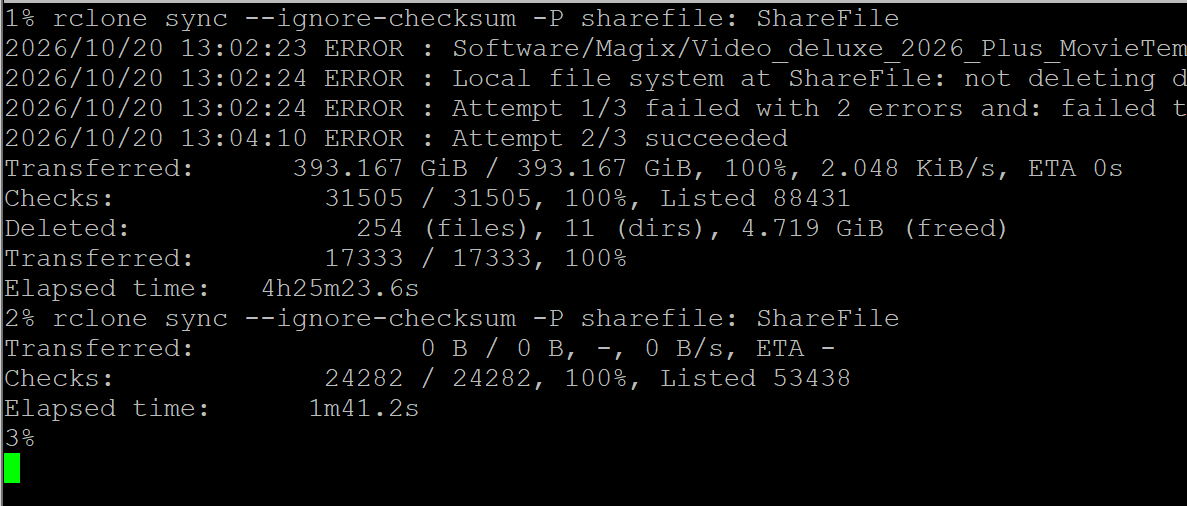
To be fair, I'm very impressed with the final result. A second run after a 400GiB sync from cloud storage to local #ZFS on #NetBSD took less than 2 minutes.
Alt...
Two runs of a program called rclone. The first copied nearly 400GiB in 4 hours and 25 minutes. The second took less than two minutes as everything had already been copied.
1% rclone sync --ignore-checksum -P sharefile: ShareFile
Transferred: 393.167 GiB / 393.167 GiB, 100%, 2.048 KiB/s, ETA 0s
Checks: 31505 / 31505, 100%, Listed 88431
Deleted: 254 (files), 11 (dirs), 4.719 GiB (freed)
Transferred: 17333 / 17333, 100%
Elapsed time: 4h25m23.6s
2% rclone sync --ignore-checksum -P sharefile: ShareFile
Transferred: 0 B / 0 B, -, 0 B/s, ETA -
Checks: 24282 / 24282, 100%, Listed 53438
Elapsed time: 1m41.2s
![[?]](https://kamloops.social/system/accounts/avatars/116/709/082/696/410/635/original/247f7c942115c10b.jpeg)
 [
[@drew i wonder, has anybody ever asked #NetBSD to reconsider the "core can approve slop" clause, or to publish some info on whether core has approved #slop so far?
sounds quite cool though! I'm still hoping somebody might fork an older #Linux #kernel - might be hard to keep that going but it would send a sign.
#LLM #NoSlop #ensloppification #AI #NoAI #FreeSoftware #FOSS #FLOSS #OpenSource
![[?]](https://files.mastodon.social/accounts/avatars/117/262/394/958/092/588/original/54349a36964f320a.png)
![[?]](https://snowfan.it/system/accounts/avatars/117/342/193/979/745/312/original/ca9ec961a255db56.png)
![[?]](https://masto.bike/system/accounts/avatars/109/298/328/498/155/315/original/70dbdf0cef9f4ef2.png)
Today I discovered:
/usr/pkg/share/examples/pkgin/preferred.conf.example
that goes in:
/usr/pkg/etc/pkgin/preferred.conf
non-bloated functionality is always better.
![[?]](https://cdn.masto.host/mastodonart/accounts/avatars/115/598/771/990/863/078/original/82a9e67f9974c159.jpg)
I heard #NetBSD was trending, so decided to check whether we needed to fix anything to build edk2 under it
Not much.
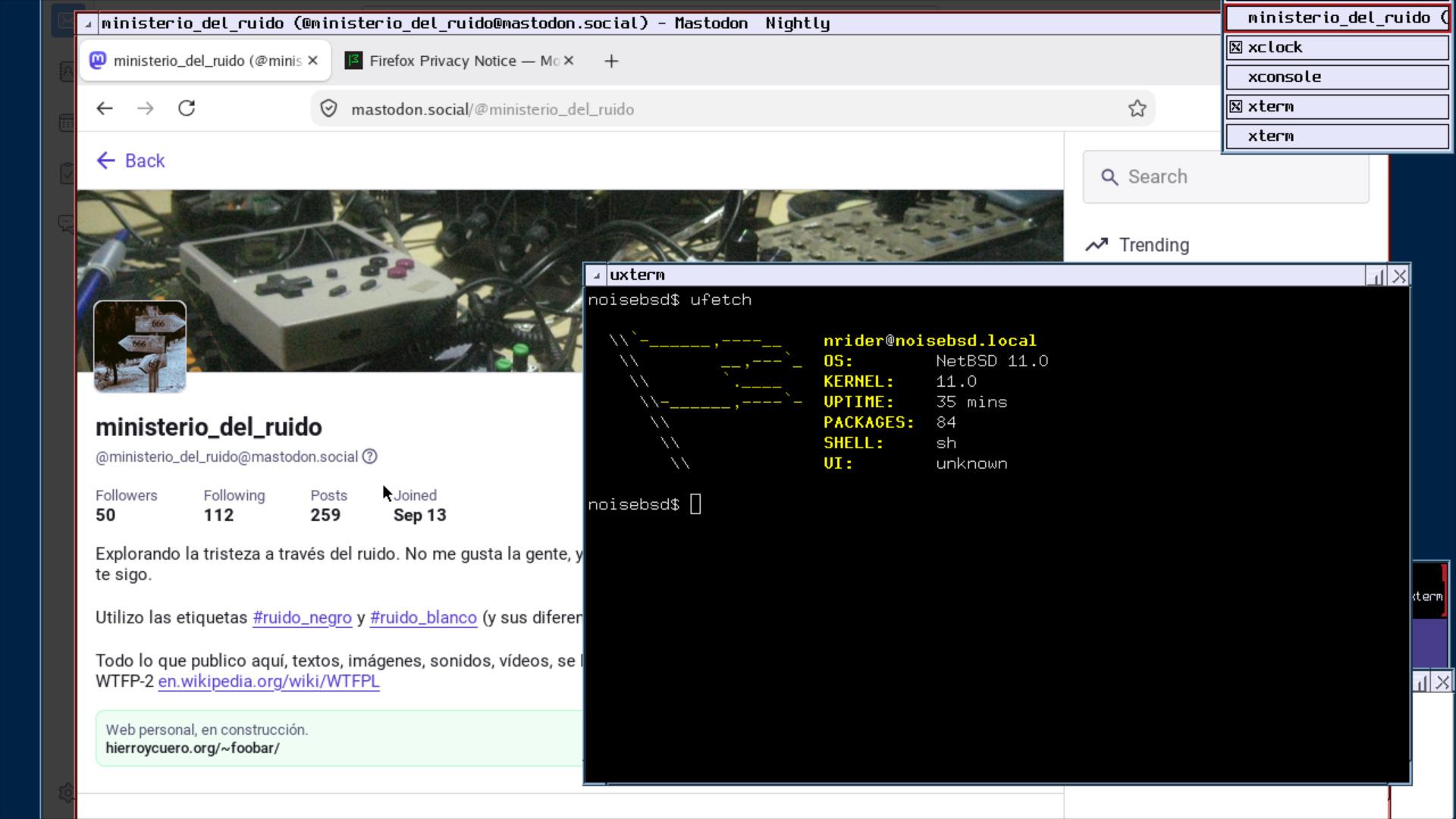
La instalación de #netbsd en una máquina virtual, previa a la instalación en un #t400 ha sido mucho más sencilla de lo que esperaba.
Veremos con el hierro.
Alt...
una pantalla de una máquina virtual corriendo la última versión de netbsd con sistema gráfico, en el escritorio se ve un menú, una terminal con ufetch, firefox y por debajo está thunderbird.
![[?]](https://media.bsd.cafe/bsdmmedia01/accounts/avatars/110/740/169/477/916/693/original/dfa8f1b9beefa405.png)
Not as straightforward as on FreeBSD, but you can make your own read only NetBSD device quite easily. I've been doing it for years, and it works perfectly.
Make your own Read-Only Device with NetBSD
https://it-notes.dragas.net/2024/09/10/make-your-own-readonly-device-with-netbsd/
![[?]](https://tooting.ch/system/accounts/avatars/110/705/971/614/171/519/original/dd338a09a8776027.png)
@peachfiend Yes, unfortunately, it is not like people are suddenly looking for alternatives to Linux, and #NetBSD was ready to catch them. Netbsd had little funding for years, and modern hardware support is not that good. In case you wanna have it improved in a couple of years, support netbsd now.
boosted![[?]](https://cdn2.miau.pub/accounts/avatars/111/077/294/997/712/881/original/e466d91ac7b69254.png)
RE: https://mastodon.bsd.cafe/@dianea/117471549323589711
I made a new account to focus on my new major project, installing #NetBSD ...well, installing was easy, but now I can get my life back and take control with the UNIX Philosophy. There's even a wikipedia page on it, and you should read it and make it part of your daily life! It is the very opposite of AI Slop:
https://en.wikipedia.org/wiki/Unix_philosophy
#netbsd boostedThis is what I have been missing until this last week when I installed #NetBSD
Daily mail reports from the system on my own mailserver. This is what they took from us. Now I am getting it back. This network is mine once again. #RUNBSD #security
Alt...
Screen capture of X11 terminal window with the Alpine (Pine) mail client viewing mail from the local mail spool, showing security risks to be considered.
![[?]](https://media.bsd.cafe/bsdmmedia01/accounts/avatars/117/449/223/768/395/817/original/604e806bdb3817af.png)
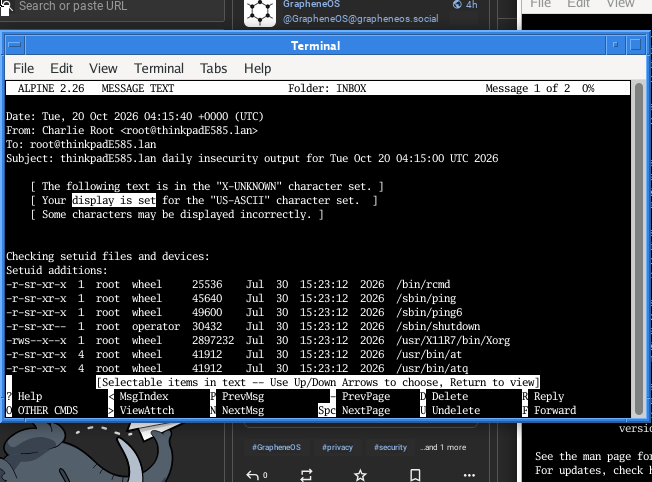
This is what I have been missing until this last week when I installed #NetBSD
Daily mail reports from the system on my own mailserver. This is what they took from us. Now I am getting it back. This network is mine once again. #RUNBSD #security
Alt...
Screen capture of X11 terminal window with the Alpine (Pine) mail client viewing mail from the local mail spool, showing security risks to be considered.
boosted![[?]](https://media.bsd.network/accounts/avatars/111/524/166/403/053/595/original/233ee7a09456c854.jpg)
Got https://braincoded.software, now I need to find a good hosting akin to @OpenBSDAms but with #NetBSD *_*
It's the same with #DragonFlyBSD's DPorts and also the #FreeBSD ports tree. They all integrate building from source directly using the ports tree with installing binary packages.
![[?]](https://media.hachyderm.io/accounts/avatars/109/334/849/122/085/613/original/8fa76bd801bc4cf1.jpg) boosted
boosted![[?]](https://media.bsd.cafe/bsdmmedia01/accounts/avatars/113/581/189/138/915/857/original/dce4579d1cca5c22.jpeg)
it's been heartwarming hearing people are installing #NetBSD. i just put it on my main desktop too! #NoAI #humanemacs
boosted![[?]](https://mastodon.clitheroe.ca/system/accounts/avatars/114/441/807/466/803/214/original/94ade8d5ba444135.jpg)
Exploring #NetBSD pkgsrc tonight in more detail on the VM, in prep for the bare metal install. It's really neat. I like how the package tools can be used on from-binary or from-source package installs interchangeably.
I also like how the NetBSD installer grabs the latest quarterly pkgsrc release when you install it from the install CD.
![[?]](https://indiepocalypse.files.fedi.monster/accounts/avatars/117/102/576/716/677/162/original/cea2ad95dd7a18df.png) boosted
boostedgot my distraction-free netbsd laptop set up nicely. posting this from the terminal using toot #netbsd

Alt...
screenshot of netbsd running on my laptop, spectrwm window manager
![[?]](https://media.tech.lgbt/accounts/avatars/108/211/661/207/863/972/original/f71e87694925d011.png)
I just watched a 4-year-old talk on porting Wayland to Net-/OpenBSD.
All the cool stuff on your computer is in C but I learned Java and PHP.
![[?]](https://cdn.masto.host/mastohackerstown/accounts/avatars/114/325/776/600/995/692/original/3766dbe319db359d.jpg)
![[?]](https://files.mastodon.social/accounts/avatars/000/311/466/original/beef2218665d0c12.jpg)
Installed #NetBSD on my ancient 686 netbook. Surprisingly easy compared to my OpenBSD (in fairness that was on a Raspberry Pi 3).
Curious to see how much of a headache package management will be, coming from Slackware. If things go well, I'll migrate my other machines over from Slackware.
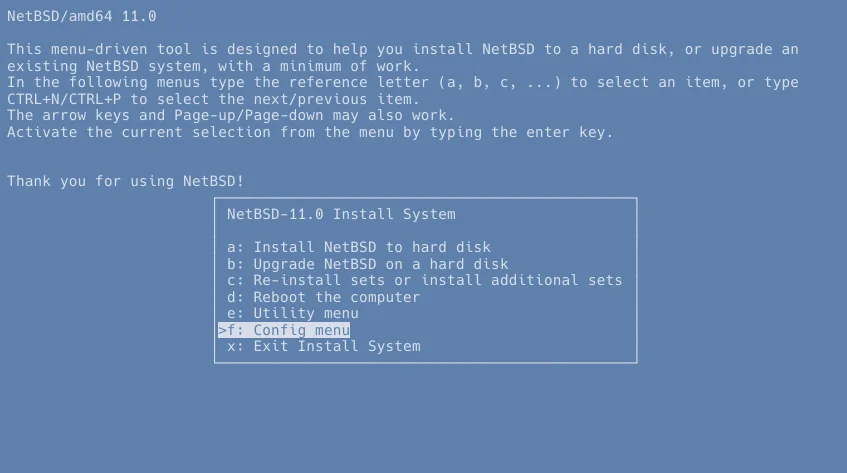
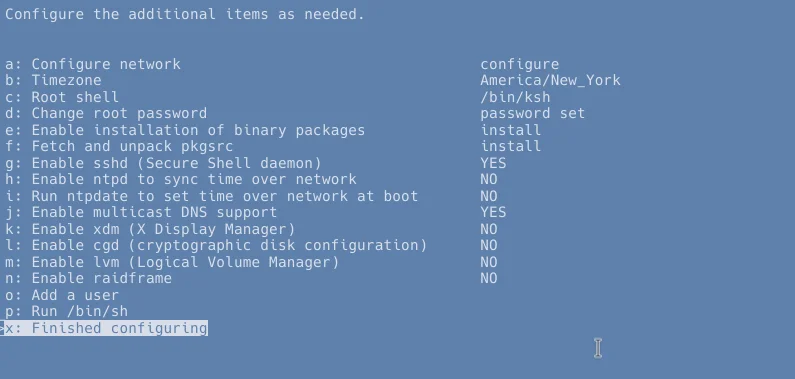
boostedif you missed configuring something during installation, and liked the little TUI interface for doing things, you can use it at any time afterwards in your installed system by just running sysinst as root. the 'Config menu' option likely has most of the things of interest.
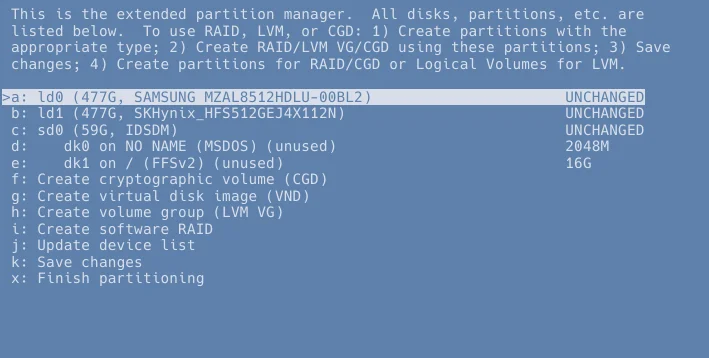
you can also launch directly into the TUI partitioner with sysinst -p.
also! if the display messes up at any point while you are using sysinst, you can press CTRL+L to redraw everything. this sometimes happens if kernel messages print while you are doing something. (this keyboard shortcut works in other TUI programs as well)
Alt...
NetBSD/amd64 11.0's menu-driven install tool, showing its main menu. it is being run from a fully installed NetBSD system, not the installer image. out of the listed options, the "config menu" option, second to last, is chosen.
Alt...
the aforementioned config menu, including options to configure the network, timezone, root shell, root password, install binary packages, install pkgsrc (source-based packages), enable or disable some common daemons, add a user, drop to a shell, or exit.
Alt...
the aforementioned partition manager, showing a list of my system's connected disks and their partitions, as well as options to create a cryptographic volume (cgd), virtual disk image (vnd), volume group (lvm vg), or software RAID, update the device list, save any made changes, and finish partitioning.