Search results for tag #netbsd
![[?]](https://media.hachyderm.io/accounts/avatars/109/498/573/053/367/436/original/72c5c6d63e4b8cd0.png)
I just want to take a moment to appreciate the #Purescript team members that turned around a fix for my #NetBSD issue faster than I expected. https://github.com/purescript/spago/issues/1418
 boosted
![[?]](https://cdn.masto.host/rubysocial/accounts/avatars/000/093/360/original/920f5a8782200f9b.jpg)
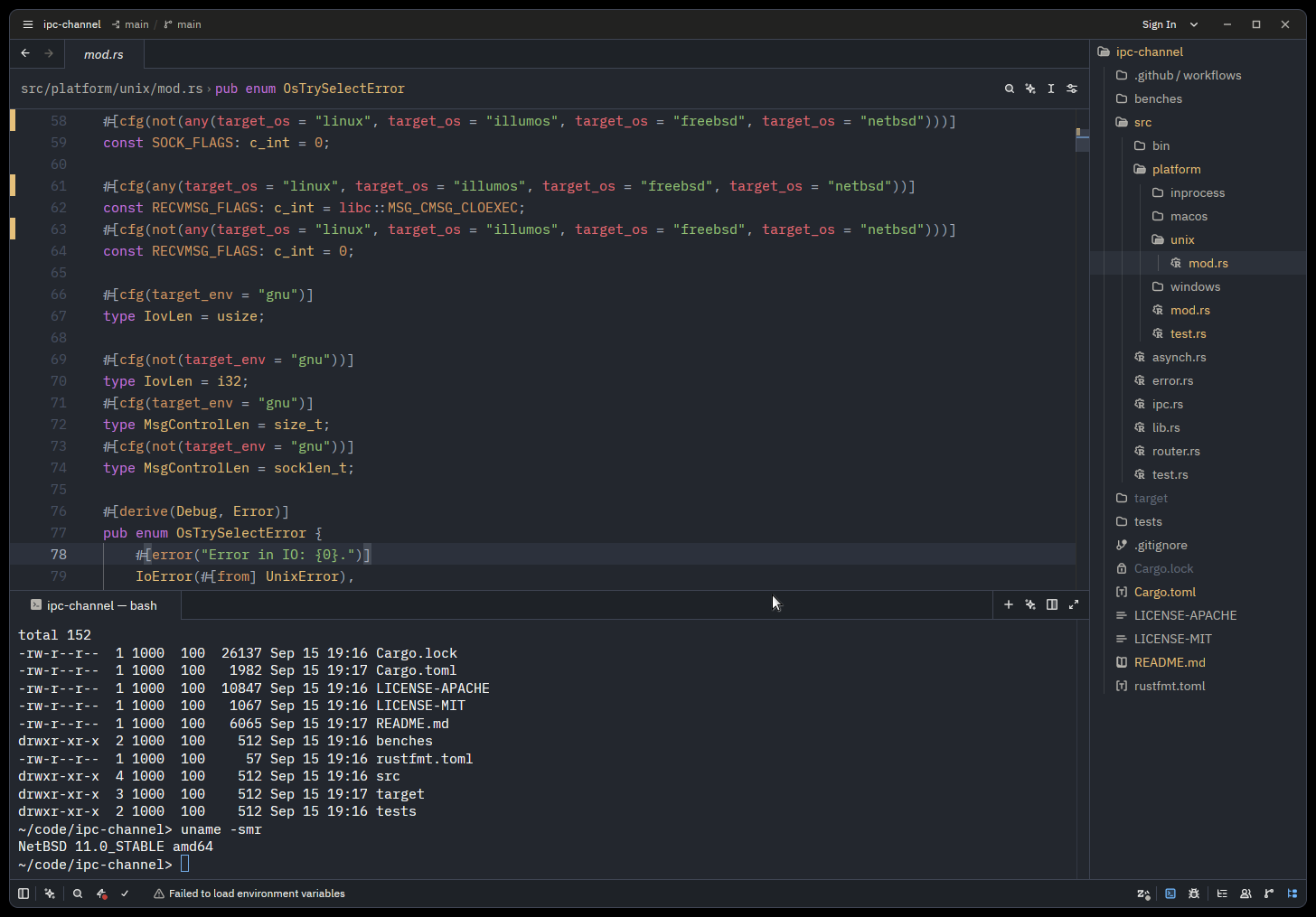
Today I tried to install #NetBSD 11 on an old Acer E15 laptop that I had been using as a #Debian CLI-only system.
The install was a little dicey. First one failed, but the second time I was able to go all the way through and configure WiFi on the Edimax N150 USB. I kept getting errors in the console about the BIOS (likely related to the battery, which is pretty dodgy).
X started but really didn't run. I could try messing with it, but I'll probably go to #OpenBSD next.
![[?]](https://media.bsd.cafe/bsdmmedia01/accounts/avatars/117/229/469/256/862/649/original/1f7e21b86b7a3a7f.jpeg)
![[?]](https://media.bsd.cafe/bsdmmedia01/accounts/avatars/113/221/555/857/543/882/original/c6a3eb570f7787dc.jpeg)
![[?]](https://snac.smithies.me.uk/justine/s/avatar-270304302821a87b50026a5768a00c56.png)
![[?]](https://files.functional.cafe/accounts/avatars/108/197/412/836/833/295/original/36fd30acd388fccb.gif)
It's just a basic config whilst I iron out stuff on my test NetBSD setup. More to come!

Alt...
Photo of a foot terminal showing the output of fastfetch on NetBSD
boosted![[?]](https://mastodon.sdf.org/system/accounts/avatars/114/205/366/579/623/449/original/2eeba344bc5e17ba.png)
how I came to netbsd, a story [SENSITIVE CONTENT]
"Target Linux APIs exclusively, ignore everything else existing" allowed exerting power over a large ecosystem. It is hard to get people to believe in things if their employer benefits from them not believing in them.
But honestly this is a bit of a trap, because once you start thinking this way, you're writing POSIX compliant C89 code that can run on a Motorola 68000 and be compiled with PCC. And inventing stuff like rump kernels.
But maybe that's fine. #netbsd
![[?]](https://media.bsd.cafe/bsdmmedia01/accounts/avatars/113/698/673/569/488/272/original/1fc827cf6cff37d6.png)
![[?]](https://files.mastodonapp.uk/accounts/avatars/109/508/813/126/393/770/original/98a69cbbce7ad298.png)
From the point of view of a package creator, it's a bit of a toss-up. #NetBSD's package system has some things that #FreeBSD's does not, and vice versa.
Two examples:
1. FreeBSD some years ago introduced a new +MANIFEST file format based upon the Universal Configuration Language. It can (and does) contain SHA256 hashes of the individual files in a package. NetBSD uses an older +MANIFEST format.
1. NetBSD includes +BUILD_INFO in packages, displayable with pkg_info -B. FreeBSD's +MANIFEST system does not have an equivalent.
That's the same problem that @jaypatelani was having with #NetBSD and a #Thinkpad.
The full dmesg shows the NetBSD problem that wasn't in the screenshot:
ihidev0 at iic1 addr 0x2c: vendor 0x6cb product 0xce67, TPD0
ihidev0: 14 report ids
acpi_gpio_get_int: translate failed: AE_NO_HANDLER
ihidev0: autoconfiguration error: can't find gpioint resource
Vendor 06cb is Synaptic.
That and the Elan are idiosyncratic PS/2 keyboards and mice, on machines with 9 USB root hubs, that also talk a special extension of the PS/2 protocol in order to be touchpads, and that *also* talk over I2C.
There's a Synaptic fingerprint reader to go with it on your second USB hub.
ugen1 at uhub1 port 5
ugen1: vendor 06cb (0x06cb) product 00f9 (0x00f9), rev 2.00/0.00, addr 4
https://mastodonapp.uk/@JdeBP/117393118010891531
#netbsd boostedAn external USB keyboard should work. Everything that I can find indicates that on Thinkpad E14s the keyboard is actually a PS/2 keyboard (sic!). So look at the part of dmesg that scrolled off your screen that deals with PS/2 device enumeration.
There's also some bizarre extra PS/2 stuff related to that Elan USB device, but that's to do with your fingerprint reader/trackpad.
Maybe pressure the @netbsd to fund a developer to look into #NetBSD's I2C and PS/2 drivers and make it recognize and handle these oddball old PS/2 things that #Lenovo decides to use in machines with 9 USB hubs. (-:
I've no idea whom one would even talk to. But if you ever find someone, that's at least what to point them at.
![[?]](https://polymaths.social/fileserver/01HCMX6M1CZNEVJ4F5H58TT5XJ/attachment/original/01M4GVVZSEWT13KC280GWBJSF8.png)


 🍵
🍵  [
[I saw that when @robpumphrey pointed at it. Of course, you *are* one of those people. (-:
Several of those I don't depend from. I have doas, too, for instance. But some I indirectly depend from. #FreeBSD's and #NetBSD's packaging systems use SQLite. #Debian's packages are compressed with xz.
![[?]](https://d35e9bfo1msux2.cloudfront.net/accounts/avatars/109/535/770/898/980/239/original/fe47a9c6a062442b.png)
They render just fine in mine, which does not use BDF in the first place, nor PCF.
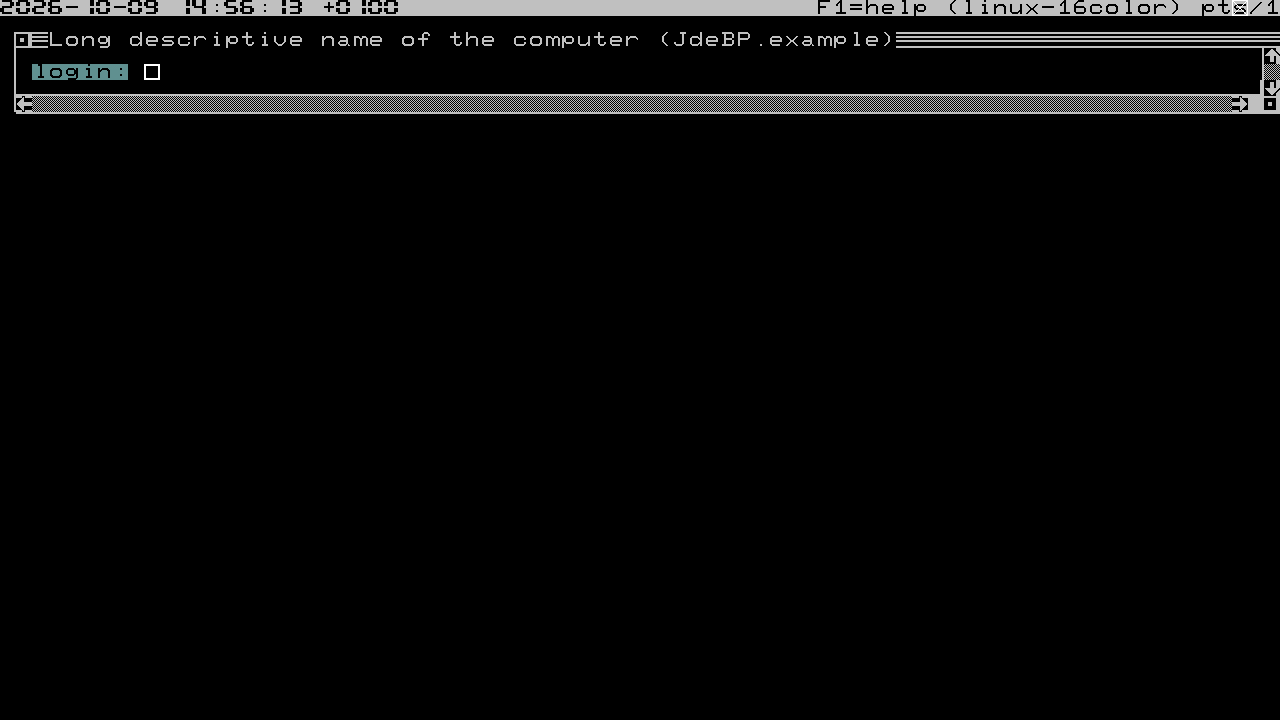
It's supposed to be a drop-in upgrade for FreeBSD's, #Linux's, #NetBSD's, & others's kernel #VirtualTerminals; so I wrote it to re-use #FreeBSD's vt font format.
That format has no trouble with the supplementary planes, as it uses 32 bits for code point values, albeit that it is limited in some other ways (which I avoided since I allowed multiple font files to be used in concert).
Alt...
A terminal session in white on black. A status bar at the top has a digital clock using Unicode 7-segment LED characters, an F1=help message and some ancillary information about the terminal and terminal type. A login dialogue box below is drawn with Unicode MouseText characters for the frame and widgets, and is presenting a 'login:' prompt next to a box cursor in an empty entryfield.
![[?]](https://gts.tumfatig.net/fileserver/01FJ093H6Y5VGN20G998J7KN1M/attachment/original/01JZTJV1P9RVJ502PCXKN68R1F.jpeg)
Boring Teams’ meeting happening so let’s play cool kid.
#NetBSD 11.0 on the #ThinkPad P14s Gen 5 AMD. Unfortunately, this fairly recent machine seems to not be well supported: no DRM (1024x768 in vesa mode), no WiFi, no Touchpad, no suspend/resume (needs the S0ix thing). Looks like a no-go on this particular one 🤷♂️
Full dmesg is there https://dmesgd.nycbug.org/dmesgd?do=view&id=9184. Bad news are still news.

Alt...
A fastfetch output from NetBSD on the laptop
![[?]](https://mastodon.sdf.org/system/accounts/avatars/000/005/463/original/a54b1acc2e3ae4b1.jpg)
Also: I am most displeased that I haven't worked and learned on my #NetBSD IdeaPad netbook since its installation.
Work has a way of interfering with my natural geek tendencies of 'ooooh! here is a shiny new thing to play with!' and that, dear friends, is simply unacceptable.
I need to reactivate my geek to do list, and that includes learning #emacs on #NetBSD 11... 
Fortunately, Friday is work from home day, because next week is workshop week. For the whole week. At Accenture.
the funny thing is that I wanted this machine to be headless. Well, I guess that at least it will detect when a screen is plugged 😀
![[?]](https://cdn.fosstodon.org/accounts/avatars/109/860/465/494/023/450/original/eb2faa9c8053bd7a.jpg)
Day 27
New blog post!
For the past few weeks I've been exploring the use of NetBSD as a desktop OS. If the X sets are chosen during install, an X server and the CTWM window manager are integrated into its base system.
There is, however, another window manager I've long had a soft spot for, and that is Openbox. Its very bare bones to start with, but its an excellent foundation for crafting a desktop just the way I like it!
![[?]](https://mastodon.sdf.org/system/accounts/avatars/109/331/226/121/432/740/original/932e706977e06d66.png) boosted
boosted![[?]](https://mastodon.sdf.org/system/accounts/avatars/109/564/857/456/913/094/original/651ab60302ce5d82.png)
Updated binary packages on my T430 #NetBSD Laptop yesterday using #pkgsrc 2026Q3. All went great.
Note one minor thing, if you move to #emacs31 you may need to add this exact line to the very first line of ~/.emacs and any other personal .el files:
;; -*- lexical-binding: nil -*-
This will avoid an error prompt about lexical-binding on statrup.
![[?]](https://media.infosec.exchange/infosec.exchange/accounts/avatars/108/195/621/247/550/549/original/d96204cc09c9dbfe.jpg)
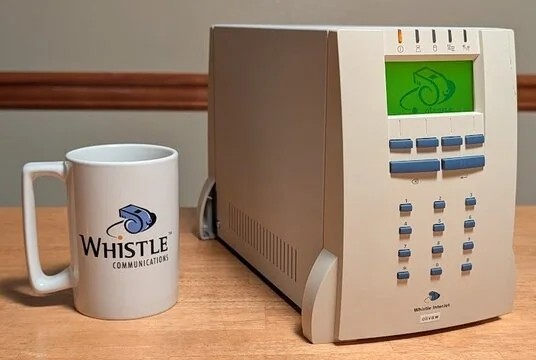
Highly motivated to seek folks with Whistle InterJets -- late-90s 486 SOHO Internet appliance on FreeBSD 2.2.x, resold by ISPs in the US, Europe, and Asia (IBM bought and sunsetted it, and sold off the whistle.com domain). People with long ISP memories may remember it because it was resold by ISPs in US /Europe / Asia (especially Japan).
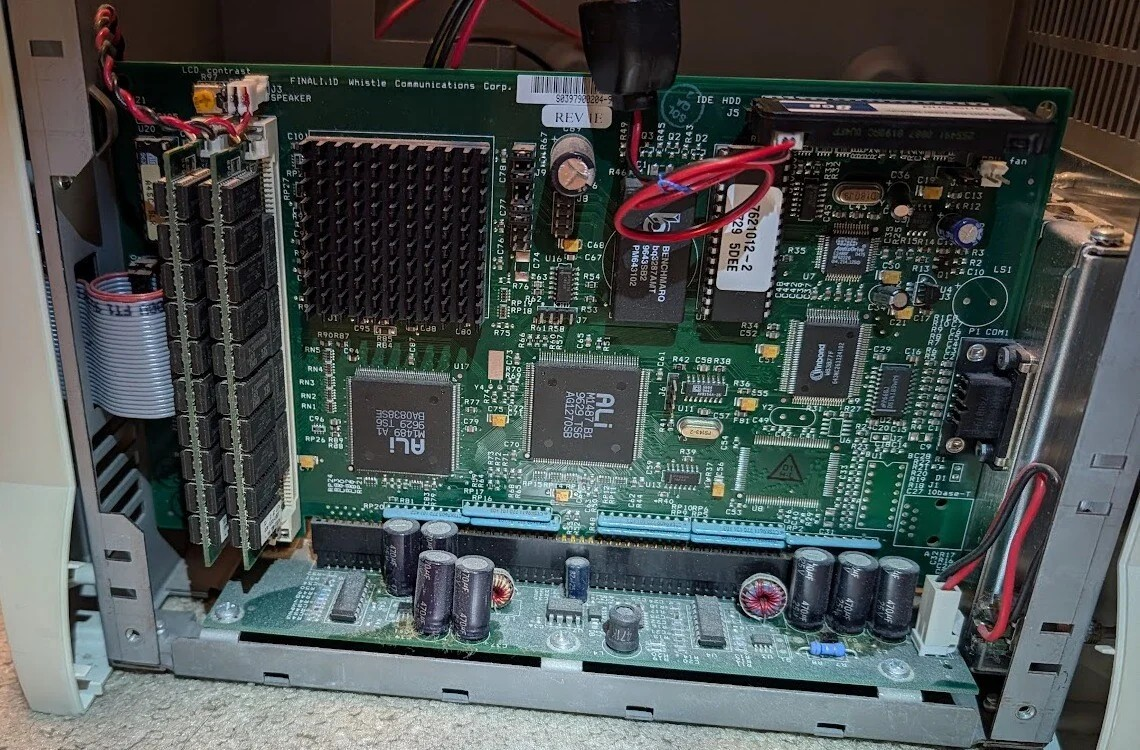
I'm building a comprehensive info resource (and tailoring modern NetBSD to run on it). We need to find folks with hardware, ephemera, or memories. The software (on 30yo) IDE drives is especially endangered.
Rough site, in all its 1995-grade (but secretly HTML5) "glory":
https://www.alaska.net/~royce/interjet/
(That tilde account is also endangered -- I've also registered a domain and will be moving to it when ready)
Reddit post:
https://www.reddit.com/r/vintagecomputing/comments/1x0kbcs/seeking_folks_with_whistle_interjets/
DM me or hit the email on the page.
Please boost, especially if you have overlap in the retrocomputing or vintage ISP space!
Alt...
A live Whistle InterJet, next to a Whistle-branded coffee cup. About the size of a large toaster, it features a green LCD screen and a blue rubbery keypad. The LED in the upper left is orange because the unit is running on its own internal UPS battery.
Alt...
The case of a unit is open, showing a vertical mainboard with two 32 MB SIMMs, a 486 covered by a heat sink, and a transcend 8 GB IDE flash. The main board is plugged into a horizontal backplane on the bottom.
boosted![[?]](https://indiepocalypse.files.fedi.monster/accounts/avatars/117/102/576/716/677/162/original/cea2ad95dd7a18df.png)
On #NetBSD I've had issues keeping pkgin (binary packages) and pkgsrc (building libraries from source) synced up with each other so they try to install the same package versions and don't conflict. Is there a good way to do this?
![[?]](https://cdn.masto.host/mastodongamedevplace/accounts/avatars/116/059/571/717/705/272/original/911c28d931792a2d.png)
I inadvertently killed my #NetBSD VM in GNOME Boxes. I tried to shrink the disk size, and I guess that's a no-go.
No problem because I installed a new one.
For any Linux or Unix, getting more experience with the installer is always a good thing.
boosted![[?]](https://media.bsd.network/accounts/avatars/109/207/430/504/108/566/original/b37198ec33972825.png)
@justine So I've got CoW working on River.
Please test the `ta/netbsd-debug` branch in the CoW repo (this is also PR 416).
There were two things happening here:
1. memfd/mmap page alignmeent changes (padding).
2. CoW was filling up the main buffer when talking to River which blocked on #netbsd.
I do have a wayland patch for this which I will send through to the maintainer of wayland.
But we should be OK without it for now.
There is a sister commit to this, in #river, to increase the buffer which river and the WM use -- this will also help with some of the messaging, but I've fixed CoW to be more sensible about what it sends over.
For those of you who are using NetBSD, and can test this for me, I'd appreciate it.
As always if you have any questions, come and find me on IRC: #cow-wayland on libera.chat
Special thanks goes to @sborrill for allowing me access to a NetBSD VM over which I could debug this. Stephen, I'll let you know when I'm finished with your VM. :)
Day 26
Created an account on @Codeberg and uploaded my Openbox and X11 configs.
https://codeberg.org/dwarmstrong/dotfiles/src/branch/main/.config/openbox
![[?]](https://static.piaille.fr/accounts/avatars/110/819/083/252/755/905/original/470814fc01e71006.png)
@EnercoConseils
"La Document Foundation a clarifié sa position sur l’IA. Si elle n’a rien contre les LLM par principe"
Ca commence et termine pas bien, ça veux donc dire que c'est juste un détail technique, une question de temps .. Bref la slopisation de l'écosystème libre (linux, debian..) me rends triste.
C'est la fin de l'ère où le logiciel libre se voulait avoir une portée humaine et sociale, une ère où parler d'éthique était normal.
*team vieux con ;)*
s'en retourne étudier l'informatique décoloniale du futur #permacomputing qui permettra dans un premier temps de travailler sur presque n'importe quelle machine déjà construite (team #netbsd #uxn :)
boosted![[?]](https://media.tilde.zone/accounts/avatars/109/310/257/706/941/276/original/e5b07fb9d1845d72.jpg)
![[?]](https://mastodon.top/system/accounts/avatars/000/187/905/original/d02302cede9cf733.png)
![[?]](https://nfts.freeradical.zone/accounts/avatars/113/534/365/251/365/702/original/ac9c08cf21dc5ed3.jpeg)
freebsd [SENSITIVE CONTENT]
Was thinking if,when #NetBSD would do on-demand populating of "/dev" as current FreeBSD versions do. Then found ...
Re: FreeBSD's /dev on NetBSD, response 20050813,
by Hans P S,
https://mail-index.netbsd.org/tech-kern/2005/08/13/0006.html
... I ask as see the nodes in "/dev" in NetBSD v11 for the bits that are missing from the system, or some that are not used yet.
Also, due to ...
https://hachyderm.io/@oxy@bsdlab.au/117387881101207127
... So ... has there been any (improve|move)ment since c 2005?
![[?]](https://files.mastodon.social/accounts/avatars/114/161/422/455/909/834/original/e17915543c8f38ba.jpg)
Improving and Stabilizing the Racoon2 IKE Daemon in NetBSD
![[?]](https://media.bsd.network/accounts/avatars/000/006/949/original/9592eac6e5018e39.png)
