Search results for tag #netbsd
 boosted
![[?]](https://cdn.woof.tech/accounts/avatars/110/845/362/143/356/321/original/c901c046c550f1b3.png)
Alright, serious question for #NetBSD experts: is there any way to mount and access a BTRFS partition in NetBSD?
I have been looking and looking and LOOKING for information about this, but keep finding crappy dead ends. I need some means of being able to mount two BTRFS partitions so that I can migrate the data to something that both Linux and NetBSD will use. Here is what I have found:
1) https://github.com/adam900710/btrfs-fuse A read-only FUSE driver for BTRFS. Appears to be Linux only?
2) https://github.com/rustutils/btrfsutils Buried in here is another read-only FUSE driver for BTRFS. Again, seems to be aimed at Linux only.
3) https://github.com/maharmstone/btrfs WinBtrfs, Windows-oriented... but is willing to relicense to make it BSD-friendly. https://github.com/maharmstone/btrfs/issues/531
4) https://github.com/lkl/linux/ Linux Kernel Library, aka LKL, which allows for using the Linux kernel as a FUSE driver. There is a version for FreeBSD: https://www.freshports.org/filesystems/lkl/ but even I, a complete newbie to the world of the BSD Boys, knows that FreeBSD and NetBSD are completely different operating systems, so I have no idea how portable this is to NetBSD. However if this DOES work with NetBSD, then this would be an excellent solution...
boosted![[?]](https://cdn.masto.host/rubysocial/accounts/avatars/000/093/360/original/920f5a8782200f9b.jpg)
I forgot to mention that when I was doing my bare metal test of #NetBSD, wpa_gui did work and got my WiFi configured.
![[?]](https://files.mastodon.social/accounts/avatars/108/217/143/359/557/467/original/7feaa1d88a2ac72c.jpg)
![[?]](https://cdn.fosstodon.org/accounts/avatars/109/860/465/494/023/450/original/eb2faa9c8053bd7a.jpg)
Day 24
A clock is usually included in a desktop panel, but I'm not using a panel on Openbox. I wanted a clock that would pop up on demand using a key combo, and liked the chunky font look of 'tty-clock' but could not get it to work properly: as the time display refreshed it would accumulate artifacts ('10:99').
I found a replacement in 'clock-rs', which retains the visual style of 'tty-clock' with a few extra features. Works OK!
Should I add journaling to the filesystem in #NetBSD?
![[?]](https://s3.eu-central-003.backblazeb2.com/social-lol-media/accounts/avatars/111/887/223/729/319/238/original/b4e4bf986ca15639.jpeg)
New link saved:
Running Emacs in microVM - The Emacs Cat
🔗 https://olddeuteronomy.github.io/post/running-emacs-in-microvm/
Running Emacs inside a NetBSD microVM.
#emacs #netbsd
![[?]](https://pleroma.anduin.net/media/e42775318fd38a77b2c02300192e27e61861443424849feef9767918512fac8b.png?name=blob.png)
But my plan is #NetBSD, obviously. After fixing it up a bit. Why?
boosted![[?]](https://media.hachyderm.io/accounts/avatars/109/373/526/924/987/252/original/b4cca86ad053a4db.jpg)
The first thing I had to do after the NetBSD install was get emacs installed, and the whole pkg_add process was kind of a mess as I had to configure PKG_PATH which isn't configured by default for some strange reason.
I mean sure I guess you might want to use something _other_ than cdn.netbsd.org but that seems unlikely for new users or installations.
So the first thing I actually ended up doing was installing pkgin because who wants to fuck around with all that.
After that, `pkgin install emacs` went about as expected and a few minutes later I had a working editor that wasn't vi =)
![[?]](https://media.hachyderm.io/accounts/avatars/110/492/347/627/948/632/original/f0c7816f2364a2e3.jpg)


Reading the book (Absolute FreeBSD third edition), without skipping parts, I discovered here a part of the story that I didn't know: #BSD was developed for 15 years at the University of California, Berkeley (and in collaboration with other universities) and, at that time, the original code coming from AT&T practically didn't exist anymore.
This is an important fact (since AT&T tried to fight this later). So you can see that the common practice of these companies is theft.
![[?]](https://media.mstdn.social/accounts/avatars/109/521/442/245/107/734/original/9303ae5bd9aebaa5.jpeg)
If you create a symlink to a symlink to a symlink ... at some point your system will return ELOOP.
A reasonable system has that value defined in sys/param.h as MAXSYMLINKS or as sysconf(_SC_SYMLOOP_MAX).
On Linux, the value of MAXSYMLINKS in sys/param.h is 20, but the kernel actually uses 40:
https://elixir.bootlin.com/linux/v7.2.8/source/include/linux/namei.h#L14
The sysconf(3) man page on Linux documents _SC_SYMLOOP_MAX, but then fails to actually retrieve that value.
Good job, Linux. You illustrate why I use #NetBSD to teach this class.
![[?]](https://polymaths.social/fileserver/01HCMX6M1CZNEVJ4F5H58TT5XJ/attachment/original/01M4GVVZSEWT13KC280GWBJSF8.png)


 🍵
🍵  [
[*cough*
#NoSlop / #NoAI / #AInt / #NeverSlop folks, it's time to put our money where our mouths are. (As you're able)
![[?]](https://snac.smithies.me.uk/justine/s/avatar-270304302821a87b50026a5768a00c56.png) boosted
boosted![[?]](https://media.bsd.network/accounts/avatars/000/006/949/original/9592eac6e5018e39.png)
Happy #WorldHeartDay! 🫀
Small healthy choices today can make a big difference tomorrow. choose #NetBSD 🚩🧡
#NetBSD #WorldHeartDay2026 #OpenSource #UNIX #noai #nollm #runbsd

![[?]](https://files.raphus.social/accounts/avatars/116/366/479/330/331/657/original/03ca16006c35ecbe.jpg)
New #passgen release! It works on #NetBSD now, and the portability changes will probably improve support on other systems too. If you're on a platform with `bash`, I'd appreciate you trying this out and reporting how it fares on your computer. I suspect it'll work on any BSD at this point, at least.
If you're on Linux, you do not need to upgrade. Prior versions are perfectly fine permanent software for your use case. You can if you want though, and even review the contents - it's still, by design, a sub-hundred-line bash script, with no room to hide anything up its sleeve. If anything, the word separator logic is now a bit cleaner and easier to follow.
https://git.sr.ht/~maddiem4/passgen/commit/bdb073ec2312545ffb3d9779d868a96529b208d8
Day 23
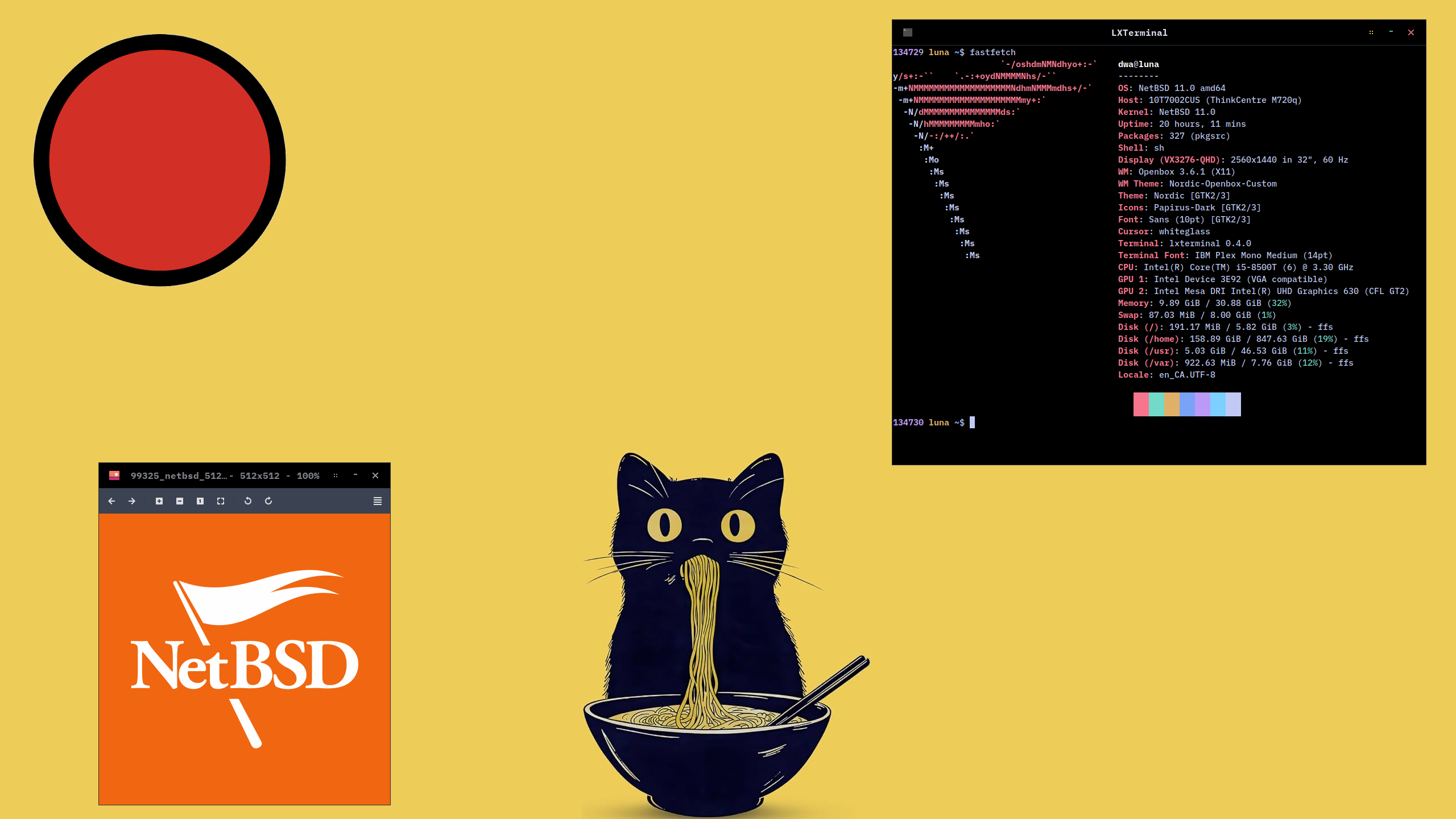
After exploring NetBSD on spare hardware, I've moved Linux (LMDE with Cinnamon desktop) off my main desktop (ThinkCentre M720q) and replaced it with NetBSD and Openbox.
I think its a keeper!
#X11 #Openbox #40DaysOfNetBSD #NetBSD #RunBSD
Alt...
Screenshot of the Openbox window manager. Background image is a ramen-eating cat under a red sun. In the foreground is a terminal window with system information outputted by the 'fastfetch' command, and a second window with the NetBSD logo displayed by the 'viewnior' image viewer.
![[?]](https://nfts.freeradical.zone/accounts/avatars/113/534/365/251/365/702/original/ac9c08cf21dc5ed3.jpeg)

 boosted
![[?]](https://gts.tumfatig.net/fileserver/01FJ093H6Y5VGN20G998J7KN1M/attachment/original/01JZTJV1P9RVJ502PCXKN68R1F.jpeg)
In today’s episode of "You can’t pronounce the hostname but you can hopefully read the content", an overview of the two #ThinkCentre that I recently got, centered towards power consumption when running #FreeBSD, #NetBSD and #OpenBSD.
TL;DR:  not bad at all!
https://www.tumfatig.net/2026/what-about-thinkcentre-m710q-m720q-and-bsd/
![[?]](https://media.bsd.cafe/bsdmmedia01/accounts/avatars/113/407/688/140/177/903/original/de6c43fbc2be3c55.jpg)
Okay, while I've stubbed my toes on a few corners, this attempt at installing and using #NetBSD has gone a lot better than the last time I tried this.
GUI is up and running X with the default window-manager (#ctwm though I'll replace that with #Fluxbox).
A few common packages installed so it's time to go kick the tires on the install.
boosted![[?]](https://todon.eu/system/accounts/avatars/108/195/195/683/530/949/original/8174cd7215c979ba.png)
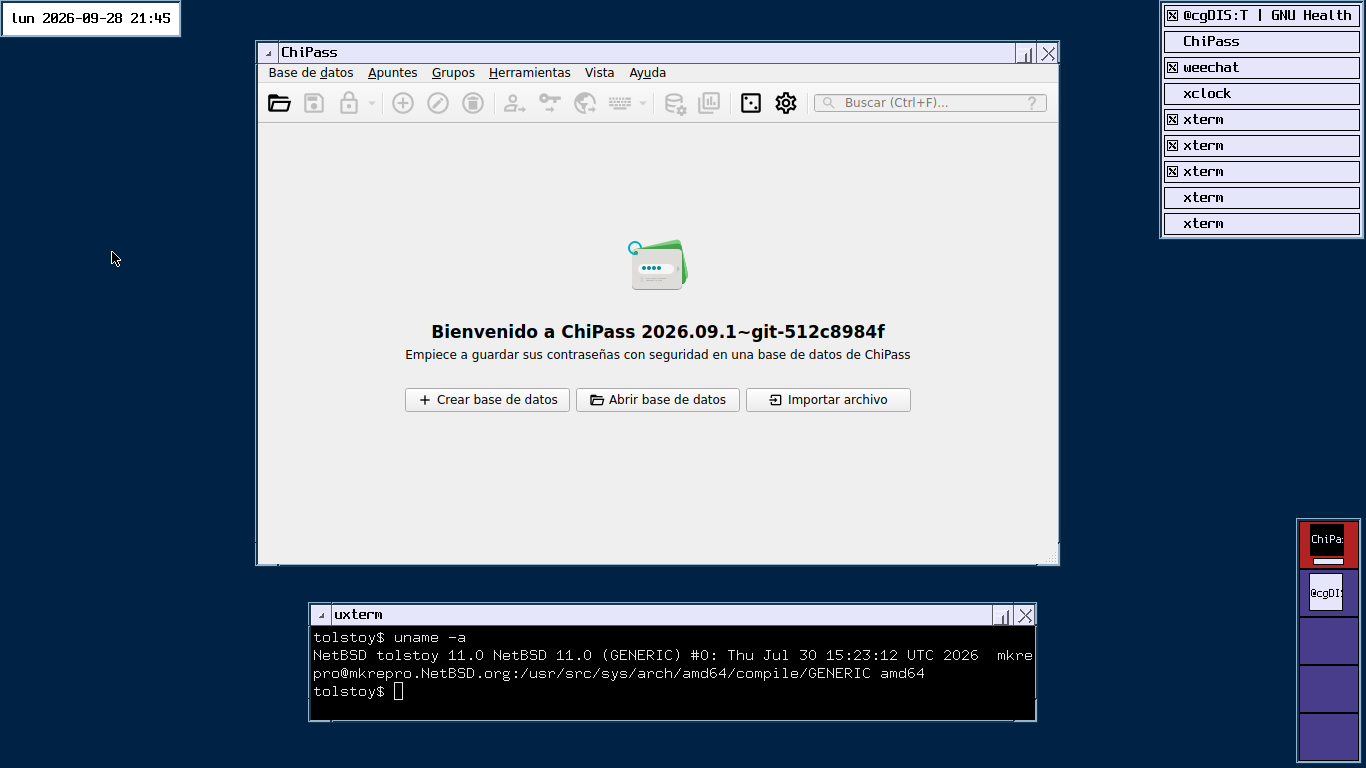
Great news to finish the day. I just sucessfully compiled & installed #ChiPass in #NetBSD 11. ChiPass is defined as "A cross-platform password manager for people with extremely high demands on secure personal data management" . They also refuse #LLM ❤️ . Good night, everyone!
https://codeberg.org/ChiPass/ChiPass
#privacy #noAI
Alt...
The initial screen of ChiPass password manager running on NetBSD in a CTWM window manager. The text is in Spanish matching my locale settings "Bienvenido a ChiPass 2026.09.01" . Options to open a database, create a new one or import a file.
There is a another terminal emulator below, showing the uname command result:
"NetBSD tolstoy 11.0 NetBSD 11.0 (GENERIC) #0: Thu Jul 30 15:23:12 UTC 2026 mkrepro@mkrepro.NetBSD.org:/usr/src/sys/arch/amd64/compile/GENERIC amd64"
boosted![[?]](https://pxscdn.com/cache/avatars/789980589548961657/avatar_4v14.jpg)
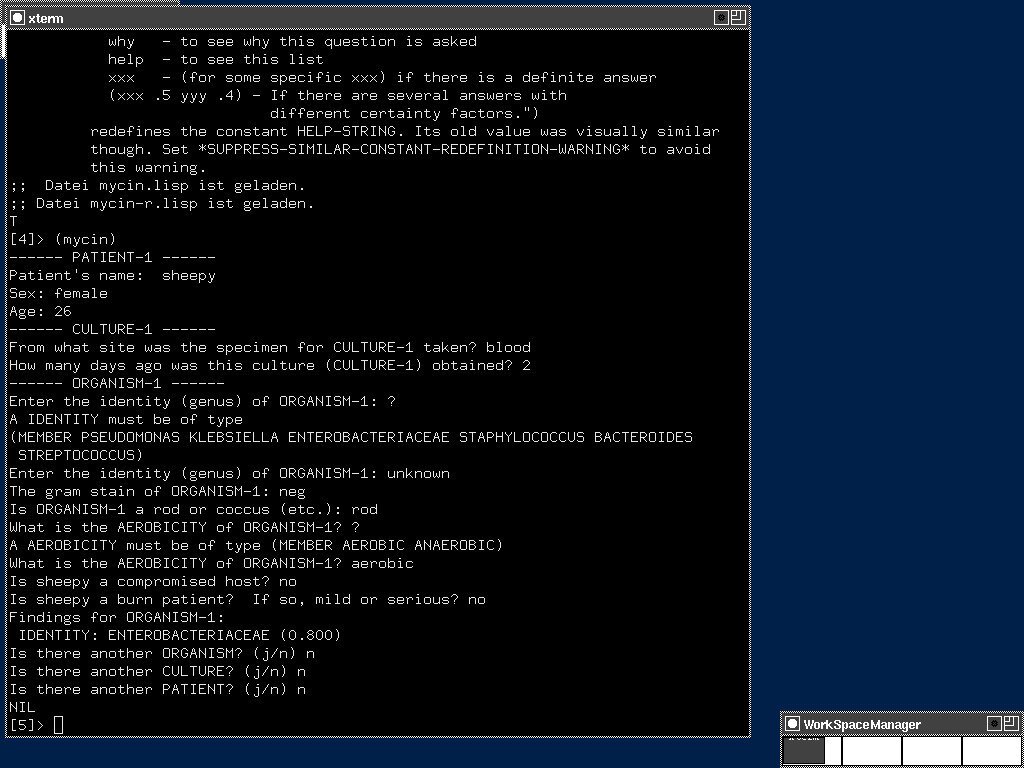
MYCIN was developed at Stanford University in the early 1970s to diagnose bacterial infections and recommend antibiotics. In 1979, it achieved a 90.9% agreement rate with Stanford experts.
The system was built around roughly 450 production rules, each representing clinical decision criteria from infectious disease experts.
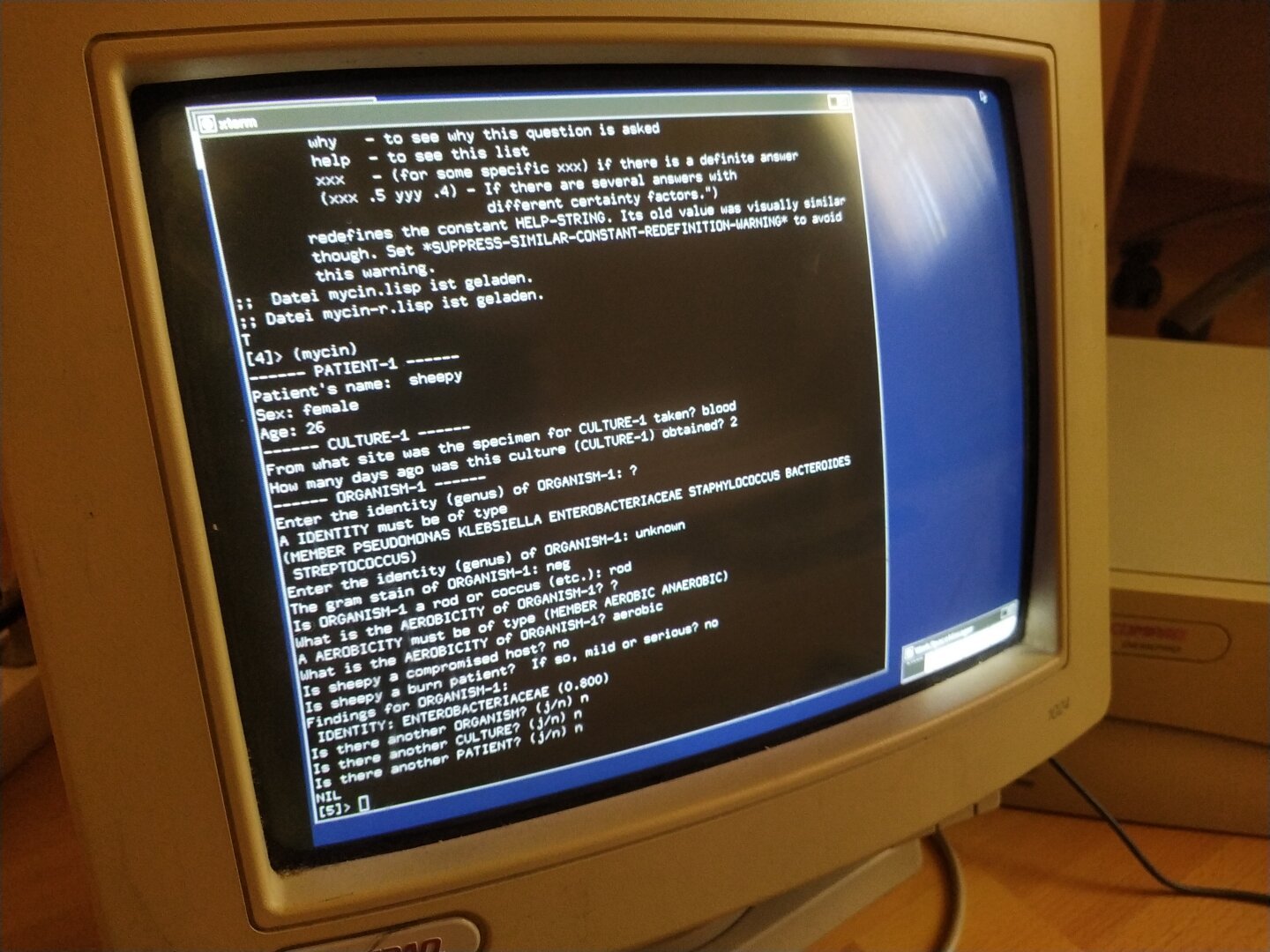
So I got the code, installed CLISP on the Pentium 1 and started the consultation.
There was one small compatibility issue: Peter Norvig's implementation uses two functions not defined in modern CLISP, requires and rest2. A short shim file fixed that and the inference engine came to life.
The version available today is only a fragment of the original MYCIN. The implementation from Peter Norvig's book "Paradigms of AI Programming" contains the inference engine and just 6 rules for identifying organisms. The remaining rules for therapy, dosage and patient-specific recommendations are gone.
The original MYCIN was written in Interlisp for a DEC PDP-10 running WAITS. It was never released as open source. What survives today is essentially the shell of the system, not the knowledge it contained.
MYCIN is a monument to AI history. The way its source code was handled is both a memorial and a warning.
ELIZA (1966) survived because Weizenbaum published the code. CLIPS (1985) survived because NASA released it as open source. MYCIN (1972) did not.
Publicly funded research. Publicly funded code. Never released to the public.
This is why publicly funded research should be open source. Always!
#MYCIN #AIHistory #ExpertSystems #ArtificialIntelligence #AI #Stanford #Lisp #CLISP #NetBSD #Pentium1 #Pentium #Pentium166 #RetroComputing #vintagecomputing #OpenSource #FOSS #OpenScience #PubliclyFundedResearch #ComputerHistory #Science #Research #AcademicChatter
![[?]](https://mastodon.sdf.org/system/accounts/avatars/114/205/366/579/623/449/original/2eeba344bc5e17ba.png)
OS: #NetBSD and Mac OS X 10.4
Editor: vi
Audio editing: Reason on Mac OS X 10.4 and Techno Motor on Sega Saturn https://washbear.neocities.org/techno-motor/
Browser: #PaleMoon
Image editing: Photoshop CS2 and GIMP 2.10. Never upgrading.
Password Manager: kpcli https://kpcli.sourceforge.io/
Did not think #NetBSD "/usr/pkg" would have file collection which could compress enough to matter, but ...
zfs list -o name,used,avail,mounted,compress,compressratio,mountpoint pool/usr/pkg pool/ pool/var/log
NAME USED AVAIL MOUNTED COMPRESS RATIO MOUNTPOINT
pool/usr/pkg 965M 16.7G yes gzip-4 4.60x /usr/pkg
pool/var/log 168K 16.7G yes gzip-4 4.32x /var/log
![[?]](https://files.mastodon.social/accounts/avatars/000/396/350/original/707d3beea6076986.png)
Latest 𝗩𝗮𝗹𝘂𝗮𝗯𝗹𝗲 𝗡𝗲𝘄𝘀 - 𝟮𝟬𝟮𝟲/𝟬𝟵/𝟮𝟴 (Valuable News - 2026/09/28) available.
https://vermaden.wordpress.com/2026/09/28/valuable-news-2026-09-28/
Past releases: https://vermaden.wordpress.com/news/
#verblog #vernews #news #bsd #freebsd #openbsd #netbsd #linux #unix #zfs #opnsense #ghostbsd #solaris #vermadenday
![[?]](https://media.bsd.cafe/bsdmmedia01/accounts/avatars/110/753/691/400/011/788/original/7decba5a2514dda4.png)
Latest 𝗩𝗮𝗹𝘂𝗮𝗯𝗹𝗲 𝗡𝗲𝘄𝘀 - 𝟮𝟬𝟮𝟲/𝟬𝟵/𝟮𝟴 (Valuable News - 2026/09/28) available.
https://vermaden.wordpress.com/2026/09/28/valuable-news-2026-09-28/
Past releases: https://vermaden.wordpress.com/news/
#verblog #vernews #news #bsd #freebsd #openbsd #netbsd #linux #unix #zfs #opnsense #ghostbsd #solaris #vermadenday
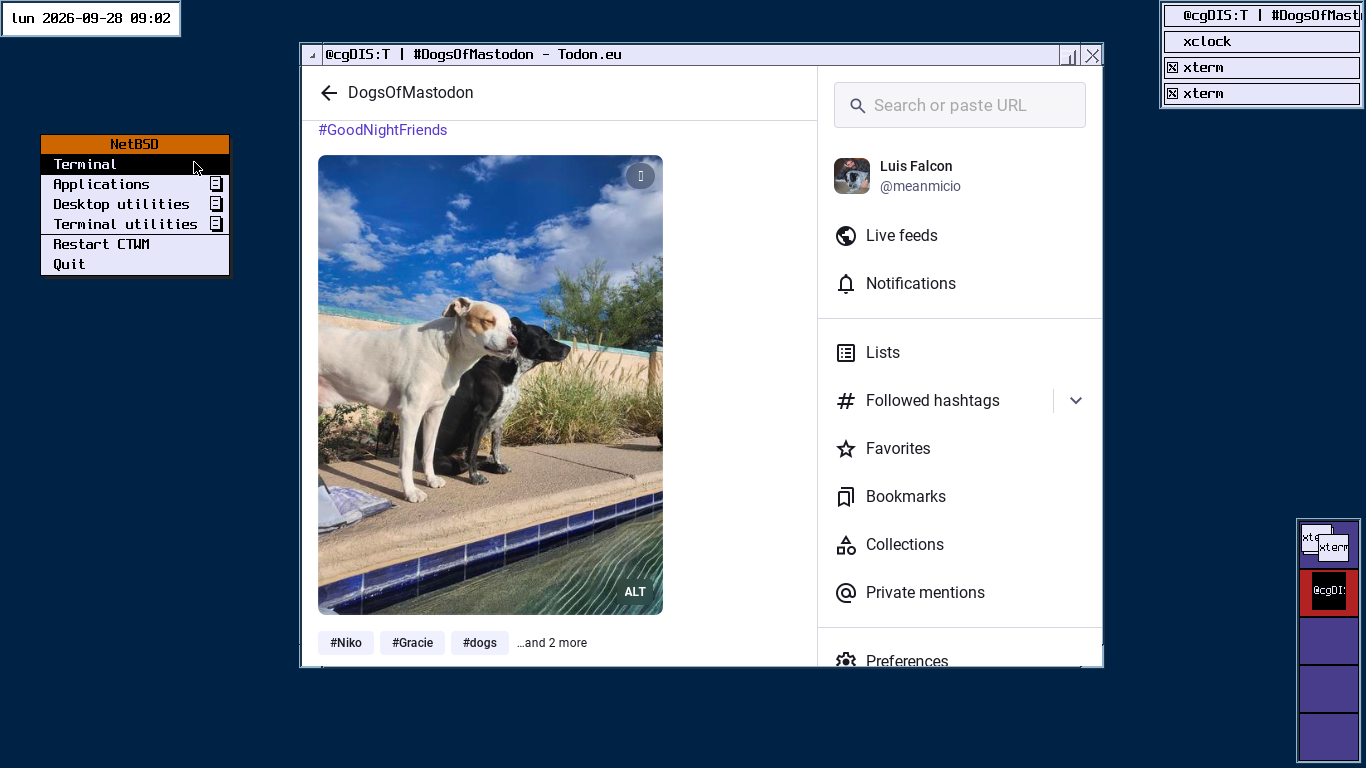
@NASA btw fun fact #NetBSD logo on moon inside USB
https://mail-index.netbsd.org/netbsd-advocacy/2021/02/07/msg000849.html
Man, I need a table of commands of #Git or #Mercurial equivalent in #CVS!
Has been ages since I last used the latter ... might have been c late 1990, when I switched to Subversion.
Any news on when #NetBSD be switching to Mercurial|Git?


 boosted
Anyone know how to search the #NetBSD package ecosystem for a specific binary? Trying to figure out where shuf(1) is hiding, after installing both coreutils and moreutils. Ideally, I'd like to get better at finding these things so I can answer my own questions in the future, teach a girl to fish, but I'd settle for a direct fish donation if that's all people got for me.
![[?]](https://cdn.masto.host/mastohackerstown/accounts/avatars/114/343/995/396/440/337/original/3b6a780a831bab23.png)
 [
[the #Libreboot on my ThinkPad X200s is old enough that its GRUB is falling behind on BSD updates.
I used to run #NetBSD on it, maybe it was version 7 or something. then recently I installed 10.1 on it and that did OK. now I really can't boot into 11.0 no matter how hard I try.
#OpenBSD 7.9 installs but I can't boot it...
so I am putting #Guix 1.5.0 back on there, and hoping for the best. the installer doesn't have ext3 as an option, so it's gotta be XFS due to the age of this Libreboot GRUB.
#NetBSD "top(1)" has mismatched option name & purpose in "--color". It turns off use of color (not that I get default color output when connected over SSH via Cygwin terminal).
"top(1)" does not show #ZFS ARC use; "vfs.zfs" MIB tree also does not have the related information. "ZFS on NetBSD" https://wiki.netbsd.org/zfs/ mentions of the latter.
How does one configure (suggested) memory use & check it?
Oh, one does not simply set,see the ARC limit.
Right, should have remembered that.