Search results for tag #netbsd
![[?]](https://nfts.freeradical.zone/accounts/avatars/113/534/365/251/365/702/original/ac9c08cf21dc5ed3.jpeg)
#NetBSD "top(1)" has mismatched option name & purpose in "--color". It turns off use of color (not that I get default color output when connected over SSH via Cygwin terminal).
"top(1)" does not show #ZFS ARC use; "vfs.zfs" MIB tree also does not have the related information. "ZFS on NetBSD" https://wiki.netbsd.org/zfs/ mentions of the latter.
How does one configure (suggested) memory use & check it?
Oh, one does not simply set,see the ARC limit.
Right, should have remembered that.
![[?]](https://polymaths.social/fileserver/01HCMX6M1CZNEVJ4F5H58TT5XJ/attachment/original/01M4GVVZSEWT13KC280GWBJSF8.png)


 🍵
🍵  [
[ boosted
![[?]](https://files.raphus.social/accounts/avatars/116/366/479/330/331/657/original/03ca16006c35ecbe.jpg)
Getting back into setting up #NetBSD on Cithria as a starting point for daily driving on that machine. While I did get i3 installed no problem (we'll see how it runs after reboot) after solving the basic issue of setting up `pkgin`, I do find myself fascinated by the out-of-the-box CTWM experience. It's foreign enough to be intriguing. But also, some of the icons... my kingdom for a tooltip!
(the sacred texts here are probably in a man page, to be fair, but I'll get back to that investigation once I've got my basic workflow up-and-running, and I can treat Katarina as my backup device instead of my primary)
Post your #NeverSlop tech stack!
I'm thinking...
- OS: #NetBSD, #Illumos, #Haiku, #RedoxOS or #9front
- Editor: #ed, #nvi, #VimClassic, or vis
- eBooks: #clbre??? (Doesn't seem to have any downloads yet); #arcalibre?
- Document/PDF/ePub viewer: Zathura, mupdf
- Social: (egad, #Mastodon is already sloppified?!?) #GoToSocial, #snac2, hopefully #LittleFedi
- Audio editing: #Tenacity
- Browser: #KonformBrowser
- Image editing: libvips, #GIMP, #Inkscape, GrafX2 (thanks to @nina_kali_nina)
- Data/file encryption: #LibreSSL, ccrypt
- Password Manager: #ChiPass, pass
- Terminal Multiplexer: GNU #Screen and #OpenTmux
- Email: #aerc, #clawsMail
- Terminals: foot, Alacritty
(I haven't tried all of these yet)
Resources:
- https://codeberg.org/ethical-foss/open-slopware
- https://slopscan.ava.pet/scan
- https://hacktivis.me/notes/slop-alt (thanks to @lanodan)
- https://microblog.jackiejude.me/slop-free-software/
- https://noai.starlightnet.work/list.html
- https://www.vibedetect.io/ (Warning: questionably helpful, maybe be vibe-coded itself)
![[?]](https://6-28.mastodon.xyz/accounts/avatars/000/001/517/original/39211d84ecf6c396.png)
Dernier live de préparatif de rentrée, on finit le setup du PC d'expérimentation, c'est maintenant sur https://www.twitch.tv/ahp_nils ! #twitchtv #linux #netbsd #twitchfr
... Via "ktrace(1)", immediate error is ...
4807 4807 zfs CALL open(0x77686d4c9771,2,0xe818)
4807 4807 zfs NAMI "/dev/zfs"
4807 4807 zfs RET open -1 errno 13 Permission denied
… & …
crw------- 1 root wheel 190, 0 Sep 26 11:47 /dev/zfs
… Hunh, is that it?!
A "chmod g+rw" later …
crw-rw---- 1 root wheel 190, 0 Sep 26 11:47 /dev/zfs
… issue was gone!
Semi-permanent workaround would be some "dev" rule.
With "/var/log" as its own file system (with both of [FZ]FS), during #NetBSD boot up I see messages from "syslogd" that various log files are missing, namely "/var/log/messages" which exists already in the file system.
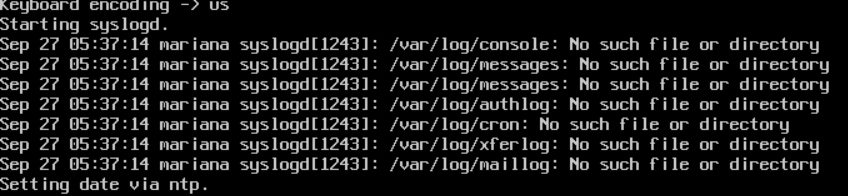
Alt...
NetBSD console shows messages from "syslogd" process ...
/var/log/console: No such file or directory
/var/log/messages: No such file or directory
/var/log/messages: No such file or directory
/var/log/authlog: No such file or directory
/var/log/cron: No such file or directory
/var/log/xferlog: No such file or directory
/var/log/maillog: No such file or directory
... This is interesting as I chose GPT partition during installation of #NetBSD v11.0 ...
gpt show -a -l /dev/dk2 || gpt show -a -l /dev/rdk2
gpt: /dev/dk2: Cannot open (Device busy)
gpt: /dev/dk2: No GPT found (Device busy)
[1] 16534 exit 1 gpt show -a /dev/dk2
GPT not found, displaying data from MBR.
start size index contents
0 16777216 Unused
... so, was gaslit instead?
Why does "gpt(8) show -a" need to have a device specified, when the manual page sez ...
『gpt show [-aglux] [-i index] [-b startsec]
The show command displays the current partitioning on the listed devices and gives an overall view of the disk contents [...] With the -a option, all information for all GPT partitions (just like with -i index) will be printed.』
... ?
... See also ...
bin/60383: fssconfig(8): distinguish between taking and loading a snapshot, reported 20260629,
by Taylor R C,
https://mail-index.netbsd.org/netbsd-bugs/2026/06/29/msg093490.html
boosted![[?]](https://cdn.masto.host/retrogaidencom/accounts/avatars/116/366/512/369/498/550/original/d98212f49153ec47.png)
There is some efforts to develop the NetBSD compat-linux for make it compatible enough to run also Steam, but the latest official blogposts are pretty old today.
I wonder, are there progresses for this?
I should test if at least the gog installer and games works.
https://blog.netbsd.org/tnf/entry/implementation_of_drm_ioctl_support
boosted![[?]](https://indiepocalypse.files.fedi.monster/accounts/avatars/117/102/576/716/677/162/original/cea2ad95dd7a18df.png)
Wrote up the steps I had to take to disable an NVIDIA Optimus card (a secondary discret NVIDIA GPU in addition to the main intergrated graphics) on a laptop to save power and generate less heat under NetBSD, where Optimus isn't supported with a guide on the UnitedBSD forums here: https://www.unitedbsd.com/d/1690-how-to-disable-nvidia-optimus-cards-on-netbsd-a-guide
![[?]](https://media.hachyderm.io/accounts/avatars/110/492/347/627/948/632/original/f0c7816f2364a2e3.jpg)


https://www.youtube.com/live/t_1x70mciQw?si=T3WWoT58xnj5PVVa
Alan Somers (Clara Systems) addressed the operational disconnect between FreeBSD’s 6-month release lifecycle and enterprise deployment realities.
He highlighted that #FreeBSD’s `stable` branch only guarantees #ABI compatibility rather than production stability, forcing companies into an endless 6-to-9-month qualification loop or leaving them with unsupported end-of-life systems.
To solve this enterprise treadmill, Clara Systems announced a commercial #FreeBSD Long-Term Support (LTS) program for versions 14 and 15, offering 5 years of maintenance focused strictly on minimal security backports and annual Ports tree updates without feature churn.
Presented by a #NetBSD developer and thin-client company founder, this session detailed the effort to execute proprietary Linux applications specifically the #Citrix ICA client natively on NetBSD thin clients.
Rather than using virtualization, the strategy relies on a lightweight system call shim layer and `/emul/linux` path translation.
To ensure high fidelity across architectures, the developer integrated the Linux Test Project (LTP) into NetBSD's `pkgsrc`. This systematic testing framework uncovered missing syscalls, `/proc` file formatting mismatches, and edge-case kernel bugs like `RT_sigqueueinfo` signal panics.
A #NetBSD developer delved into low-level concurrency, explaining why lockless algorithms like Decker's Algorithm require strict store-before-load memory barriers (`membar_sync`) beyond standard release-acquire semantics.
The talk highlighted architectural contrasts—from x86 Total Store Order (TSO) to weak memory models in ARM, PowerPC, and MIPS and demonstrated formal verification using the Herd 7 tool to mathematically prove assembly correctness.
Additionally, the speaker addressed hardware cache coherence with `bus_dmamync` and guest-to-host barrier synchronization (`paravirt_membar_sync`) for #VirtIO drivers running uniprocessor guests on SMP hypervisors.
+++
![[?]](https://files.mastodonapp.uk/accounts/avatars/109/508/813/126/393/770/original/98a69cbbce7ad298.png)
What would I have in the #NetBSD Guide?
Something like this:
http://jdebp.info/Proposals/NetBSDGuide/chap-misc.xml#chap-misc-adding-new-disk
albeit maybe a little more polished. I just quickly knocked that together. Yes, that is the actual DocBook XML, though.
The modern user, who has experienced GUID partitioning, who has SATA drives, can see NetBSD as actually quite a familiar environment, the only frankly novel thing being disc wedges.
@phlash will enjoy that wedges get a mention, I hope. (-:
On near-bare #NetBSD installation installation of #ShellCheck package requires "3198M" additional space.
 Do not remember that package to be of such size (but smaller on FreeBSD v14, Rocky Linux v8) ... or, am I imagining the numbers
I'm not convinced of that last part. Plenty of people just use GUID partitioning as the norm. I myself have #NetBSD on some memory cards. I didn't muck around with disklabels or anything else fancy that would have required one operating system's specific tools. I just created a GUID partition table.
Let's take §22.6 of the #NetBSD Guide as a case in point.
A modern user won't have a SCSI controller, won't have a disc that comes pre-installed with MS-DOS in a FAT partition, won't have any reason to deal in C/H/S values at all, and won't need any reason to even think about disklabel.
This sort of thing makes NetBSD seem more arcane to the modern user than it actually is; and not only is it the primary explanation, it is the only explanation the Guide gives.
A modern user actually only needs to use gpt and dkctl.
After #NetBSD v11.0 installation in a virtual machine (after setting environment variable "PKG_PATH") "pkg_add pkgin" did not produce any output.
"kdump(1)" output of "ktrace -d -i pkg_add -v pkgin" — too deep for new user — showed that "pkg_add" was trying to access IPv6 address & stuck. Come On😖
After consulting …
Re: Is it possible to completely disable ipv6 in NetBSD 10, 20251114,
by Robert E,
https://mail-index.netbsd.org/netbsd-users/2025/11/14/msg033395.html
… deleted the IPv6 entries. Then "pkg_add" worked.
boostedI just gave the world a re-write of the boot chapter of the #FreeBSD Handbook that does away with bsdlabel and (finally!) uses gpart.
https://mastodonapp.uk/@JdeBP/117326574782531292
I wonder whether we can get the FreeBSD Handbook people to embrace this. GEOM was a big new thing in FreeBSD in 2003.
I see that the #NetBSD Guide suffers from the same disklabel-centrism, when it is closing in on 2 decades of having the gpt command.
I actually read the #FreeBSD Handbook's chapter on how FreeBSD bootstraps.
It's stuck in 2010. I'm not kidding. There's stuff in there that changed in the FreeBSD 7.3 release notes.
FreeBSD can boot on UEFI firmware nowadays, and directly from ZFS datasets. There's a gpart bootstrap command, and syscons does not use bright white for kernel messages any more.
In the meantime, the Handbook is telling people how to accidentally destroy their MBR or GUID partition tables with bsdlabel.
Do you think that we can get the Handbook people to catch up with the actual operating system, that is 16 years ahead? (-:
boosted![[?]](https://todon.eu/system/accounts/avatars/108/195/195/683/530/949/original/8174cd7215c979ba.png)
Enjoying the design of #NetBSD native audio. Simple, direct and outstanding sound quality.❤️
Check it out at the NetBSD Kernel Interfaces Manual - audio page.
https://man.netbsd.org/audio.4
![[?]](https://lemmy.ml/pictrs/image/9AY4jZuh4Q.png)
Diff’ing NetBSD and FreeBSD ZFS zpool features
I’ve been backing up my home directories on my NetBSD machines to my FreeBSD backup server using rsync(1). But I’ve been experimenting with using ZFS for /home on NetBSD, so I thought it made sense to use zfs send for backups to the FreeBSD machine instead.
I don't want to spoil the #retrocomputing fun, but for those new to the BSDs who do not have the context and might come away thinking that they should move from GUID partitioning, or even MBR-style partitioning with LBAs, to disk labels:
The "BSD disklabel" is a partitioning scheme from 1988 that can destroy your GUID partitioning or boot loader if accidentally mis-used. #NetBSD, #OpenBSD, and #FreeBSD haven't agreed on disklabel partition types since IBM's JFS2. They don't agree on what the types for ZFS or HAMMER2 partitions are, for example. It is 32-bit, occasionally 16-bit, in some fields, and mostly has the old 2TiB size limits that the GUID system overcame with 64-bit addressing at the turn of this century. And the on-disk data structures are no longer even compatible as of OpenBSD discontinuing 'v0' in 2025 (with a somewhat optimistic note in the version control history that no-one has written that to disc since 2007).
In "How to use file system snapshots in #NetBSD" https://wiki.netbsd.org/tutorials/how_to_use_snapshots/ , does …
『Recovering from a snapshot
If you made a mistake and need to recover from the snapshot, you can use, e.g., net/rsync to revert files back to what they were in the snapshot:
# rsync -aHc --delete /home/.snap/20260706/bofh/. /home/bofh/.』
… mean the snapshot does not have to be mounted to restore a file?
Or, is "Recovering …" section relying on the reader to mount the snapshot per "Taking a snapshot" section?
boosted#NetBSD trip report: This reminds me highly of setting up Arch Linux in the mid-late 00's. Including being very confused how to get PulseAudio to work. 
The sound test application
On the plus side, the wifi card in this laptop works (an Intel one) although the speed is maxing out at 54 mbits/sec. Graphics performance is pretty good as well. Just need to figure out how to get sound to work...
boostedFinally got my old 2015-era laptop's NVIDIA Optimus card to disable under #NetBSD by following the instructions here by @bkrawczyk !
Had to change out the ACPI methods being called to the ones used by my laptop (in my case, \\_SB.PCI0.PEG0.PEGP._OFF and _ON) which I found by running a Linux live USB, blacklisting the nouveau module with modprobe.blacklist=nouveau installing the bbswitch module, reading the kernel log of the ACPI device found by it, unloading bbswitch, building and installing acpi_call, testing with that a bit, and then rebuilding the NetBSD kernel module with the new ACPI method.
I really should write this up on the NetBSD wiki or something...
(Or port bbswitch properly. But that runs into the problem of my test cases being a grand sample of one.)
![[?]](https://media.bsd.network/accounts/avatars/000/006/949/original/9592eac6e5018e39.png)
Alright, #NetBSD folks. Maybe you can help me with something. I cannot for the life of me figure out the PKG_PATH to install pkgin. I'm even poking around on my Linux machine at various URLs at this point, all sorts of variations adjacent to https://cdn.netbsd.org/pub/pkgsrc/packages/NetBSD/x86_64/11.0_2026Q2/All/pkgin* (with and without All, with and without the asterisk, with and without the platform). I have followed the docs, comparing the man page back and forth with the post-install instructions on the NetBSD site.
At this point I'm wondering if it's an issue on the server side, which seems insane, it has to be user error somehow. Right? What am I doing to always get these "Can't process <url>: Not Found" errors?
![[?]](https://mastodon.sdf.org/system/accounts/avatars/109/564/857/456/913/094/original/651ab60302ce5d82.png)
![[?]](https://media.mas.to/accounts/avatars/114/260/046/832/065/008/original/8f3ac33a53cf43b4.png)
@klu9 @joel @chadmccullough
for live #NetBSD you can find a usb img file here https://cdn.netbsd.org/pub/NetBSD/images/11.0/NetBSD-11.0-amd64-live.img.gz
![[?]](https://files.ohai.social/accounts/avatars/114/456/967/863/618/736/original/f647d10235954580.png)
KDE, Gnome, Xfce, Mate, Lumina etc all available for #BSD
Most #FreeLibre software than runs on Linux also available for BSD as they share Unix roots.
But IIRC I don't think #Wayland works on BSD.
So if the latest version of a #DesktopEnvironment is Wayland-only (e.g. KDE?), then you'll have to use the last version that runs on X. (& there's a new non-Wayland fork of KDE, #SonicDE )
(Anyone please correct me if I'm wrong.)
![[?]](https://media.tilde.zone/accounts/avatars/000/131/507/original/28fa127e28d45fc4.png)
@jaypatelani @joel @chadmccullough
Looks interesting!
I've never tried #NetBSD or an OS based on it, so I have a few "normie" questions :)
Is #os108 still usable? Maybe after updating?
Can it be tried from Live USB?
If so, can I use it with Ventoy? Or does it to have be written on dedicated media?
This normie had a BSD workstation in 2006! But that was thanks to PC-BSD.
https://en.wikipedia.org/wiki/TrueOS
I've never tried a "straight" BSD.
Hoping someone comes up with a PC-BSD-style normie-friendly version of NetBSD (preferably Xfce)
With host-side SEV support, multi-core virtualization, and networking now functional in `bhyve`, the team is working on upstreaming the code to the main FreeBSD repository.
Future milestones include upgrading to newer SEV generations like SEV-ES for encrypted CPU register states and SEV-SNP for hardware memory integrity protection as well as updating the FreeBSD kernel to run seamlessly as an encrypted *guest* OS using memory C-bit handling and bounce buffers.
And for you, mere mortal, what does all of this actually mean? It means true cloud privacy without having to blindly trust anyone. Whether you're hosting sensitive customer data, financial workloads, or proprietary algorithms, confidential computing ensures that not even your cloud provider or a rogue admin with full root access can peek into your running memory.
By bringing AMD SEV to FreeBSD, top-tier, silicon-enforced protection stops being an exclusive enterprise luxury and becomes part of the open-source toolkit.
Bottom line: your data is finally locked down in transit, at rest, and right down to the hardware while in use.
@Canageek people do gaming on #NetBSD https://www.reddit.com/r/BSD/s/zakRs7SycX
Wine is also there but I haven't played or tried any.